You launch a new product line, publish the category pages, push internal links live, and wait for organic demand to show up. Weeks later, nothing moves. The pages exist. The content is fine. Sales still come from paid search and branded traffic because Google hasn't meaningfully discovered, revisited, or prioritized the URLs that make you money.
That's the crawl budget problem in business terms. Google has finite attention for your site, and many companies waste it on filtered URLs, redirects, broken pages, search results, faceted combinations, and thin archives that never had revenue potential in the first place. Meanwhile, product pages, SaaS solution pages, feature pages, and high-intent landing pages sit undercrawled.
For a CMO, this isn't a technical side quest. It's an efficiency problem. You already paid for content, development, merchandising, and category expansion. If search engines spend their time crawling junk, the return on those investments drops. Crawl budget optimization fixes that by redirecting search engine effort toward pages that can win rankings, leads, and revenue.
Why Your Most Important Pages Go Unseen
Most crawl budget failures don't look dramatic. They look like underperformance.
An eCommerce team adds hundreds of product URLs, but Googlebot keeps revisiting filtered category combinations and old redirected paths. A SaaS company launches new feature and integration pages, but crawl activity clusters around tag archives, duplicate campaign URLs, and stale documentation variants. Leadership sees flat organic growth and assumes the problem is content quality or backlinks alone.
Sometimes the issue is simpler. Google isn't spending enough time on the right URLs.
Practical rule: If high-intent pages aren't getting discovered, refreshed, or indexed fast enough, keyword strategy won't save you.
This is why crawl budget optimization matters most when a site has scale, complexity, or frequent updates. The larger the site, the easier it is for technical clutter to consume search engine attention. Every wasted crawl on a low-value URL is a missed opportunity for a product page, commercial landing page, or updated service page.
Three patterns show up repeatedly in revenue-focused audits:
- eCommerce clutter: faceted navigation, sort parameters, pagination variants, discontinued product URLs, and redirect chains soak up bot activity.
- SaaS duplication: documentation mirrors, tagged blog archives, internal search pages, and campaign tracking URLs create noise around otherwise strong commercial pages.
- Sitewide neglect: XML sitemaps, canonicals, and internal links don't reinforce the pages the business wants to rank.
Crawl budget optimization is the discipline of correcting that imbalance. Not by treating every URL equally, but by deciding which URLs deserve server resources, internal links, crawl access, and recrawl priority.
When this work is done well, important pages get seen faster, updated pages get revisited sooner, and organic visibility has a clearer path to commercial impact.
Understanding Crawl Demand vs Crawl Limit
Google's framework is clearer than many SEO teams make it sound. In Google's documentation on crawl budget, the search engine states that crawl budget is driven by crawl limit and crawl demand. Crawl limit depends on how much crawling your site can handle without performance issues. Crawl demand depends on the popularity, uniqueness, and freshness of URLs.
Two levers control how much Google crawls
Think of this as supply and demand.
Crawl limit is the supply side. It reflects how much Googlebot can request from your site without causing trouble. Google explicitly says that if a site responds quickly for a while, the crawl limit can go up. If the site slows down or returns server errors, Googlebot crawls less.
Crawl demand is the interest side. Google is more likely to revisit pages that appear important, distinct, and worth checking again. That usually includes pages with stronger internal visibility, pages that change meaningfully, and pages that serve a clear search purpose.
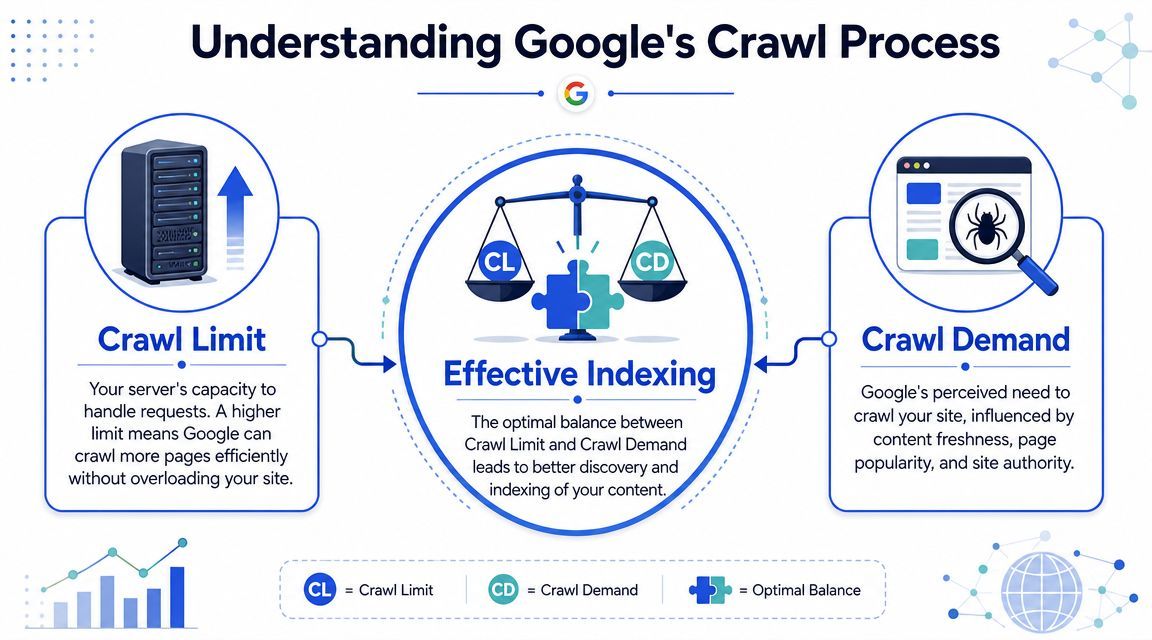
That distinction matters because many teams only work one side of the equation. They block some junk URLs and assume the job is done. It isn't. Crawl budget optimization also means making the site technically reliable and making important URLs more attractive to recrawl.
Why this matters for revenue pages
If your most valuable pages sit on a slow platform, on unstable hosting, or behind bloated template logic, your crawl limit suffers. If those same pages are buried deep in the architecture, poorly linked, or diluted by duplicates, crawl demand suffers too.
Google also notes two direct ways to increase crawl budget in its documentation: add more server resources if host load is exceeded, and improve content quality signals for the relevant Google product. That's an important strategic point. Crawl budget isn't only about blocking waste. It's also about earning more efficient crawling through better infrastructure and stronger URL value.
The strongest crawl budget programs balance capacity and priority. A fast server without clear URL priorities still wastes requests. Strong content on an unstable site still gets throttled.
For CMOs, the takeaway is straightforward. Technical SEO here isn't a housekeeping exercise. It's resource allocation. You want Google spending more time on pages that influence pipeline, transactions, demos, and qualified leads, and less time on URLs that add no business value.
How to Audit Your Crawl Budget and Find Waste
A crawl budget audit should answer one question first. Where is Googlebot spending time, and how much of that activity helps the business?
On large sites, the waste becomes visible in patterns, not isolated URLs. That's why a serious audit starts with crawl behavior by template, section, parameter, and status code, not a random list of “SEO issues.”
Lumar's guidance on crawl budget optimization highlights three core actions: clean up the website, speed it up, and analyze server logs. That framing is useful because it keeps the audit operational. You're not looking for trivia. You're looking for crawl waste that blocks discovery and refresh of valuable pages.
Start with Google Search Console
Google Search Console gives the first directional view through Crawl Stats. This won't replace logs, but it helps you spot whether Googlebot is spending time on successful requests, errors, redirects, or sluggish downloads.
Review Crawl Stats with these questions in mind:
- Are crawls clustering around the wrong URL patterns? Check whether parameters, faceted combinations, or archived sections appear to absorb activity.
- Are redirects overrepresented? Google warns that long redirect chains hurt crawling efficiency. If crawlers hit old paths before reaching final URLs, technical overhead is consuming attention that should go elsewhere.
- Do error responses keep showing up? Repeated 4xx and 5xx behavior suggests bots are revisiting broken paths or hitting unstable sections.
- Does crawl behavior align with launch priorities? If you recently published product or landing pages, but crawl interest remains concentrated elsewhere, priority signals are weak.
A useful habit is to compare what leadership cares about against what Googlebot appears to care about. Those lists often don't match.
Use log files as the source of truth
Search Console is useful. Server logs are decisive.
Log analysis shows exactly where Googlebot went, how often, and what response each request got. For crawl budget optimization, segmentation matters more than raw volume. Break logs into page types so you can see whether Googlebot is spending time on product pages, blog posts, category pages, parameterized URLs, filtered results, scripts, feeds, or redirects.
If you only measure “total crawls,” you'll miss the real problem. Waste hides inside page-type distribution.
For eCommerce, segment logs into:
- Core commercial URLs: product pages, category pages, top brand pages
- Navigation variants: filters, sorts, pagination, search result pages
- Legacy clutter: redirected product URLs, discontinued SKUs, old campaign pages
- Supportive content: guides, blog content, FAQs, buying advice
For SaaS, segment into:
- Money pages: solutions, feature pages, industry pages, integration pages, demo-focused landing pages
- Support content: docs, help center, changelog, blog taxonomy pages
- Duplicate or near-duplicate patterns: URL parameters, campaign tracking variants, printer-friendly or alternate states
- Error and redirect zones: broken docs paths, migrated resource centers, outdated blog structures
A practical output from log analysis is a waste map. Mark which sections are overcrawled, undercrawled, or unstable. That becomes the foundation for prioritization.
Common crawl waste sources and detection tools
| Source of Waste | Primary Detection Tool | Example |
|---|---|---|
| Parameterized URLs | Server logs | Filter and sort combinations on category pages |
| Redirect chains | Google Search Console and crawler checks | Old product URL redirecting through multiple steps |
| Broken internal links | Site crawler and logs | Internal links pointing to removed landing pages |
| Non-indexable URLs in sitemaps | XML sitemap review and Search Console | Redirected or noindex URLs submitted in sitemap |
| Internal search result pages | Logs and crawl data | /search/ URLs absorbing bot requests |
| Faceted navigation sprawl | Logs segmented by page type | Color, size, price, and availability combinations |
| Thin archive or taxonomy pages | Site crawler and template review | Tag pages with little unique value |
| Error-prone sections | Logs and server monitoring | Repeated 5xx responses from product or docs templates |
Once you've mapped waste, rank issues by business cost.
Start with anything that blocks or delays crawling of revenue-generating templates. After that, move to sections that absorb large amounts of bot activity without producing indexable value. Crawl budget optimization works best when you treat it like portfolio management, not a bug list.
High-Impact Server and Technical Fixes
The biggest technical lever is server performance. Wix's technical guidance on crawl budget optimization aligns with Google's own position: when a site responds quickly, crawl limit can rise, and when it slows down or returns errors, Googlebot crawls less.
That's why infrastructure usually deserves priority over URL tinkering. If the platform is slow or unstable, Google won't keep pushing deeper.

Fix server responsiveness first
When I audit large sites, I usually separate technical fixes into two buckets. The first bucket changes how much Google can crawl. The second reduces waste. The first bucket comes first.
Focus on these actions:
- Upgrade hosting where needed: shared or strained infrastructure creates inconsistent response behavior and limits how confidently bots can crawl.
- Use a CDN wisely: static assets and global delivery benefit both users and crawlers when the setup is clean.
- Implement caching properly: repeated template rendering, heavy database calls, and uncached assets waste resources on every request.
- Reduce front-end weight: compress and minify CSS and JavaScript where appropriate, and serve images in modern formats as recommended in the Wix resource.
- Stabilize key templates: category, product, solution, and landing page templates should return consistent responses even under load.
A fast homepage doesn't fix crawl inefficiency. Googlebot spends its time across templates, not on your speed test screenshot.
Clean up technical friction
After server responsiveness, remove the technical patterns that waste crawl capacity.
That includes redirect chains, broken internal links, dead-end URLs, and repeated requests to pages that shouldn't still exist in navigation or XML sitemaps. Google has warned that long redirect chains hurt crawling efficiency, and in practice they slow discovery of the final destination.
This is also the stage to review how teams handle deleted pages. If removed URLs still receive internal links or sitemap inclusion, bots will keep wasting requests there. For ops teams managing migrations or catalog churn, it helps to have a shared process for how to resolve 404 errors on servers so deleted or moved URLs return the right signals and don't stay in circulation longer than necessary.
Use infrastructure work to support crawl efficiency
Parameter-heavy sites need extra discipline because technical clutter grows quickly.
For eCommerce, that often means constraining overcrawled filters and paginated variations through robots.txt, sitemap cleanup, and internal-link hygiene. For SaaS, it can mean cleaning campaign-tagged URLs, support duplicates, and legacy content paths that still attract bot requests.
A short training resource can help your team align around the basics before implementation:
The trade-off is simple. Some fixes feel less exciting than publishing new pages, but they often provide more value from the pages you already have. If Googlebot can reach final URLs faster, get stable responses, and avoid dead ends, your commercial pages have a better chance of being crawled thoroughly and revisited when they change.
Strategic URL and Architecture Management
Once the platform is stable, the next job is directing Google toward the URLs that matter and away from the ones that don't. During this process, many teams make expensive mistakes by applying the wrong control to the wrong problem.
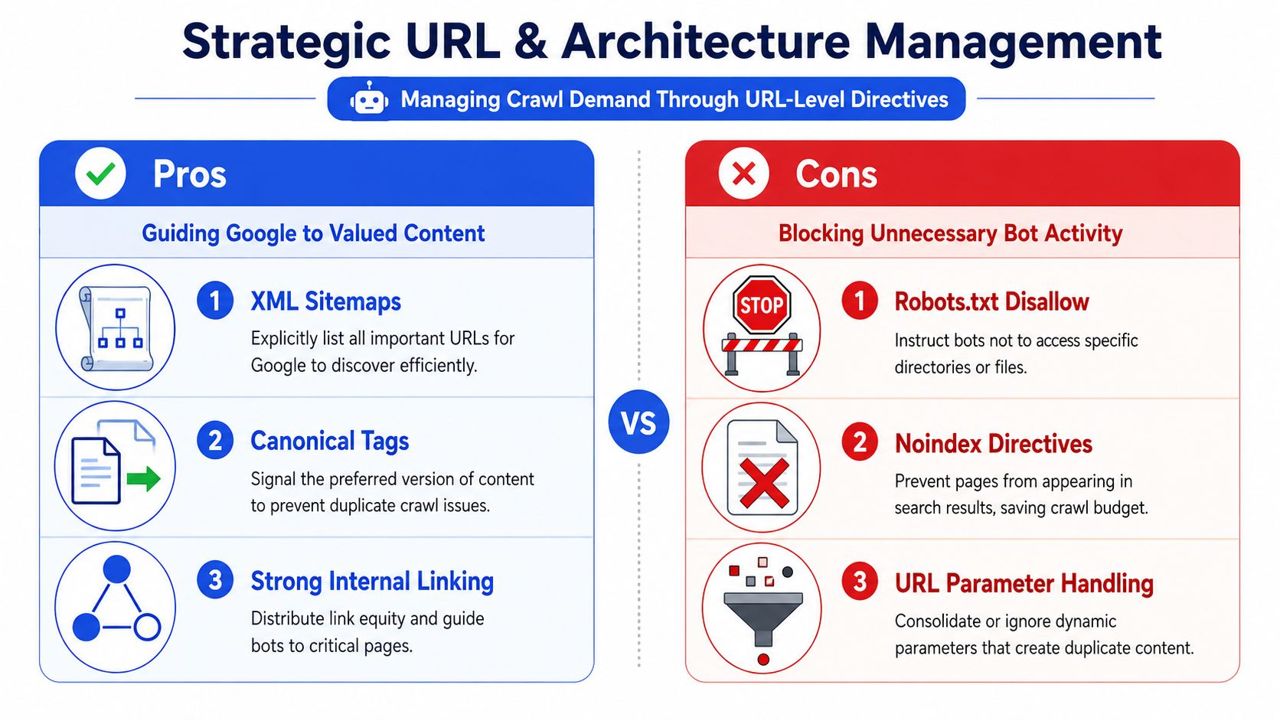
Crawl budget optimization isn't about using every directive available. It's about choosing the right one for each URL type.
Choose the right control for the problem
The three most common tools are robots.txt, noindex, and canonical tags. They solve different problems.
| Method | Best used when | Main trade-off |
|---|---|---|
| robots.txt disallow | You want to reduce crawling of low-value sections or parameter patterns | If blocked, crawlers may not access on-page signals there |
| noindex | A page can be crawled but shouldn't appear in search results | It doesn't stop crawling by itself |
| Canonical tag | Multiple similar URLs exist and one version should consolidate signals | Crawlers may still access alternate versions |
That distinction matters a lot on large sites.
Use robots.txt when crawling itself is the problem. Typical examples include internal search results, filter combinations with little value, or parameter spaces that can expand endlessly.
Use noindex when a page can exist for users but shouldn't compete in search. Think thank-you pages, some utility pages, or low-value archives that still need to remain accessible.
Use canonical tags when duplicate or near-duplicate versions must exist, but one URL should be treated as primary. This often applies to variant states, sorted category views, or duplicated campaign paths.
Blocking and indexing are not the same decision. Many sites fail crawl budget optimization because they treat them as interchangeable.
How to handle faceted navigation and parameter sprawl
Faceted navigation creates revenue and crawl waste at the same time. That's why it needs business judgment, not blanket blocking.
If filtered combinations produce genuine search demand and distinct value, they may deserve indexable landing pages with controlled templates, clean internal links, and sitemap inclusion. But most combinations don't. They create a near-infinite set of crawlable states that dilute attention away from core category and product URLs.
A strong decision framework looks like this:
- Keep indexable: curated category pages, high-value brand pages, or selected filtered URLs with unique intent
- Allow but deprioritize: user-helpful sort or view states that shouldn't rank
- Disallow crawling: low-value combinations, repetitive filters, and internal search permutations
- Consolidate with canonicals: duplicate or near-duplicate variants where one primary page should carry signals
For SaaS, the equivalent problem often appears in campaign parameters, documentation versions, and filtered resource libraries. The same logic applies. If the URL state adds no unique search value, don't keep feeding it bot attention.
Architecture signals that shape crawl demand
Crawl demand increases when your site makes importance obvious.
Three architecture elements do the heavy lifting:
- XML sitemaps: include indexable, canonical URLs that deserve discovery and refresh. Remove redirects, errors, and low-value pages.
- Internal linking: link prominently to money pages from navigational hubs, relevant content, and section-level pages. Don't bury commercial URLs under weak pathways.
- Template consistency: keep canonical targets, status codes, and internal references aligned so Google receives one clear instruction set.
A common mistake is sending mixed signals. Teams disallow one path, canonicalize another, leave both in the sitemap, and keep linking to an older version internally. That doesn't guide crawling. It creates ambiguity.
Good crawl budget optimization simplifies decisions for Google. Important URLs should be accessible, linked, canonicalized correctly, and represented in sitemaps. Low-value URLs should be absent from those priority systems and, where appropriate, constrained from crawling altogether.
Monitoring and Proving SEO ROI
Crawl budget optimization needs ongoing reporting or it gets treated like a one-off cleanup project. That's a mistake. Sites change constantly. New templates launch, merchandising rules shift, content teams create new sections, and developers introduce redirect or parameter issues without realizing the crawl cost.
The right dashboard should show whether technical changes improved discovery and recrawl of pages tied to revenue.
Track technical movement on key templates
Start with operational indicators tied to sections that matter.
Useful monitoring views include:
- Crawl activity by page type: product pages, category pages, feature pages, landing pages, docs, blog archives, parameterized URLs
- Response quality: successful requests versus redirects and error-heavy sections
- Indexation alignment: whether URLs in sitemaps and core templates are being discovered and refreshed as expected
- Launch responsiveness: whether newly published or updated commercial pages get crawled promptly
Technical SEO becomes executive-friendly, as you're not reporting abstract crawl theory. You're showing whether Googlebot is spending more time on pages that support transactions, demos, signups, or lead capture.
The most persuasive crawl report is simple: less waste, faster discovery of priority pages, and stronger visibility on commercially important templates.
Translate crawl improvements into business reporting
For leadership, frame the outcome in terms of speed, coverage, and efficiency.
Good reporting language sounds like this:
- key product and category templates are receiving a larger share of crawl activity
- updated landing pages are being revisited more consistently
- low-value parameter spaces and redirect chains are consuming less crawler attention
- sitemap and internal-link cleanup has reduced ambiguity around priority URLs
Then connect those operational shifts to business outcomes qualitatively:
- new products can enter organic discovery faster
- refreshed service or solution pages have a better chance of being re-evaluated after updates
- high-intent pages are less likely to be delayed behind technical clutter
- SEO investment is being concentrated on pages with commercial purpose, not vanity inventory
For CMOs, that changes the conversation. Crawl budget optimization stops looking like back-end maintenance and starts looking like distribution strategy for organic search. That's the right lens. The question isn't whether bots crawled more in the abstract. The question is whether the right pages got more of Google's attention.
Crawl Budget Optimization FAQ
Does crawl budget optimization matter for every website
No. It matters most on larger, more complex, or frequently updated sites. Smaller sites can still benefit from clean architecture, fast responses, and clear internal linking, but the business impact becomes sharper when thousands of low-value URLs can distract Google from high-value pages.
Is crawl budget the same as indexation
No. Crawling is discovery and revisiting. Indexation is whether a URL gets stored and considered for search results. A page can be crawled and not indexed. It can also be technically indexable but rarely crawled, which delays discovery and updates.
Should I block every filtered URL in robots.txt
No. Some filtered or faceted URLs may deserve indexation if they match real search intent and support revenue goals. The mistake is treating all facets the same. Decide which combinations have strategic value, then block or deprioritize the rest.
Can canonical tags solve crawl waste on their own
Usually not. Canonicals help consolidate preferred versions, but they don't automatically stop crawling. If a URL pattern creates large-scale waste, you may need stronger controls such as robots.txt, internal-link cleanup, and sitemap corrections.
What usually wastes the most crawl budget on eCommerce sites
Faceted navigation, parameters, outdated redirects, broken internal links, non-indexable URLs in sitemaps, and low-value archived pages are common offenders. On many stores, crawl waste sits inside category logic and discontinued product handling.
What about SaaS websites
SaaS sites often leak crawl budget through documentation sprawl, blog taxonomies, campaign URL variants, internal search pages, and duplicate resource hubs. The biggest mistake is assuming crawl issues only affect huge retail catalogs. They also affect mid-sized SaaS sites with messy content systems.
How often should a crawl budget audit happen
For large or fast-changing sites, review crawl behavior regularly. A formal audit is smart after migrations, major navigation changes, platform rebuilds, large catalog expansions, or major content architecture updates. For stable sites, a lighter recurring review can catch waste before it compounds.
If your site has strong products, solid commercial pages, and real growth targets, but Google still spends too much time on the wrong URLs, it may be time for a strategic audit. SEOBRO® helps eCommerce, SaaS, and local businesses turn technical SEO into a revenue-focused system, with crawl control, indexation clarity, and execution tied to leads, signups, and sales.