You’re probably looking at a dashboard right now where CTR is either underperforming, flat, or rising without any clear impact on revenue. That’s where many find themselves stuck. They know the number moved, but they don’t know whether it’s good, bad, or irrelevant.
The issue isn’t the metric itself. It’s the lack of context. A 0.57% display CTR can be normal, while a 5.50% ecommerce search ad CTR can still leave money on the table if the query mix is weak, the offer is generic, or the landing page leaks intent. Benchmarks matter, but only if you use them to diagnose what’s broken.
If you want to answer what is a good ctr, start with one rule. A good CTR is one that reflects strong relevance for the channel, the search intent, and the business model, while still bringing in qualified traffic that converts.
Your CTR Is a Symptom Not a Score
A low CTR usually isn’t the core problem. It’s the visible symptom of a mismatch somewhere else.
That mismatch might be between the keyword and the offer. It might be between the ad copy and the landing page. It might be between what the searcher wants right now and what your title promises. Teams often react by rewriting headlines in isolation, but the click problem usually starts earlier.

An ecommerce brand sees product page impressions rise, but clicks stay soft. That can point to weak title tags, missing price or review context, or a SERP crowded by stronger merchants. A SaaS company ranks for informational queries but gets poor engagement because the snippet reads like a product pitch when the searcher wants a framework. A local service business appears in search, yet prospective customers skip it because the title doesn’t signal geography, service type, or trust.
Practical rule: If CTR is low, don’t ask only “how do we get more clicks?” Ask “why are qualified buyers not choosing this result?”
This is why CTR is more useful as a diagnostic signal than a scoreboard. It helps you spot where intent breaks down:
- Message mismatch means the headline or ad copy doesn’t reflect the query.
- Offer weakness means the result doesn’t give users a reason to prefer you.
- Presentation gaps mean your listing lacks the visual cues that improve confidence.
- Position problems mean you’re not visible enough to earn the click.
A good CTR doesn’t just mean people noticed you. It usually means your search appearance matched what they needed at that moment.
For revenue teams, that matters because every missed click from a high-intent impression is a lost opportunity. In paid search, that can mean wasted budget. In SEO, it can mean ranking well but under-monetizing visibility. In both cases, the number only becomes useful when you treat it as feedback from the market.
What Is CTR and Why It Directly Impacts Revenue
A CMO looks at a report and sees 200,000 impressions. The next question is the one that matters. How many of those views turned into visits from people likely to buy?
CTR stands for click-through rate. It measures how often someone clicks after seeing your listing, ad, email, or search result.
The formula is simple
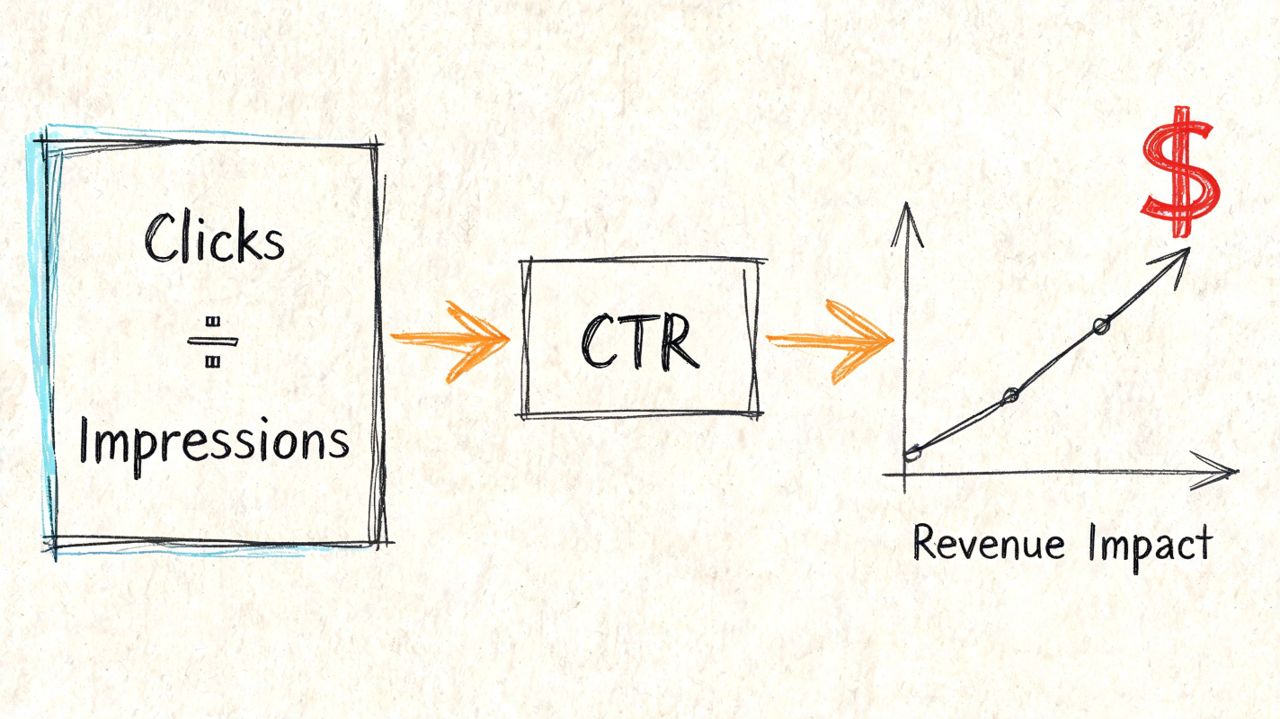
The formula is:
Clicks ÷ Impressions = CTR
If 1,000 people see a page and 50 click, the CTR is 5%.
The math is simple. The business impact is not. CTR sits near the top of the funnel, but it influences everything below it. More qualified clicks create more chances for product views, demo requests, calls, and closed revenue. Weak CTR limits growth before your site, sales team, or offer even gets a chance to perform.
That is why a good CTR rate should be judged by business outcome, not by vanity. A high CTR from the wrong audience can waste spend and create low-quality pipeline. A lower CTR on a high-intent query can still be profitable if those visitors convert at a much higher rate.
This matters differently by business model.
For eCommerce, CTR affects revenue per impression. If your category pages and product listings do not win the click, you lose shoppers before price, shipping, reviews, or merchandising can do their job.
For SaaS, CTR shapes pipeline quality. A high-ranking page that attracts curiosity clicks but few demos often signals a mismatch between the promise in search and the offer on the page.
For local businesses, CTR has a direct lead-gen effect. If searchers do not choose your result, they call the competitor who made location, service, and trust clearer in the SERP.
Why CMOs should care
In SEO, CTR shows whether your rankings are producing traffic with commercial value. In paid search, CTR also affects efficiency because ad platforms reward ads that earn engagement and match intent well. The same impression volume can produce very different economics depending on who clicks and why.
I do not treat CTR as a standalone KPI. I read it next to average position, query intent, landing page type, and conversion rate. A service page with lower traffic and stronger lead quality usually deserves more attention than a blog post with strong click volume and weak revenue contribution.
A short explainer can help frame it for internal teams:
The practical use of CTR comes down to three questions:
- Does the search listing earn attention?
- Does the message match the intent behind the query?
- Do the clicks lead to revenue, leads, or other qualified actions?
CTR matters because it is the handoff point between visibility and demand capture. If that handoff is weak, rankings, media spend, and brand exposure produce less revenue than they should.
CTR Benchmarks You Should Actually Use in 2026
A CMO looks at a 2.8% CTR and asks whether it is good. The honest answer is, "Compared to what?" A 2.8% CTR on branded search can signal underperformance. A 2.8% CTR on display can be unusually strong. A 2.8% CTR on a local service page ranking in position six may be perfectly workable if calls convert well.
That is why channel-wide averages only help as a first filter. The benchmark has to match intent, SERP competition, and business model. Ecommerce teams need to separate category terms from product terms. SaaS teams need to split high-intent demo queries from education content. Local businesses need to judge CTR against map pack visibility, review strength, and mobile call behavior.
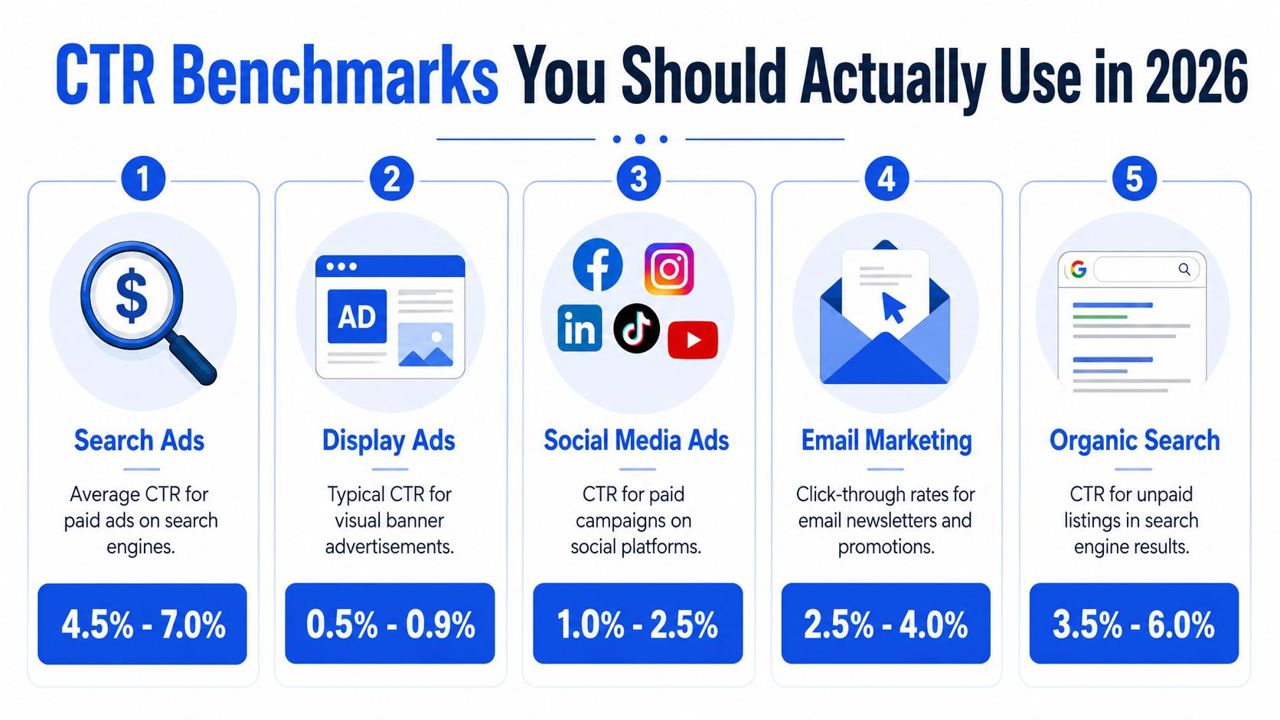
The benchmark table that matters
According to CXL benchmark data, these are useful directional ranges for paid channels. Organic search has no single universal average because position, query type, and SERP features distort the number too much to make one flat benchmark useful.
| Channel | Average CTR | Good CTR | Exceptional CTR |
|---|---|---|---|
| Google Search Ads | 6.64% across industries | 4% to 6% | 8%+ |
| Display Ads | 0.57% | 0.5% to 1% | 1.5% to 2% |
| Meta platforms | No verified universal average in this dataset | 1% to 2% | 2.5%+ |
| Email marketing | Varies by list quality, audience temperature, and campaign type | 2% to 5% is a workable general reference, as noted earlier | Varies by industry and segmentation quality |
| Organic search | No universal average that holds across positions and query types | 2% to 3% can be competitive on non-branded terms. 3%+ is often solid in the right context | Depends heavily on rank, brand strength, and SERP layout |
What these benchmarks mean in practice
For eCommerce, paid search CTR often looks healthy while revenue still lags. That usually means teams are writing ads that win the click but attract weak-fit traffic, or they are driving users to category pages that do not match the product promise in the ad. In retail, I care more about CTR on non-branded product and category terms than on brand terms, because that is where incremental revenue is won.
For SaaS, the split between problem-aware and solution-aware queries matters more than the sitewide average. A high CTR on top-of-funnel content can look good in a dashboard and still generate little pipeline. Lower CTR on high-intent terms such as pricing, software comparison, or use-case queries is often more valuable to improve because each additional click has a clearer path to demo requests or trials.
For local businesses, a good CTR is tied to trust signals in the search result. Review count, proximity, service wording, and whether the page title mirrors the searcher's need all affect clicks before the visitor ever reaches the site. A local page with modest impressions and strong lead quality can outperform a higher-traffic page that draws curiosity clicks from outside the service area.
One reference I like for sense-checking channel context is Trackingplan's guide to a good CTR rate, especially if your team keeps comparing unlike channels and drawing the wrong conclusion.
Compare CTR inside the same intent bucket, same device type, and same SERP context. That is the only benchmark that helps you decide what to fix.
Use the table as a screening tool. Then get more specific. If an ecommerce product page sits below paid search norms, test price-led copy, shipping language, and stronger product specificity. If a SaaS page ranks well but CTR stalls, rewrite titles around the commercial use case instead of the feature label. If a local service page appears often and gets skipped, put location, trust, and service urgency in the snippet first.
How to Find and Analyze Your Own CTR Data
A page can sit in position three, pull thousands of impressions, and still miss revenue targets because the listing fails to win the click. That is why CTR analysis starts at the query and page level, not in a sitewide average.
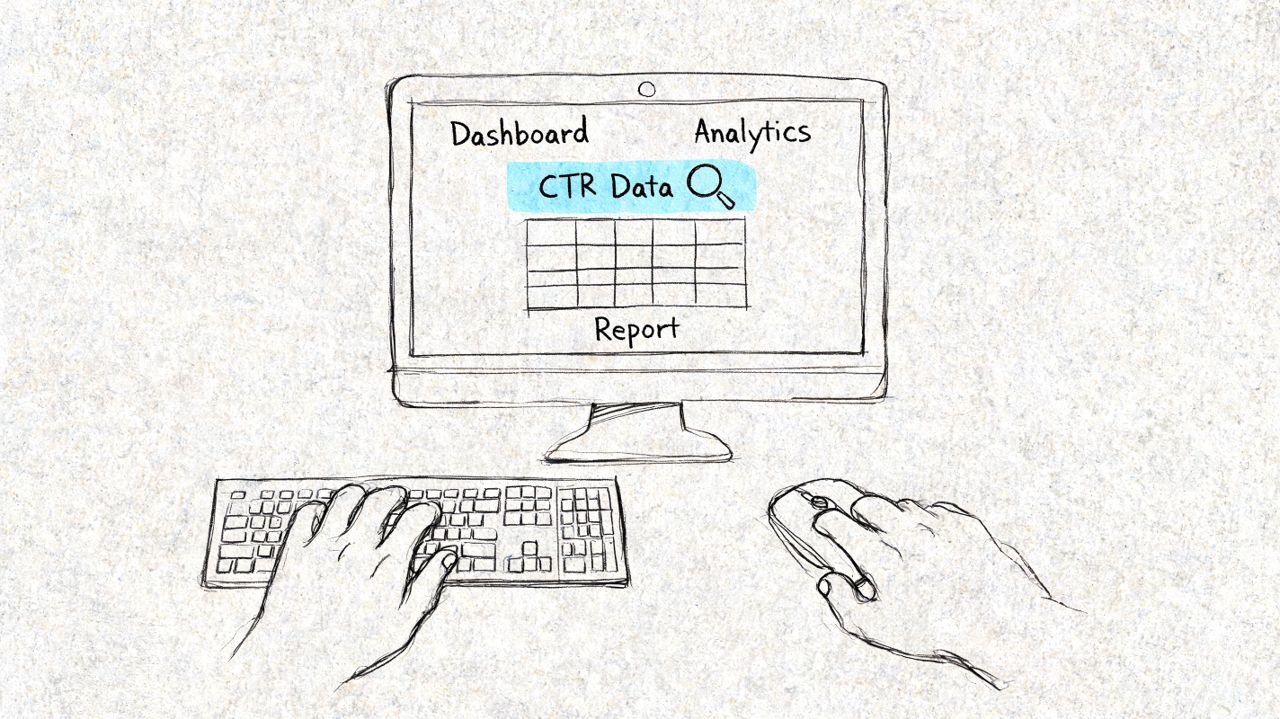
Where to pull the numbers
For organic search, use Google Search Console’s Performance report. Pull clicks, impressions, CTR, and average position by query, by page, then split by device and country if your audience varies by market. A category page that underperforms on mobile may not have the same problem on desktop. A local service page may look healthy overall but weak inside its actual service area.
For paid search, go deeper than campaign summaries in Google Ads. Review CTR at the campaign, ad group, keyword, search term, and ad level. The goal is to find wasted visibility. In practice, that usually means broad keyword clusters with weak intent match, or ads that get impressions on the right terms but lose the click because the message is too generic.
For post-click quality, check GA4. GA4 does not replace Search Console or Google Ads for CTR analysis, but it answers the question that matters to a CMO: did those clicks lead to product views, form fills, trial starts, calls, or revenue?
If your team is validating exports in spreadsheets, use a simple calculator for spot checks. This online click-through rate tool is useful when numbers get copied across reports and someone needs to confirm the math quickly.
How to prioritize the right pages and queries
Start with pages that can change business outcomes fastest.
High-impression pages with weak CTR
These already have visibility. Better titles, meta descriptions, ad copy, or offer framing can produce gains without waiting for rankings to improve.Pages tied to revenue or lead generation
For eCommerce, prioritize product and category pages. For SaaS, start with pricing, demo, comparison, and solution pages. For local businesses, focus on location and service pages that drive calls, bookings, or quote requests.Queries with buying or hiring intent
Terms that include product type, service need, comparison, cost, near me, or brand modifiers usually deserve attention before top-of-funnel research queries.Segments with clear device differences
Mobile CTR often behaves differently because titles truncate sooner, local intent is stronger, and SERP features take more space. Analyze mobile and desktop separately before rewriting anything.
One caution matters here. Low CTR is not always a snippet problem. If average position is poor, the page may need ranking work first. If CTR is weak despite solid position, fix the listing before touching the page itself.
A useful workflow is simple. Export the last 90 days from Search Console or Google Ads, sort by impressions, filter for commercial intent, then compare CTR against conversion quality in GA4 or your CRM. That gives you a ranked list of pages and queries where one extra point of CTR has a realistic path to more sales, demos, or leads.
The point of this analysis is prioritization. Find the pages that already earn attention, connect them to revenue, and fix the listings that are getting seen but skipped.
The 5 Levers That Control Your Click-Through Rate
CTR moves when one of five levers changes. If you know which lever is weak, testing becomes more focused and less random.
Why some listings get ignored
A page can rank well and still get skipped. An ad can show often and still fail. That usually happens because the listing loses on relevance, visibility, perceived value, trust, or presentation.
Position is one of the clearest examples. According to WebFX’s CTR benchmark analysis, top-position search ads achieve 12% to 15% CTR, while bottom positions drop to under 2%. The same source notes mobile search CTR at 5.06% versus desktop at 4.28%. That gap tells you two things. Placement matters, and the context of the click matters too.
The five levers
Relevance
The title, ad headline, or subject line has to match the query closely enough that the user feels understood. If someone searches for pricing, comparison, near me, or same day, generic messaging will underperform.
For SEO, this often means tightening title tags around intent instead of stuffing in broad keywords. For paid search, it means segmenting ad groups so the copy reflects the actual search terms, not a blended category.
Visibility
You can’t earn clicks if you barely appear. Rank, ad position, and SERP real estate all influence CTR before the user reads a word.
That’s why structured snippets, review stars, sitelinks, image packs, map results, and other search features matter. If your result takes up less space and offers less context, the click becomes harder to win. Teams that want to win in modern SERP with SEO usually improve CTR by tightening snippet strategy, not just by chasing rankings.
Offer
A user asks one question before clicking. “Why this result?”
That answer might be price transparency for ecommerce, clear outcomes for SaaS, or speed and trust for local services. Weak offers produce passive impressions. Specific offers earn attention.
Authority
Brand familiarity helps. So do visible trust cues.
Review stars, known brand names, category expertise, product depth, and strong business signals all affect whether a searcher feels comfortable clicking. In local SEO, authority also comes from a complete Google Business Profile, clear service areas, and a reputation that shows up in the SERP itself.
Presentation
Presentation is the packaging. It includes title tag wording, meta description quality, schema, ad assets, favicon, URL clarity, and image selection where relevant.
A lot of CTR work isn’t about saying more. It’s about making the right information visible at the exact moment someone decides.
If your team treats CTR as a copywriting issue only, you’ll miss half the opportunity. The best gains usually come from aligning all five levers, not polishing one headline in isolation.
Actionable Tactics to Increase CTR for Your Business Model
Generic CTR advice wastes time because ecommerce, SaaS, and local businesses lose clicks for different reasons. The fix should match the model.
For ecommerce brands
Ecommerce CTR usually improves when the SERP snippet reduces uncertainty. Shoppers want fast clues about product fit, value, and trust.
Focus here first:
Rewrite category and product titles around buying intent
Put the primary product phrase first, then add qualifiers buyers care about, such as brand, model, use case, or product type. If the query suggests price sensitivity or urgency, reflect that in the copy where appropriate.Use product and review schema where it fits the page type
Rich results can make the listing more informative and more credible. This is especially useful on product and category pages where users compare options quickly.Tighten meta descriptions around offer clarity
Mention the practical value proposition. That may be shipping speed, product range, fit, materials, or returns. Don’t write a summary of the page. Write the reason to click.
A common mistake is optimizing collection pages like blog posts. Category pages need to sell the click, not explain the topic.
For SaaS companies
SaaS CTR improves when the message matches buying stage. Too many teams write every title like a landing page headline, even when the keyword is informational.
Use a split approach:
- For bottom-funnel pages, make the commercial outcome obvious. Buyers want to know what the product helps them do.
- For mid-funnel comparison pages, show the category, audience, or use case clearly in the title.
- For educational content, answer the problem first and keep the product pitch secondary.
SaaS teams also underuse internal linking from high-impression informational content into demo, feature, and solution pages. That doesn’t change CTR directly in the SERP, but it improves the commercial value of the traffic you win.
If the query says “how,” don’t lead with “book a demo.” If the query says “software” or “platform,” don’t lead with a blog-style title.
Another practical move is to test paid search messaging against core organic themes. Ads can reveal which value proposition gets the strongest response, and that language often improves organic snippets too.
For local businesses
Local CTR is driven by trust, geography, and immediacy. Searchers want confirmation that you serve their area and solve their exact problem.
Start with these:
Add geo-modified wording where it reflects actual service coverage
Service page titles and local landing pages should make the city or area visible when location intent is part of the query.Strengthen your Google Business Profile signals
Business category, services, photos, reviews, and business description all affect whether searchers choose you from local results.Write for decision speed
Local prospects often need one of three things fast: availability, specialization, or reassurance. Your page titles and descriptions should reflect that. “Emergency plumber,” “family dentist,” or “commercial HVAC repair” carries more intent than a generic company name alone.
Local businesses also need message consistency across location pages, Google Business Profile, and on-site service pages. If the SERP says one thing and the landing page says another, CTR and conversion both suffer.
Across all three models, the best CTR gains usually come from a short priority list:
- Fix pages with high impressions and weak click appeal.
- Match copy to search intent, not internal brand language.
- Improve snippet presentation with schema, clearer titles, and stronger offers.
- Review conversion quality after the click so you don’t optimize for empty traffic.
That’s the practical answer to what is a good ctr. It’s the rate that attracts the right visitor, from the right query, into the right page.
Conclusion Move Beyond Metrics Focus on Revenue
A good CTR isn’t universal. It depends on channel, position, intent, device, and business model. That’s why broad advice often leads teams in the wrong direction.
The more useful approach is simple. Benchmark CTR against the right channel. Analyze it by page, query, and device. Then improve the parts of the search experience that drive the click: relevance, visibility, offer, authority, and presentation.
If you’re running ecommerce SEO, a stronger CTR can mean more product page visits without waiting for new rankings. If you’re in SaaS, it can mean getting more value from existing impressions by matching the message to buying stage. If you’re managing local search, it can mean turning visibility into calls and booked jobs instead of passive exposure.
What matters is what happens after the click. A higher CTR only helps if it brings in qualified traffic that can convert into revenue, pipeline, or leads.
That’s the right way to answer the question what is a good ctr. Good is contextual. Great is commercial.
If you want help turning rankings, impressions, and CTR into qualified leads and revenue, consider working with SEOBRO®. The right SEO partner won’t chase vanity metrics. They’ll connect technical SEO, content strategy, SERP optimization, and conversion intent into one search program built around business outcomes.