If you're reading this because your Google Business Profile just got suspended, you're not dealing with a minor marketing issue. You're dealing with a lead flow problem. Your brand can disappear from Maps, branded searches can look broken, and customers who were ready to call can end up with a competitor instead.
I see the same pattern over and over. A business treats Google Business Profile like a directory listing, makes a few “SEO” edits, adds keywords to the name, uses the wrong address setup, or creates duplicate listings for coverage. Then Google flags the profile, and the business learns the hard way that Google Business Profile guidelines aren't suggestions. They're operating rules.
The upside is simple. If you treat compliance as part of local SEO strategy, not admin work, you reduce suspension risk and make the profile easier for Google to trust. That trust affects visibility, calls, direction requests, and the quality of leads coming from local search. In this way, policy and revenue meet.
Why Ignoring GBP Guidelines Costs You Revenue
A suspended profile rarely starts with one dramatic mistake. It usually starts with small shortcuts. A location manager adds a city name to the business title. An agency creates another listing to target a nearby area. Someone swaps the phone number. Nothing breaks immediately, so the business assumes it's fine.
Then the calls slow down.
For local businesses, Google Business Profile often sits closer to revenue than the website does. A customer searching on mobile doesn't always want a long buying journey. They want opening hours, proof the business exists, a phone number that works, and confidence that they're choosing a legitimate provider. When the profile disappears or looks inconsistent, that buyer doesn't wait.
Practical rule: Treat your profile like a revenue asset, not a side platform. Every field has to earn trust with Google and with customers.
The businesses that win locally aren't always the ones doing more. They're the ones doing less nonsense. They keep one accurate profile, align it with real-world branding, and avoid edits that create spam signals.
Here's the business impact in plain terms:
- Lost visibility: Your Maps presence can drop or vanish when the profile is suspended or weakened by bad edits.
- Lost lead quality: Wrong hours, bad categories, or a mismatched phone number create wasted calls and frustrated prospects.
- Lost trust: Customers notice when listings feel fake, outdated, or inconsistent with your signage and website.
- Lost momentum: Reinstatement takes attention away from sales, service delivery, and actual growth work.
This is why smart local SEO starts with compliance. You can't optimize a profile that Google doesn't trust.
Eligibility Who Can Have a Google Business Profile
Google's foundational rule is simple. Your profile has to represent the business “as it's consistently represented and recognized across signage, stationery, and other branding,” and Google requires only one profile per business in its Business Profile representation guidelines.
That sentence should drive every decision you make.
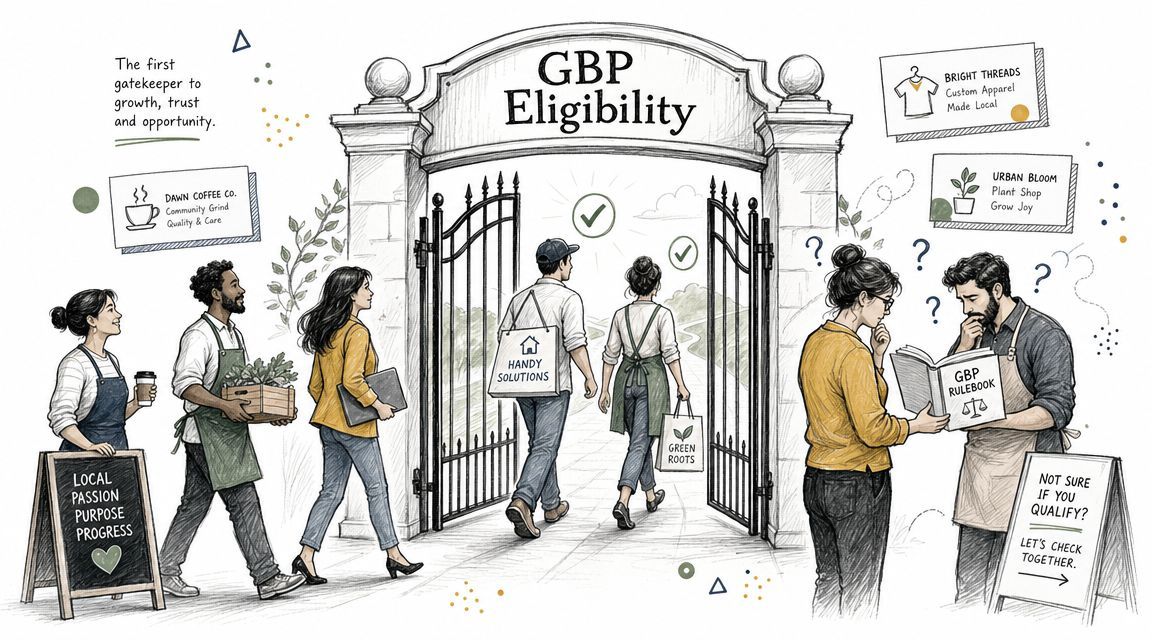
The basic eligibility test
If customers meet you in person, you may be eligible. If the business exists only online, you shouldn't be creating a profile.
A quick way to understand it:
| Business model | Eligible approach |
|---|---|
| Storefront business | Use the real physical location where customers visit |
| Service-area business | Use a service-area setup if you go to customers |
| Hybrid model | Use the real location and define service coverage accurately |
| Online-only brand | Don't create a GBP listing |
What qualifies in practice:
- Storefronts: Offices, clinics, restaurants, retail stores, studios, and similar businesses where customers visit during stated hours.
- Service-area businesses: Plumbers, cleaners, electricians, and similar businesses that meet customers in person at the customer's location.
- Hybrid businesses: Businesses that serve people at a location and also travel for certain services.
Who should stay out of GBP
Often, suspensions occur because businesses try to force eligibility to achieve local rankings, despite their model not qualifying.
Don't build a profile around any of these setups:
- Online-only operations: If there is no in-person customer interaction, skip GBP.
- Mailbox or forwarding addresses: A mailing arrangement isn't a customer-facing business location.
- Made-up branch locations: If a city page exists on your website but the business doesn't exist there in real life, that isn't a valid listing.
- Duplicate profiles for one entity: Google's one-profile rule is not flexible.
If a location can't be proven offline, don't try to rank it online.
That sounds restrictive. It's useful. It forces you to build local visibility around places your business can defend with signage, operations, documentation, and customer interaction. That's exactly what reduces suspension risk.
Address and Verification Rules The Proof of Place
Address setup is where bad local SEO advice does the most damage. Businesses still try virtual offices, vague service areas, borrowed addresses, and half-staffed coworking spaces. Those tricks don't create local authority. They create verification problems.
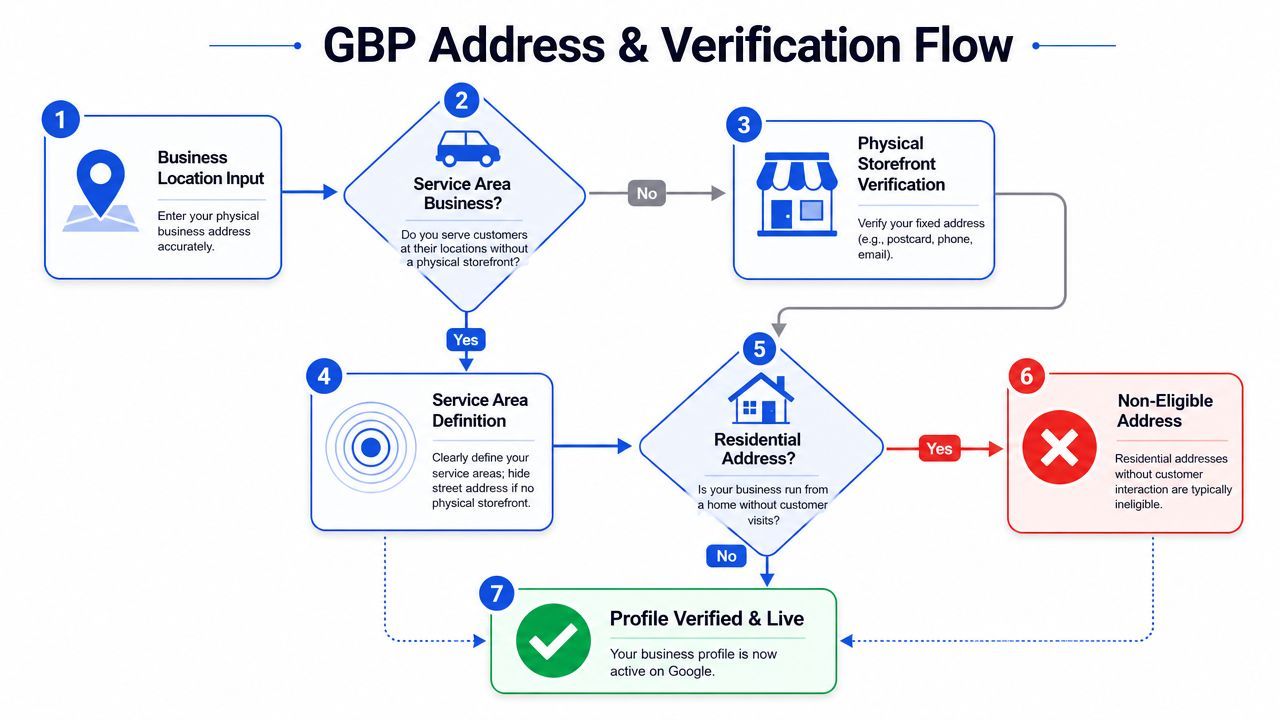
Your address has to match reality
Google allows accurate and precise address information, including suite numbers, floors, and building numbers where applicable. It also expects location data to reflect the actual business model. If customers visit the location, show the address accurately. If you travel to customers and don't receive them at the location, use a service-area setup instead.
That leads to a simple compliance split:
- Storefront location: Show the exact address as customers would find it.
- Service-area business: Hide the address if customers don't come there, then define the service area precisely.
- Hybrid operation: Present the business in a way that reflects how customers interact with it.
Common failures are predictable:
| Risky setup | Why it's a problem |
|---|---|
| Virtual office | It doesn't prove a real operating presence |
| PO box | It isn't a business location |
| Unstaffed coworking address | Customers can't reliably interact with the business there |
| Residential location with no customer-facing activity | It weakens eligibility |
Verification is now an evidence exercise
Verification isn't just a checkbox anymore. It has become more proof-driven. Google may require phone, email, text, video recording, or live video verification depending on the business model and risk profile, as summarized in this Google Business Profile verification guide.
That matters because many businesses start the process before they can prove the business exists in the way the profile claims.
Prepare evidence first:
- Exterior proof: Clear signage, visible entrance, nearby street signs.
- Interior proof: Workspace, branded materials, tools, or service environment.
- Document proof: Utility records, legal paperwork, or address evidence that matches the listing.
- Operational proof: A local phone number that reaches the specific location directly.
The fastest reinstatement cases usually come from businesses that already have clean evidence. The worst cases come from businesses trying to explain away a location that never should have been listed.
If you manage several locations, standardize this process. Build a verification folder for each branch before anyone touches the profile. That's where a structured local SEO workflow helps. Businesses often use internal operations docs, profile management software, or service support from providers such as SEOBRO® when they need help aligning location data, verification readiness, and profile fields without improvising.
Core Profile Content Guidelines Name Categories and Info
Most Google Business Profile problems aren't technical. They're editorial. Somebody changes a field because they think it will improve rankings. Instead, it creates a mismatch between the listing and the actual business.
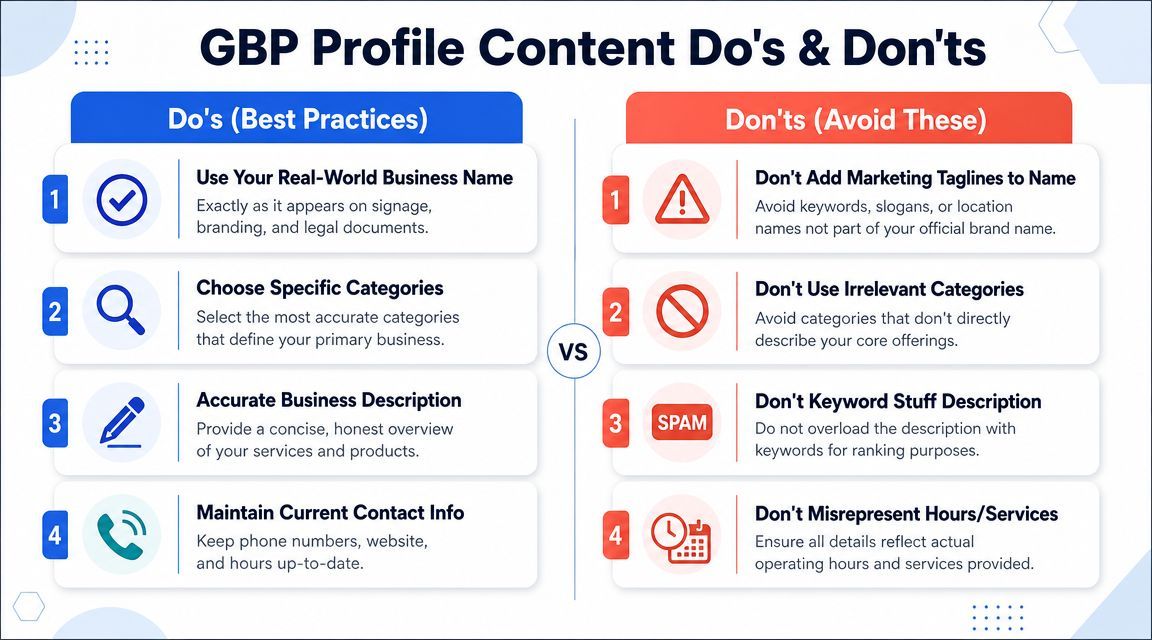
Name fields are where businesses get reckless
Your business name should be your real-world business name. Not your slogan. Not your service list. Not your city plus category plus “best rated” variation.
Bad examples are easy to spot:
- Keyword-stuffed names: “City Emergency Plumbing and Drain Experts”
- Location padding: adding neighborhoods or city names that aren't part of the actual brand
- Promotional additions: “Official”, “Top Rated”, “Open 24/7” in the title
Google has already given the rule. The profile should match how the business is consistently represented in its physical presence. If the storefront says one thing and the listing says another, you've created a trust problem.
Categories hours phone and description
Categories are one of the strongest relevance controls inside the profile. Google advises businesses to choose the fewest categories needed to describe the core business and to use categories that are specific, representative, and not spammy. That means your primary category should describe the main commercial function of the location, not every adjacent service you hope to rank for.
A useful internal check:
| Field | Good decision | Bad decision |
|---|---|---|
| Primary category | Core service or business type | Broad or aspirational label |
| Secondary categories | Only real supporting offerings | Every category that looks useful |
| Phone number | Direct local line | Call center, tracking setup that confuses ownership |
| Website | Relevant landing page | Irrelevant homepage or mismatched domain |
Google also says business hours should reflect regular customer-facing hours, and that a business description should provide useful information about services, products, mission, and history in its guidance on profile content. That's a policy point, but it's also a conversion point.
Use the description to explain what the business does. Keep it factual. Skip hype, fake superiority claims, and keyword stuffing.
A practical content standard for core fields:
- Hours: Match real availability. Update special hours when needed.
- Description: Explain services and background accurately.
- Phone: Use a number that reaches the location or team responsible for the listing.
- Website URL: Send users to the most relevant page for that location or service.
If your local SEO isn't converting, don't jump straight to link building or AI search visibility. Clean up the trust fields first.
Guidelines for Photos Videos and Posts
Most businesses treat media as decoration. Google treats it as evidence. Customers do too.
A weak gallery makes the listing feel neglected. A misleading gallery makes it look fake. That's why photo, video, and post choices have to support the same story as your name, address, category, and verification data.
Use media that proves the business is real
The safest rule is also the best one for conversion. Upload real visuals from the actual business.
Good profile media usually includes:
- Exterior shots: The storefront, entrance, signage, and parking or street view context.
- Interior shots: Reception, workspace, showroom, seating area, or service environment.
- Team photos: Actual staff, not stock models.
- Work examples: Real jobs, products, installs, menu items, or finished results.
Poor choices create friction fast:
- Stock imagery: It weakens trust because it doesn't prove the business experience.
- Irrelevant visuals: Generic city skylines, memes, random graphics.
- Heavy text overlays: Promotional banners disguised as business photos.
- Misleading images: Photos from another location, another brand, or a future concept.
Authentic media doesn't just look better. It gives Google and customers the same answer to the same question: does this business actually exist the way it claims to?
Posts should support trust not chase clicks
Google Posts work best when they act like operational updates and proof of activity. They work worst when businesses use them like low-quality ad copy.
A compliant post usually does one of these well:
- announces a real update
- highlights a specific service
- shares an event or timing change
- reinforces seasonal operations
- answers a recurring customer concern
A weak post usually does this instead:
- shouts offers with no context
- repeats keywords unnaturally
- uses misleading claims
- links to pages unrelated to the listing intent
If you're managing GBP content across teams or locations, consistency matters as much as creativity. Brand voice, imagery standards, and approval rules should be written down. This PostSyncer guide to brand consistency is useful for building those guardrails so local posts don't drift into spammy or off-brand territory.
Managing Reviews and Questions Policy
Reviews and Q&A are public trust layers. Ignore them and other people shape the narrative for you. Manage them badly and you create policy risk.
That's why I push clients to treat these areas like reputation operations, not community side tasks.
Review management is a governance task
You can't control what customers say, and you shouldn't try to game it. What you can control is how quickly you monitor reviews, whether you respond professionally, and whether you flag content that clearly violates policy.
Flag reviews when they are obviously off-topic, abusive, conflicted, or unrelated to a real customer experience. Don't flag every negative review just because it hurts. That's not policy enforcement. That's wishful thinking.
A practical review process looks like this:
- Monitor new reviews regularly: Assign ownership. Don't leave this to chance.
- Respond like an adult: Thank happy customers. Address unhappy ones without arguing.
- Flag only clear violations: Be specific and realistic.
- Keep records: If there is a pattern of abuse or impersonation, document it.
Treat Q and A like public sales support
The Questions & Answers feature is one of the easiest places for misinformation to spread. Competitors, random users, or confused customers can answer publicly if you don't.
Use Q&A proactively:
- Add common questions yourself: Parking, service area, booking process, availability, accepted payment methods.
- Answer with authority: Short, factual, useful replies work best.
- Avoid stuffing keywords: This section is not a ranking playground.
- Update stale answers: If policies or operations change, your answers should too.
When businesses manage Q&A well, they reduce confusion before the call. That improves lead quality and saves staff time. That's the kind of local SEO improvement that matters.
Common Suspension Triggers and Prohibited Practices
Suspensions don't happen at random. Most of them are earned through patterns that look misleading, manipulative, or unverifiable.
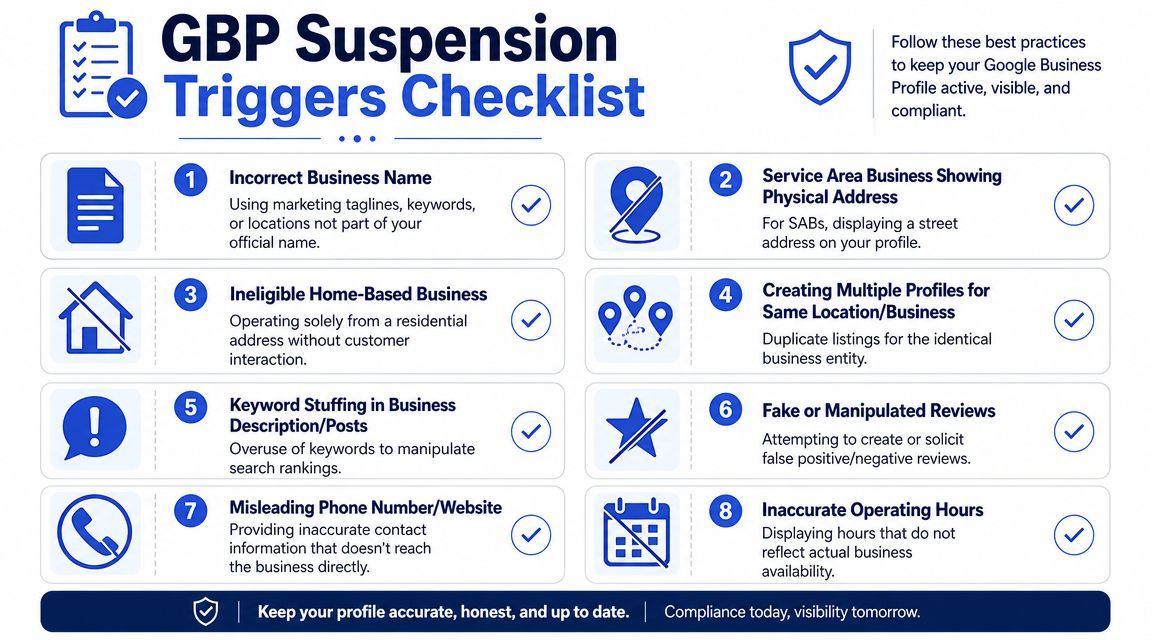
What usually gets profiles flagged
The biggest triggers are usually the obvious ones that people talk themselves into.
Watch for these:
- Name manipulation: Adding service keywords, cities, or taglines to the business title.
- Address abuse: Listing a place that isn't a real, eligible operating location.
- Duplicate listings: Creating extra profiles for the same business or location.
- Misleading edits: Changing categories, phone numbers, or business details in ways that don't match reality.
- Review manipulation: Buying reviews, posting fake ones, or coordinating suspicious activity.
- Bad operational data: Hours, website URLs, or contact details that don't reflect the actual business.
Here's the hard truth. Most “GBP hacks” are just suspension triggers wearing SEO clothes.
A quick audit table helps:
| Trigger | Business consequence |
|---|---|
| Keyword-stuffed name | Spam signal and possible suspension |
| Duplicate profile | Split authority and profile conflict |
| Fake or weak address | Verification failure or takedown |
| Wrong phone or URL | Lost leads and trust erosion |
| Misleading hours | Poor user experience and complaint risk |
This section pairs well with a visual checklist you can review with your team before making changes:
What to audit before Google does
Run a profile audit anytime one of these happens:
- Ownership changes: Agency handoff, staff turnover, franchise transfer.
- Brand changes: Rebrand, merger, phone migration, new website rollout.
- Operational changes: New suite, updated hours, relocation, changed service model.
Small inconsistencies compound inside local search. One bad edit rarely stays isolated.
If your local visibility is unstable, don't assume the issue is algorithmic. Check whether the profile has drifted away from reality. That's the first thing Google checks, and it should be the first thing you check too.
Your Step-by-Step Profile Reinstatement Guide
If your profile is suspended, stop editing randomly. Panic edits make weak situations worse.
The right move is disciplined cleanup, followed by a clean appeal supported by real evidence.
Fix the profile before you appeal
Start with an internal audit against the rules already covered.
Check these first:
- Business name: Remove extra keywords, slogans, or city modifiers.
- Address setup: Make sure the listing matches the actual business model.
- Categories: Keep only those that reflect the core business.
- Contact details: Confirm the phone number and website are accurate and direct.
- Duplicates: Find and resolve overlapping listings.
Then gather proof. If verification and reinstatement are now evidence-driven, your appeal has to be built like a case file, not a complaint.
What to submit with a reinstatement request
Your goal is clarity. Show Google that the business is eligible, real, and represented correctly.
Useful support materials usually include:
- Business identity proof: Registration or legal documentation tied to the business name.
- Address proof: Utility or similar documents that align with the listing details.
- Location proof: Photos of exterior signage, interior setup, and surrounding identifiers.
- Operational proof: Materials that show the business serves customers as claimed.
Keep your written explanation short. State what was wrong, what you corrected, and what evidence supports the current setup. Don't write a defensive essay.
One more point. Suspended listings often attract scam outreach and fake “Google support” calls. Teams under pressure are easy targets. If your front desk handles incoming calls during a suspension, this resource on how to stop spam calls for businesses is worth sharing internally.
The businesses that recover fastest usually do two things well. They fix the root issue, and they stop guessing.
GBP Guidelines FAQ
Can I use a home address for my Google Business Profile
Only if the business setup is eligible and represented correctly. If customers don't visit the location, a service-area setup is usually the safer path. If the address exists only as a private residence with no qualifying in-person business model, you're inviting problems.
Can I create more than one profile for one business
No. The one-profile rule matters because duplicate profiles create confusion in Google Maps and Search. If you need visibility in more places, build location pages, local content, and service-area coverage the right way. Don't clone listings.
Do suite numbers and floors matter
Yes. Precision matters. If the location includes a suite number, floor, or building number, include it accurately. Vague addresses create delivery problems, customer confusion, and verification friction.
Should I add lots of categories to rank for more terms
No. That's lazy local SEO. Use the fewest categories needed to describe the business accurately. More categories don't automatically mean more relevance. Irrelevant categories can muddy the profile and weaken trust.
What should I do if my listing is live but not performing
Don't assume the profile needs tricks. Audit the basics first:
- Eligibility fit: Make sure the business model still matches the listing setup.
- Trust fields: Name, category, address, phone, hours, and website should all be clean.
- Media quality: Replace weak or generic photos with real business imagery.
- Reputation layer: Answer reviews and Q&A consistently.
- Landing page alignment: The linked page should match the location or service intent.
If you want better local visibility, build around accuracy, proof, and operational consistency. Then layer in broader SEO work like location pages, internal linking, citation cleanup, technical audits, and content built around real service demand. That's how local search starts contributing to qualified leads instead of becoming another messy channel to babysit.
If your profile is suspended, unstable, or underperforming, SEOBRO® can help you audit the root cause, clean up risky profile elements, and align your Google Business Profile with a broader revenue-focused local SEO strategy.