Most SEO teams are still running the same broken process. Search Console exports in one folder. Screaming Frog files in another. Keyword research in a separate tool. Reporting lives in spreadsheets. Fix recommendations sit in docs until a developer has time to look at them.
That setup creates drag at every stage. Analysis takes too long. Prioritization gets fuzzy. Revenue impact gets buried under crawl data, indexation notes, and disconnected content ideas.
Claude Code for SEO changes the shape of the work when you use it properly. Not as a chatbot. Not as a novelty prompt box. It works best as a terminal-based operating layer that can read local exports, inspect codebases, transform raw SEO data into decisions, and help implement fixes in the same environment.
That matters because serious SEO work isn't just writing title tags. It's reviewing log files, clustering crawl issues, generating schema, comparing page templates, analyzing Search Console trends, and turning all of that into actions that improve qualified traffic, leads, and sales. Search Engine Land describes Claude Code as Anthropic's terminal-based AI coding assistant that can work directly with local files like Google Search Console CSVs, which is exactly why it fits operational SEO better than a browser chatbot. Their walkthrough also shows teams scheduling daily or weekly reports, including one example at 8:00 a.m., shifting recurring SEO analysis into reproducible workflows through Claude Code and local data handling in this reporting guide.
Used well, Claude Code becomes a practical bridge between audit, implementation, and reporting. Used badly, it produces polished nonsense, weak recommendations, and risky code. The difference is setup, data access, and validation discipline.
Introduction
If you're leading SEO for a SaaS company, ecommerce brand, or multi-location business, you've probably already felt the bottleneck. You don't need more raw data. You need a faster path from data to implementation.
Claude Code helps because it can sit closer to the actual work. It can inspect exports, read site files, generate scripts, summarize patterns, and produce outputs that are usable by strategists, content teams, and developers. The workflow is much tighter than bouncing between browser tabs and copy-pasting into general chat tools.
What's changed recently is the maturity of the ecosystem around it. One open-source Claude SEO package now advertises 25 sub-skills and 18 specialist agents across technical SEO, E-E-A-T, schema, GEO/AEO, backlinks, local SEO, ecommerce, and international SEO. It also states that audits produce a prioritized action plan based on primary-source Google guidance, which shows how SEO work around Claude Code has already been modularized into reusable automation components rather than one-off prompting in the Claude SEO repository.
Another practical example from the same ecosystem shows Claude crawling a site, using SerpAPI for keyword research, and returning a prioritized content plan in about 20 minutes, which tells you where the upside really is. Not replacing strategy. Compressing the repetitive research and synthesis work that slows strategy down.
Practical rule: Claude Code is strongest when it can access your files, your crawl data, and external search data in one workflow. Without that, it's just a smart text generator.
The key win isn't more output. It's tighter execution loops. Technical audits become implementation-ready. Content planning gets tied to SERP evidence. Reporting becomes repeatable. That is how automation starts affecting revenue, not just rankings.
Setting Up Your Claude Code SEO Environment
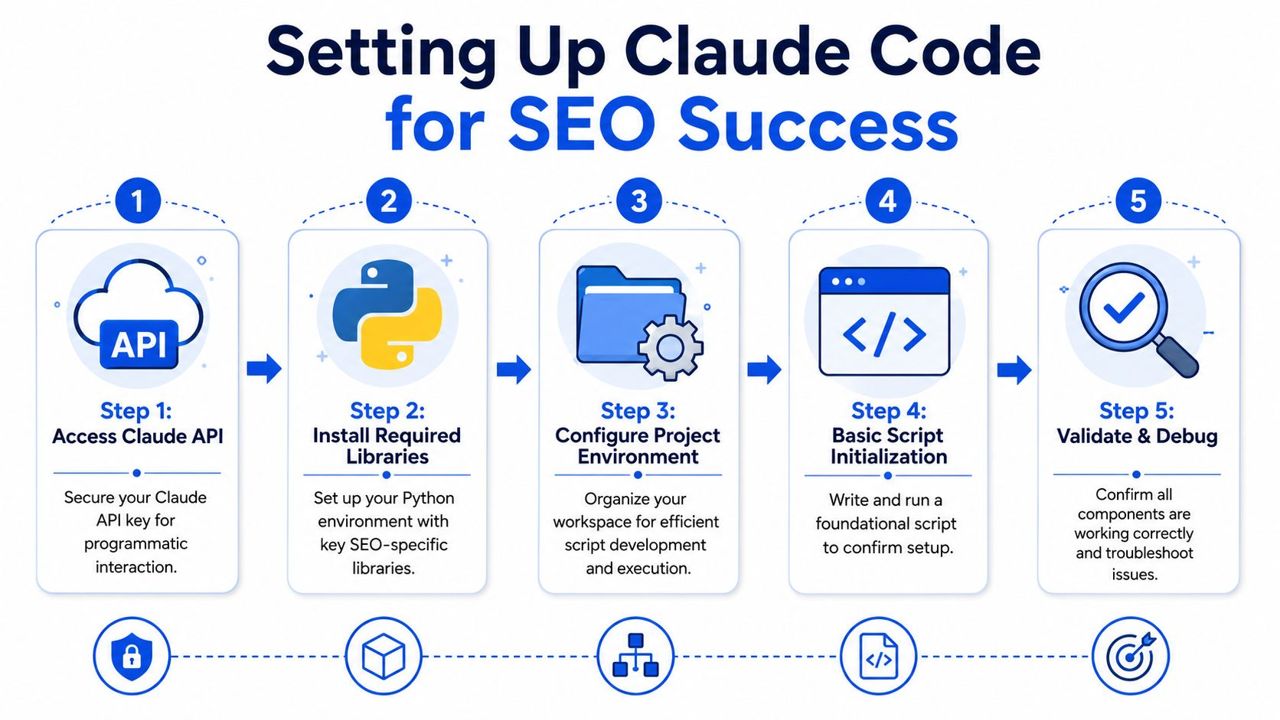
Why the local setup matters
Most SEO guides stop at installation. That misses the main point. Claude Code is useful because it can work inside your local environment with the files you already use: Search Console exports, crawl exports, content inventories, template files, and scripts.
That changes basic workflows. Instead of manually filtering a CSV, writing notes in a doc, and then asking a developer to build a script later, you can ask Claude Code to inspect the export, classify the problem, draft the logic, and output something your team can run.
A simple example:
- Before: Export Search Console data, filter branded queries, compare periods manually, paste notes into slides.
- After: Drop the CSV into a project folder, ask Claude Code to identify page-level deltas, cluster query intent, and produce a reporting table or markdown summary.
Ayima's training material illustrates the efficiency well. They report that an audit finding that used to take 20 minutes to turn into a client-ready paragraph can be reduced to 90 seconds, and a content brief that once took half a day of manual SERP analysis can be produced in about 10 minutes in their Claude SEO training overview.
What to connect before doing real SEO work
A workable environment has four parts.
Claude Code installed locally You want access to folders, scripts, and exports. If Claude can't inspect the actual files, your workflow breaks immediately.
An API-backed project environment Keep one dedicated workspace for SEO operations. Typical folders include
/gsc-exports,/crawl-exports,/logs,/templates,/schema, and/reports.An external search-data MCP This is essential. Claude Code doesn't natively provide keyword volume, keyword difficulty, or rank-tracking data. A practical setup is to use Claude for crawling and page extraction, then connect a search-data MCP such as SerpAPI or DataForSEO so it can produce a prioritized page plan with keyword, estimated volume, competitor coverage, and ranking rationale as explained in this workflow write-up.
A repeatable reporting output Markdown, CSV, JSON, or Google Sheets export. Pick one. Don't let every run produce a different format.
Claude Code without external data is good for analysis and transformation. Claude Code with external data becomes useful for strategy.
A clean setup also improves AI retrieval later. If you're publishing operational docs, templates, or implementation notes for internal and external use, it's worth reviewing guides on making content AI-ready so your documentation is easier for AI systems to parse and summarize.
A starter project structure
Use a folder structure like this:
/input/gscfor page and query exports/input/crawlsfor Screaming Frog files/input/logsfor raw server logs/output/reportsfor summaries and issue queues/output/schemafor generated JSON-LD/scriptsfor helper code Claude writes and refines
This setup sounds basic because it is. That's the point. Claude Code works better when the environment is structured enough to support repeated analysis, not one-off experimentation.
Automating Technical SEO Audits and Fixes
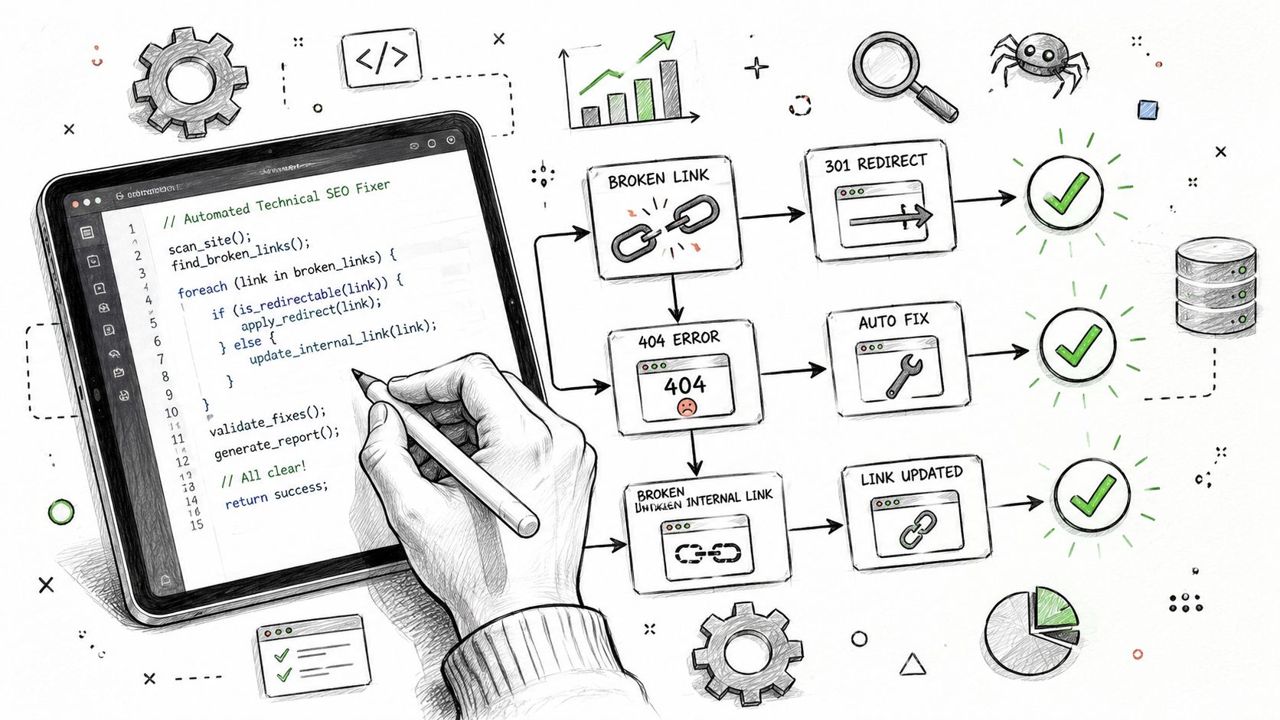
Technical SEO is where Claude Code starts paying for itself fastest. The highest-value use cases are the jobs people keep postponing because they require exports, regex, spreadsheets, or ad hoc scripts.
Parsing logs and crawl waste
If you're trying to find crawl waste, Claude Code can take raw log files and classify crawler behavior much faster than a manual review.
Use a prompt like this:
Read the server log files in
/input/logs. Isolate Googlebot requests. Group requests by URL pattern, status code, parameter usage, and directory. Flag crawl waste from faceted URLs, internal search pages, duplicate parameter combinations, and non-indexable pages. Output a markdown report sorted by likely business impact and include a CSV of the worst offenders.
That output is immediately useful when paired with a crawl budget review. If you need deeper background on what waste patterns matter operationally, this guide on crawl budget optimization is the right companion.
Expected outputs usually include:
- Parameter clusters that shouldn't be crawled
- Frequent hits to redirects or error URLs
- Low-value template paths getting more bot attention than revenue pages
- Mismatch between crawl activity and priority URLs
Turning crawl exports into fix queues
Screaming Frog exports are rich, but they usually create more work before they create clarity. Claude Code is good at converting them into fix queues that a developer or SEO manager can assign.
Prompt example:
Analyze the Screaming Frog export in
/input/crawls/sitewide.csv. Categorize all URLs with 3xx, 4xx, and 5xx responses. Separate internal links pointing to redirects from canonical issues, mixed protocol issues, orphaned problem URLs, and broken resource files. Produce a remediation table with columns for issue type, URL, likely cause, recommended fix, and implementation owner.
If you're cleaning up protocol or canonical confusion, pair that review with this breakdown of SEO HTTP HTTPS issues so decisions around redirects, canonicals, and internal linking stay consistent.
Raw crawl exports don't create revenue. Clear implementation queues do.
The practical gain here isn't just speed. It's translation. Claude Code can turn machine output into developer-ready explanations, which removes a lot of friction between audit and deployment.
Generating schema that developers can ship
Schema generation is another strong use case because it requires structure, consistency, and validation. Claude Code can inspect a URL, extract visible entities, and draft JSON-LD for common page types.
Prompt example:
Visit the page template files in this project and generate valid JSON-LD for Product, FAQPage, and LocalBusiness where applicable. Use only information present on the page or in the provided data files. Return one schema block per page type and explain any required fields that are currently missing.
Example output:
{
  "@context": "https://schema.org",
  "@type": "FAQPage",
  "mainEntity": [
    {
      "@type": "Question",
      "name": "Do you offer same-day appointments?",
      "acceptedAnswer": {
        "@type": "Answer",
        "text": "Appointments depend on technician availability and service area."
      }
    }
  ]
}
Keep one rule in place. Never deploy generated schema blind. Validate it against the page, test it, and confirm the business data is current.
Scaling Content Strategy and On-Page SEO
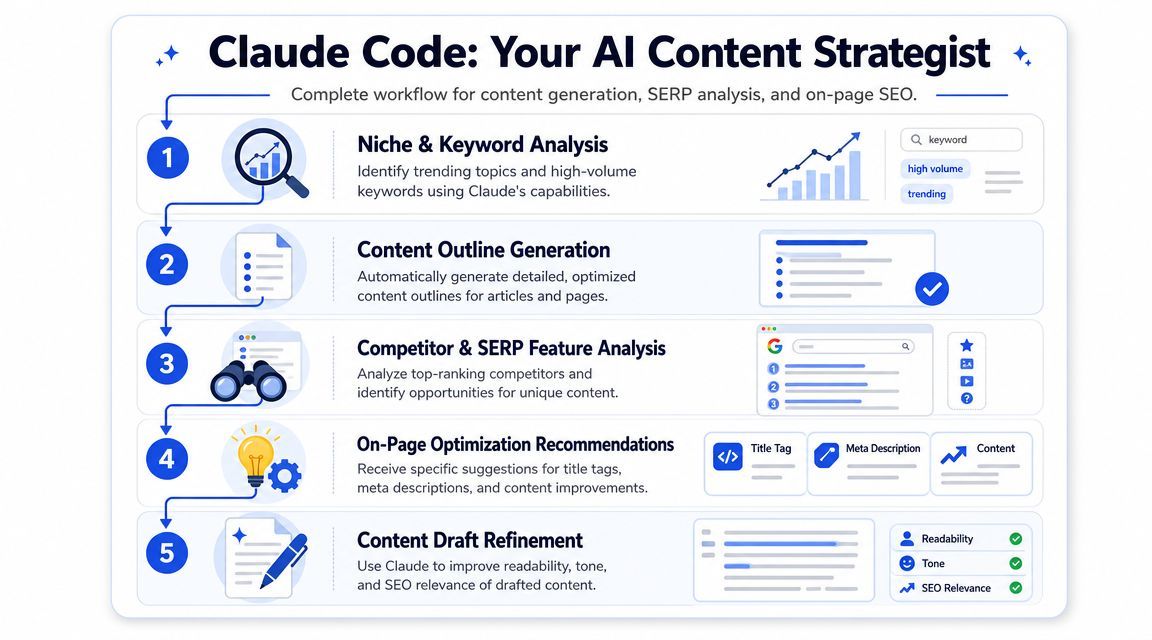
A content team with 3,000 URLs usually has the same problem. Good pages sit next to thin category copy, stale feature pages, weak local landers, and a brief backlog nobody will clear manually. Claude Code helps turn that sprawl into an operating system for content decisions, production, and refreshes.
The highest-return use case is brief generation tied to revenue intent. Instead of asking for generic drafts, feed Claude Code your page inventory, target queries, conversion goals, and search result data. Then make it classify where traffic can produce pipeline, bookings, or sales.
Building briefs from SERPs, inventory, and business model
Use a keyword plus a search-data MCP. Ask Claude Code to inspect the result set, compare it against your existing URLs, and recommend the page type with the best business fit.
Prompt template:
Use the connected search-data MCP to pull the top ranking results for the target keyword. Analyze intent, content format, recurring entities, commercial modifiers, comparison angles, internal link opportunities, and question patterns. Then compare those findings against the URLs in my site inventory. Produce a content brief with recommended page type, title direction, H2/H3 outline, conversion angle, internal links to add, and supporting entities to mention.
The useful output is the decision logic. A senior SEO lead needs to know whether the right asset is a category page, a feature page, a location page, or editorial content that supports a commercial cluster. That prevents a common failure mode where teams publish blog posts for terms that should have gone to money pages.
I use this differently by model:
- Ecommerce: map non-brand queries to category, subcategory, comparison, or compatibility pages based on margin and inventory depth
- SaaS: separate demo-intent terms from education-intent terms, then route them to feature, use-case, alternative, or integration pages
- Local: cluster service plus city terms by actual service coverage, proof points, and review support before writing a single page
That is the difference between publishing more URLs and building a semi-automated SEO system that supports revenue.
Here is a useful visual summary of that operating model.
Bulk metadata and page optimization
Claude Code is also strong at repetitive on-page work across large URL sets, especially when the constraint is consistency at scale.
Use a prompt like this:
Read the CSV in
/input/page-keywords.csvwith columns for URL, primary keyword, secondary topic, and page type. Generate title tags and meta descriptions that reflect search intent, avoid duplication across the set, and maintain a consistent brand voice. Flag any URLs where the page type appears mismatched to the keyword intent.
This saves time, but the bigger gain is control. You can apply rules across thousands of pages, review exceptions, and send a clean implementation file to content or engineering without manually touching every URL.
A few patterns where this works well:
- Ecommerce collections with repetitive manufacturer or faceted copy that needs clearer differentiation
- SaaS feature and integration pages that need tighter alignment to trial, demo, and switcher intent
- Local landing pages that need service-specific proof, not templated city swaps
- Editorial refreshes that need missing entities, FAQ coverage, and stronger internal link targets
For teams shipping content into apps or custom front ends, it also helps to stream outputs into editorial tooling instead of waiting for one large response. The implementation pattern behind streaming AI responses in React Native is useful here if your SEO workflow lives inside a product, CMS extension, or internal ops dashboard.
One caution matters. Bulk generation can standardize weak assumptions just as fast as it standardizes good ones. Set hard rules for claim validation, brand terms, prohibited phrasing, local proof requirements, and page-type eligibility before you let Claude Code touch production copy.
Claude Code works best here as a trained operator sitting between strategy and execution. It can inspect gaps, generate briefs, rewrite metadata, suggest internal linking targets, and queue refreshes across eCommerce, SaaS, and Local programs. Human review still decides what gets published, but the operating speed changes completely.
Advanced Workflows for Programmatic and AI Search
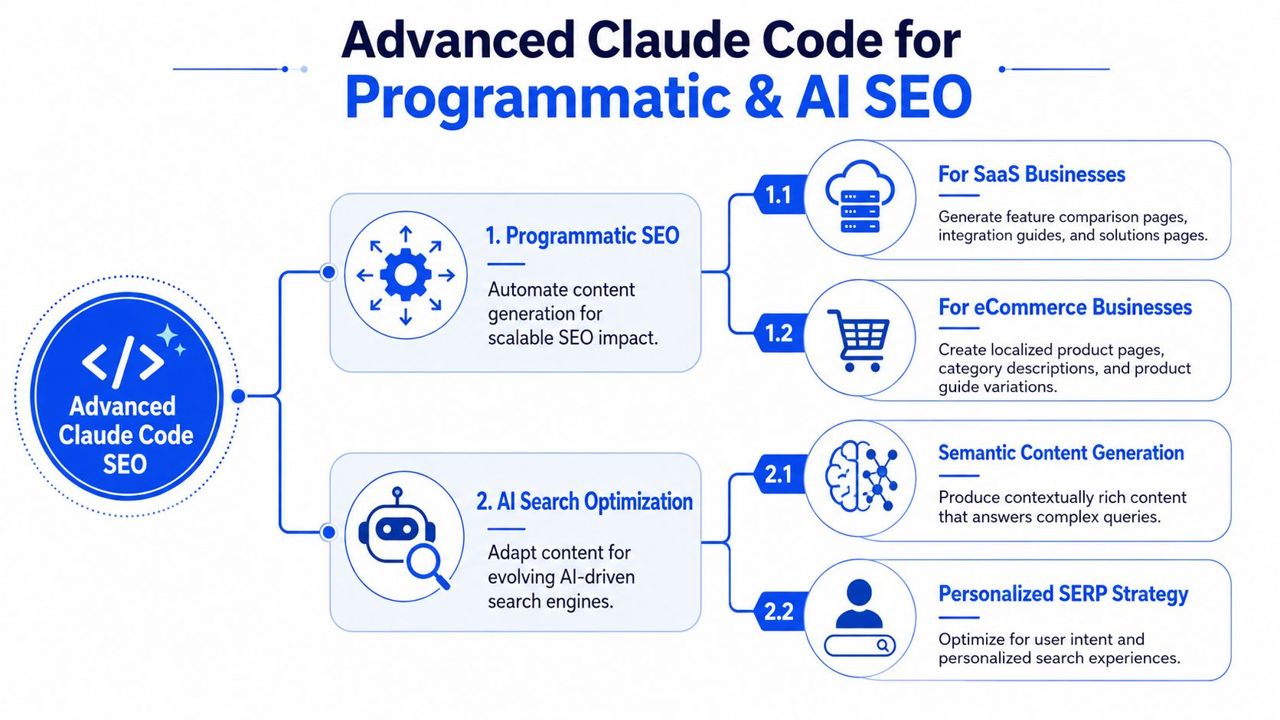
The next step isn't producing more audits. It's using Claude Code to support scalable page systems and stronger visibility in AI-driven search environments.
Programmatic SEO for SaaS and ecommerce
For SaaS, one practical model is a template family like [feature] for [industry], [integration] alternative, or [use case] software for [team]. For ecommerce, it might be category-plus-use-case pages, compatibility pages, or geo-qualified product landing pages.
Claude Code helps in three places:
| Business type | Claude Code job | Human role |
|---|---|---|
| SaaS | Build page templates, map entities, generate variant drafts from CSV inputs | Approve positioning, claims, and conversion flow |
| Ecommerce | Normalize product attributes, create collection copy rules, generate schema-ready fields | Protect merchandising logic and uniqueness |
| Local services | Create geo-page frameworks and supporting FAQs | Verify service reality, trust signals, and local proof |
Prompt example:
Read the CSV of feature and industry combinations. For each row, generate a page brief using the approved template structure. Keep shared structural elements consistent, vary examples and pains by industry, identify supporting FAQs, and flag rows that risk thin differentiation.
This only works if the template itself is good. If your base structure is weak, Claude will scale weakness faster than a human team ever could.
AI output is a multiplier. It multiplies strategy quality, good or bad.
AI visibility and citation-focused optimization
Claude Code also has a strong emerging role in GEO and AEO workflows. An open-source Claude audit tool explicitly bundles GEO, schema markup, entity clarity, and E-E-A-T content quality into one workflow, which signals a real shift toward optimizing for AI citations rather than only classic rankings as described in the Claude SEO documentation.
That makes Claude useful for reviews such as:
- Entity clarity audits to check whether the page clearly states who the business is, what it does, where it operates, and what evidence supports those claims
- Answer extraction reviews to identify passages that are concise enough for AI systems to quote
- Schema coverage checks for pages that need stronger machine-readable context
- Evidence gap analysis where service claims need proof, examples, authorship, or business details
For teams building their own interfaces around AI-assisted search experiences, frontend delivery matters too. If you're shipping product-side search or support tooling, this guide to streaming AI responses in React Native is a useful technical reference for handling real-time output cleanly.
If AI visibility is a business priority, the operational side belongs next to your broader AI search optimization services thinking. Citation eligibility depends on structure, clarity, and trust, not just adding another FAQ block.
Validating AI Output and Maintaining E-E-A-T
Claude Code can remove a lot of repetitive labor. It can't own the final judgment. That's where many teams get sloppy.
The review process that prevents bad SEO
Use a fixed validation layer before anything goes live.
Check factual claims Never let generated copy introduce unsupported claims, invented numbers, or weak comparisons. If a page needs proof, add proof or remove the claim.
Review code outputs Schema, regex, redirect logic, and helper scripts need inspection before deployment. AI-generated code can be structurally neat and still wrong.
Compare against business reality Local service areas, product availability, pricing references, service guarantees, and compliance statements often drift. Claude doesn't know what changed unless you feed it current data.
Review for brand and conversion logic A keyword-aligned title tag can still be strategically weak. So can a page intro that ranks but doesn't convert.
The safest way to use Claude Code is to let it do the heavy lifting, then force human review at every point where trust, money, or implementation risk is involved.
Where human judgment still decides outcomes
E-E-A-T doesn't appear because an AI mentions expertise. It appears when the page demonstrates it through first-hand detail, clear authorship, accurate claims, useful examples, and evidence that matches what the business does.
That is why AI should draft, organize, transform, and accelerate. It shouldn't be treated as the source of truth.
A practical split looks like this:
- Let Claude handle exports, clustering, schema drafting, pattern finding, page brief assembly, and repetitive metadata work.
- Keep humans on prioritization, risk assessment, editorial perspective, proof points, conversion intent, and final sign-off.
If you want SEO to influence pipeline rather than produce more documents, that balance matters. Automation makes the operation faster. Expertise keeps it trustworthy. For businesses that need both, it makes sense to work with an experienced SEO partner who can connect audits, implementation, content, and AI visibility into one growth system.
Frequently Asked Questions About Claude Code for SEO
Is Claude Code better than a browser chatbot for SEO work
For production SEO work, yes.
Browser chatbots are fine for one-off prompts. Claude Code is stronger when the job touches real files, repositories, crawl exports, templates, logs, and repeatable scripts. That changes the type of work you can finish in one session. Instead of asking for advice, teams can process a Screaming Frog export, rewrite metadata at scale, generate schema from source data, and prepare implementation-ready outputs.
The gap shows up in execution speed, not novelty.
Can Claude Code replace Ahrefs, Semrush, or rank trackers
No. Claude Code does not come with native keyword databases, rank tracking, or SERP history.
It works best as the execution layer around your existing stack. Feed it exports from Search Console, keyword tools, analytics platforms, product catalogs, CRM data, or a search-data MCP such as SerpAPI or DataForSEO. Then use it to clean, join, classify, score, and turn that data into actions. For revenue-focused SEO, that matters more than asking a model for generic recommendations.
What SEO tasks should you automate first
Start where the manual work is high and the review process is straightforward.
| FAQ Topic | Best starting point | Business impact |
|---|---|---|
| Technical audits | Crawl export classification | Cuts analyst hours and speeds up fixes |
| Reporting | Search Console summaries | Gives stakeholders faster reads on impact |
| On-page SEO | Bulk metadata drafting | Improves output volume for large page sets |
| Content strategy | SERP-based brief generation | Reduces research time before writing |
A good first workflow usually has three traits. The inputs are structured. The output can be checked quickly. The task already happens every month or every sprint.
Where does Claude Code usually fail
It usually fails in four places.
Weak inputs create weak outputs. If the crawl is incomplete, the product feed is outdated, or the page sample is too small, the recommendations drift fast.
Unclear prompts cause bloated deliverables. Ask for "an SEO audit" and you'll get a long document. Ask for "cluster all URLs by template, flag canonical conflicts, and output fixes as CSV columns" and the result is usable.
Publishing without QA creates risk. That is especially true for regulated industries, local landing pages, and any page tied directly to leads or sales.
It also struggles with prioritization unless you give it business context. A title tag rewrite and an indexation fix are not equal. One may improve CTR. The other may recover revenue.
Is Claude Code useful for local SEO
Yes, especially for multi-location operations that are stuck in spreadsheets and copy-paste workflows.
Claude Code is useful for building location page frameworks, drafting local schema, standardizing service-area data, clustering review themes, and turning scattered business information into publishable assets. For local SEO, the value is operational. A team can go from raw location data to reviewed page drafts and schema files much faster.
Human review still matters because local errors are expensive. Wrong hours, wrong service lists, wrong city modifiers, and weak trust signals hurt both conversion rate and search visibility.
Does Claude Code help eCommerce and SaaS teams differently
Yes. The workflows should match the revenue model.
For eCommerce, Claude Code is strong at template analysis, collection page optimization, internal linking logic, faceted navigation reviews, product attribute normalization, and category-level content production. That helps teams ship improvements across thousands of URLs without treating every page as a custom project.
For SaaS, the higher-value use cases are feature-page briefs, comparison page frameworks, use-case clusters, help-center gap analysis, and entity mapping across product, problem, and audience terms. The goal is pipeline coverage, not just more indexed pages.
Local businesses sit in a different bucket. They usually get the biggest return from location page systems, GBP support content, review mining, and better handling of inconsistent business data.
Do you need developers to get value from Claude Code for SEO
Not always. You do need someone comfortable with files, prompts, and quality control.
A strategist or senior SEO can get strong results from CSV workflows, markdown briefs, regex cleanup, schema generation, and light scripting. Developer support becomes more important when the work touches templates, deployment workflows, JavaScript rendering issues, log analysis, or programmatic page generation.
The practical model is semi-automated SEO. Claude Code does the heavy processing. SEO and product teams decide what ships.
If you want to use Claude Code for SEO in a way that supports pipeline, revenue, and implementation speed, SEOBRO® can help build the strategy around it. The work should end in cleaner architecture, stronger content systems, better AI visibility, and a prioritized roadmap your team can execute.