SEO for ecommerce category pages means optimizing your collection and listing pages to rank for high-volume commercial queries like “running shoes” or “standing desks,” the searches that individual product pages can’t capture. Category pages sit exactly where buying intent meets search volume, which makes them the highest-leverage organic template in almost every store. This guide covers the full stack: keyword-to-taxonomy mapping, copy placement, a faceted navigation decision framework built on Google’s own documentation, pagination, internal links, and the schema that’s actually allowed on listing pages.
Why category pages are your money pages (and yes, they matter for SEO)
A category page targets the “chunky middle” of search demand: queries that are too broad for a product page and too commercial for a blog post. Someone searching “trail running shoes” hasn’t picked a model yet. A product page for one specific shoe is the wrong answer to that query; a well-built category page listing thirty of them is exactly right.
This is the answer to the skepticism you’ll find on Reddit (“do category pages even help with SEO, or are they pointless?”). The confusion usually comes from comparing category pages vs product pages as if they compete. They don’t. Product pages capture model-level queries that appear and disappear with your inventory. Category pages capture evergreen, non-branded demand that exists whether or not you stock a particular SKU. When a product sells out or gets discontinued, its page dies; the category above it keeps ranking. We covered the product side separately in our guide to SEO for product pages. The two templates do different jobs.
Most stores under-invest here. Baymard Institute’s UX research, built on 200,000+ hours of testing, finds that 32% of ecommerce sites have no category pages at all. A third of stores skip their highest-leverage template entirely, which is also why this is one of the easier wins in ecommerce SEO: the bar is low.
One framing rule before any tactics: prioritize categories by revenue potential, not alphabetically. A category that ranks #4 for a query worth 20 orders a month deserves work before one that ranks #12 for a query worth two. Rankings are the means; the sort order is money.
Map keywords to your category tree first
Before touching a single page, map search demand onto your taxonomy. The rule is simple: one primary keyword per category page. Every category should own exactly one head term, and no two categories should chase the same one.
This is where most stores quietly bleed rankings. “Sneakers” and “Trainers” as separate categories with overlapping products means two URLs competing for the same query. Google picks one inconsistently, both rank worse than either would alone, and you’ve built cannibalization into your site architecture. Merge them, or differentiate them around genuinely distinct queries.
The mapping also tells you where subcategory pages are missing. If “running shoes” is a category and “trail running shoes” has real search volume of its own, that demand justifies a dedicated subcategory page with its own URL, H1, and copy. If a query has no meaningful demand, don’t spawn a page for it. Thin, near-duplicate categories aren’t free; they’re index bloat that dilutes the pages that matter.
Once subcategories exist, surface them. Baymard’s category page research finds that 76% of sites fail to feature subcategories as the primary content on intermediary category pages: users land on “Shoes” and see a wall of 400 mixed products instead of clear paths to “Running,” “Hiking,” and “Casual.” Parent categories should present their children first, both for users and because those links pass authority down to the pages that target the more specific queries.
Structure and copy placement: what goes above and below the product grid
The template anatomy that works, top to bottom:
- Title tag and H1 led by the primary keyword. “Trail Running Shoes” beats “Hit the Trails in Style.” Save the brand voice for the copy; the H1 is a relevance signal.
- One or two sentences of intro copy above the grid. Enough to confirm relevance for users and crawlers, never enough to push products below the fold.
- The product grid itself. This is the content. A category page’s primary job is showing products, and no amount of copy compensates for a grid that doesn’t match the query.
- Optional expanded copy and FAQ below the grid, for categories where buyers genuinely have questions: sizing, materials, compatibility, “which type is right for me.”
When writing content for ecommerce category pages, the copy exists to establish relevance and answer buying questions. It is not there to hit a word count. The 800-word keyword essay dumped under the grid, which nobody reads and everybody scrolls past, is a relic of an older SEO era. If a paragraph wouldn’t help a genuinely undecided buyer, cut it. Three useful FAQ entries beat ten generic paragraphs.
Round out the on-page basics: a unique meta description per category (auto-generated duplicates waste the snippet), and descriptive alt text on category banner images. These are the same fundamentals we walk through in our ecommerce SEO checklist, applied to the one template where they compound across your most valuable queries.
Faceted navigation: decide what gets indexed before it decides for you
Faceted navigation (the filters for size, color, brand, price) is where category page SEO is usually won or lost, because facets multiply URLs combinatorially. A category with 6 filter types and a few values each can generate thousands of URL variations. If you don’t decide what gets indexed, the math decides for you.
Google published dedicated faceted navigation guidance in December 2024, and it’s blunt about the cost: crawlers “will typically access a very large number of faceted navigation URLs” before figuring out they’re useless. That crawl time comes out of a budget that should be spent discovering your new products and updated categories. On large stores we routinely see the majority of Googlebot’s activity burned on filter permutations nobody searches for.
The decision framework has exactly two buckets:
| Facet combination | Treatment |
|---|---|
| Real search demand exists (e.g. “black leather boots”, “nike running shoes”) | Indexable landing page: clean crawlable URL, self-referencing canonical, unique title and H1, internal links pointing to it |
| Everything else (price sliders, size filters, sort orders, multi-facet stacks) | Block crawling via robots.txt, or build filters on URL fragments so no crawlable URL exists |
Check demand the same way you did for subcategories: if “waterproof hiking boots” gets searched, promote that facet combination to a real landing page. If “boots, size 9.5, under $180, sorted by newest” doesn’t, make sure Googlebot never wastes a request on it.
Two implementation notes straight from Google’s doc. First, the popular soft options are weaker than people assume: Google says rel=“canonical” and rel=“nofollow” are “generally less effective in the long term” than robots.txt or fragments for controlling faceted crawling, because Google must keep crawling the URLs to see those hints at all. Second, for the faceted URLs you do let Google crawl, three of the doc’s URL-structure rules matter most: return HTTP 404 for filter combinations with no results; use the industry-standard & as your parameter separator, because commas, semicolons and brackets are hard for crawlers to detect as separators; and if you encode filters in the URL path rather than in query parameters, keep the logical filter order fixed so the same selection can’t exist at two different paths.
Index bloat from facets is the single most common finding in our ecommerce technical SEO audits, and it’s invisible from the storefront. You only see it in the crawl stats and the index coverage report, usually after months of Google spending its attention on junk instead of money pages.
Pagination that doesn’t bury your products
Category pagination is short to get right and expensive to get wrong, because a broken page 2 orphans every product on it.
Google’s pagination guidance sets the rules. Give every paginated page its own unique URL, like a ?page=2 parameter, and never use URL fragments (#page=2) for page numbers, since Google ignores fragments when crawling. And the mistake plenty of platforms still ship as a default: do not canonicalize page 2+ back to page 1. Google explicitly says not to use the first page of a sequence as the canonical; each paginated page should canonicalize to itself. Pointing every page at page 1 tells Google the deeper pages are duplicates, and the products on them lose their crawl path.
Two updates that outdated guides still get wrong: Google no longer uses rel=“next” and rel=“prev”, so they earn nothing in Google. The same doc adds that other search engines may still use them, so leave working tags in place and skip them on new builds. And if your category uses infinite scroll or a “load more” button, remember that Googlebot doesn’t scroll or click. Pair infinite scroll with real paginated URLs underneath, or at minimum ensure every product is discoverable through your XML sitemap or a Google Merchant Center feed, Google’s own recommended fallback for scroll-loaded listings.
Internal links: menus, breadcrumbs, and cross-category links
Internal links are free PageRank, and category pages are where you should aim it. Google’s ecommerce site-structure guidance describes the skeleton: link from menus to category pages, from categories to subcategories, from subcategories to products. Just as important is the how. Google tells you to use real <a href> HTML links for navigation, not JavaScript click handlers on divs. JS-only navigation is a silent killer: the menu works perfectly for users while crawlers see a dead end.
Breadcrumbs belong on every category and product page. Beyond usability, breadcrumb markup is one of the few structured-data types Google actively uses on listings: it helps Google categorize the information from the page in search results and communicates exactly where the page sits in your hierarchy.
The skeleton is table stakes. The links competitors mention but never systematize:
- Sibling and related categories, in-template. “Running shoes” should link to “Trail running shoes” and “Running apparel” from a consistent template slot, so every category reinforces its neighbors automatically.
- Priority categories from the homepage. Your homepage carries the most authority on the domain. Spend its links on the categories that make money, not on a generic “Shop” button.
- Blog content pointing down. Every relevant article should link to the category it supports with a descriptive anchor. That hub-and-spoke structure (the exact one this post sits in) turns informational traffic into authority for commercial pages.
- Best sellers, concentrated. Within the grid and in “featured” slots, give your highest-revenue products the extra internal links. Equal treatment for all products means your winners are underpowered.
Schema for category pages: what’s actually allowed
Time to kill a persistent myth: Product structured data does not belong on category pages. Google’s merchant listing documentation is unambiguous: product rich results “only support pages that focus on a single product (or multiple variants of the same product),” and Google recommends “adding markup to product pages instead of pages that list products or a category of products.” Stamping Product markup on every item in a listing won’t earn rich results; it just ships markup Google told you not to place there.
What does belong on a category page:
- BreadcrumbList: the one schema type with a clear, documented function on listings.
- ItemList referencing the product URLs on the page. Legitimate and honest to include, but be clear-eyed: it carries no rich-result guarantee for category pages.
- CollectionPage / WebPage as the page type, if your stack emits it anyway.
A minimal, correct implementation looks like this:
{
  "@context": "https://schema.org",
  "@type": "CollectionPage",
  "name": "Trail Running Shoes",
  "breadcrumb": {
    "@type": "BreadcrumbList",
    "itemListElement": [
      { "@type": "ListItem", "position": 1, "name": "Home", "item": "https://example.com/" },
      { "@type": "ListItem", "position": 2, "name": "Running Shoes", "item": "https://example.com/running-shoes/" },
      { "@type": "ListItem", "position": 3, "name": "Trail Running Shoes" }
    ]
  }
}
Short and definitive on purpose. Full Product markup, with price and availability, goes on the product pages the listing links to.
Platform notes: Shopify, WooCommerce, Magento
The framework above is platform-agnostic; the traps are not.
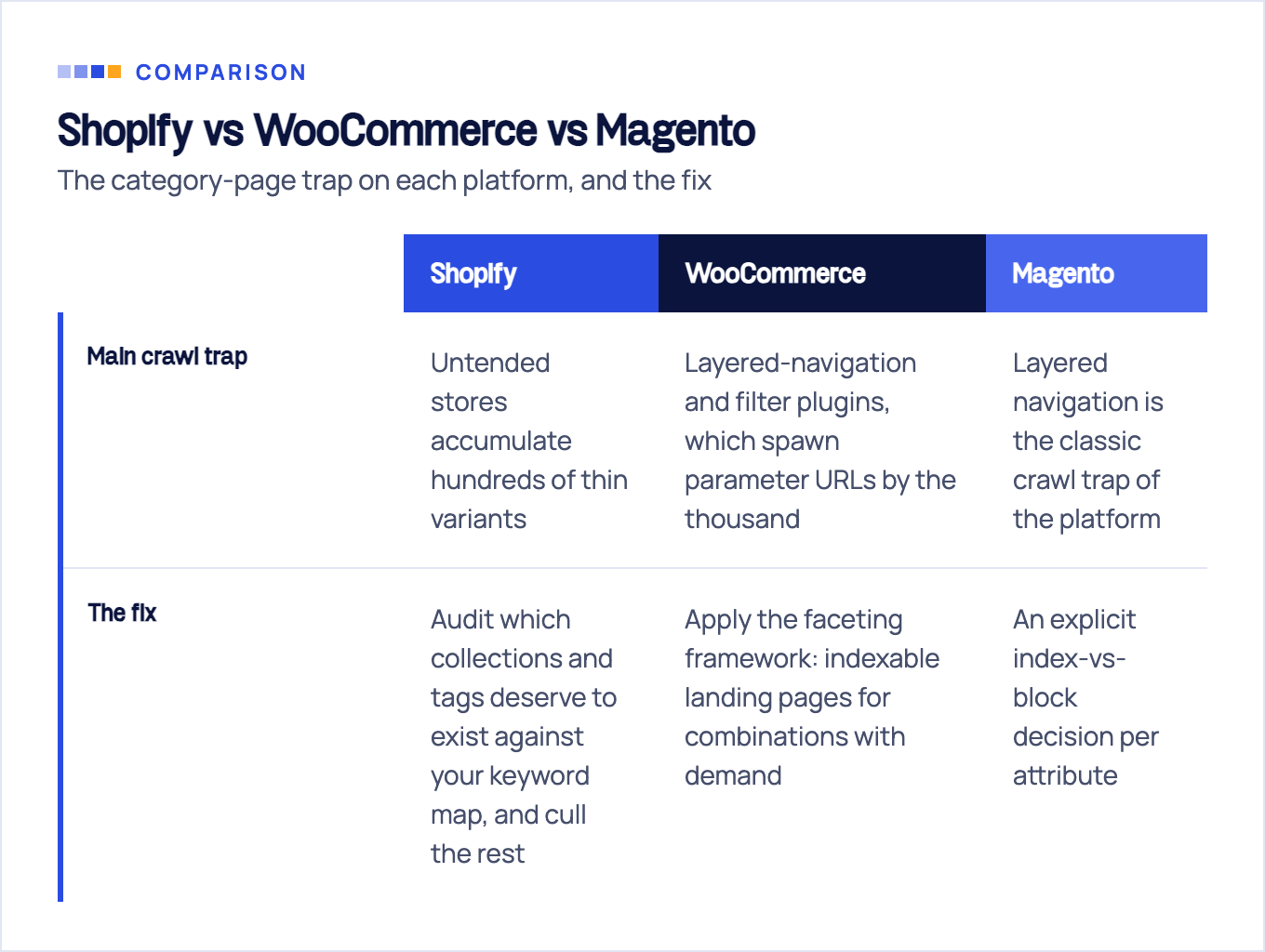
Shopify. Two things to know when you optimize category pages on Shopify (collections, in Shopify terms). First, Shopify adds auto-generated canonical tags to prevent duplicate content from appearing in search results. Don’t read that as full coverage: Shopify’s own within filter docs warn that a standard product page and the same product viewed in the context of a collection have the same content on separate URLs, and tell you to weigh the SEO implications before using it. Check what canonical your theme actually emits on collection-scoped product URLs instead of assuming. Second, tag pages: every collection tag spawns a /collections/name/tag URL, and untended stores accumulate hundreds of thin variants. Audit which collections and tags deserve to exist against your keyword map, and cull the rest. For stores where collections drive most organic revenue, this is a core part of our Shopify SEO service work.
WooCommerce. The default /product-category/ URL base is fine; leave it unless you have a strong reason. The real risk is layered-navigation and filter plugins, which spawn parameter URLs by the thousand. Apply the faceting framework: indexable landing pages for combinations with demand, robots.txt disallows for the parameter patterns behind everything else.
Magento. Layered navigation is the classic crawl trap of the platform: powerful, and by default happy to expose every attribute combination as a crawlable URL. No Magento store above a few hundred SKUs should run it without an explicit index-vs-block decision per attribute.
A 10-point category page checklist (and when to bring in help)
The condensed version of everything above:
- Every category owns exactly one primary keyword; no two categories target the same term.
- Keyword-led title tag and H1 on every category page.
- One or two sentences of intro copy above the grid; expanded copy and FAQ below it only where buyers have real questions.
- Parent categories surface subcategory links as primary content, not as an afterthought.
- Facet combinations with search demand are clean, self-canonicalizing landing pages; all other faceted URLs are blocked in robots.txt or built on fragments.
- Empty filter combinations return HTTP 404.
- Paginated pages have unique ?page=n URLs and canonicalize to themselves, never to page 1.
- Breadcrumbs with BreadcrumbList markup on every category and product page.
- All navigation uses real a-href links; menus, filters, and pagination work without JavaScript.
- No Product schema on listings: BreadcrumbList always, ItemList optionally.
Run your top ten revenue categories against this list and you’ll know within an hour where the gaps are.
A closing word on stakes. Category page decisions are architectural: a faceting rule, a taxonomy merge, or a canonical policy applies across thousands of URLs at once, and a wrong call fails silently for months before the traffic graph admits it. This is exactly what our e-commerce SEO engagements fix first. After 10+ years of store audits, the category layer is where we look before anything else, because it’s where the revenue lives. If your categories aren’t ranking and you can’t see why, that’s the conversation to start with.
Sources & fact-check
Every factual claim in this article is checked against primary sources, not opinion. Written by Roman Sydorenko, Chief SEO & AI search. Last verified July 16, 2026.
- OfficialGoogle crawler documentation, Managing crawling of faceted navigation URLs (robots.txt beats canonical tags)
- OfficialGoogle Search Central, Ecommerce pagination and incremental page loading (every page is its own canonical)
- OfficialGoogle Search Central, Merchant listing (product) structured data (for single products, not category listings)
- OfficialGoogle Search Central, Breadcrumb structured data (Google uses it to categorise the page in search results)
- OfficialGoogle Search Central, Help Google understand your ecommerce site structure (links must be real anchor tags)
- Primary dataBaymard Institute, Ecommerce Category Pages (32% of ecommerce sites have no category pages at all)
