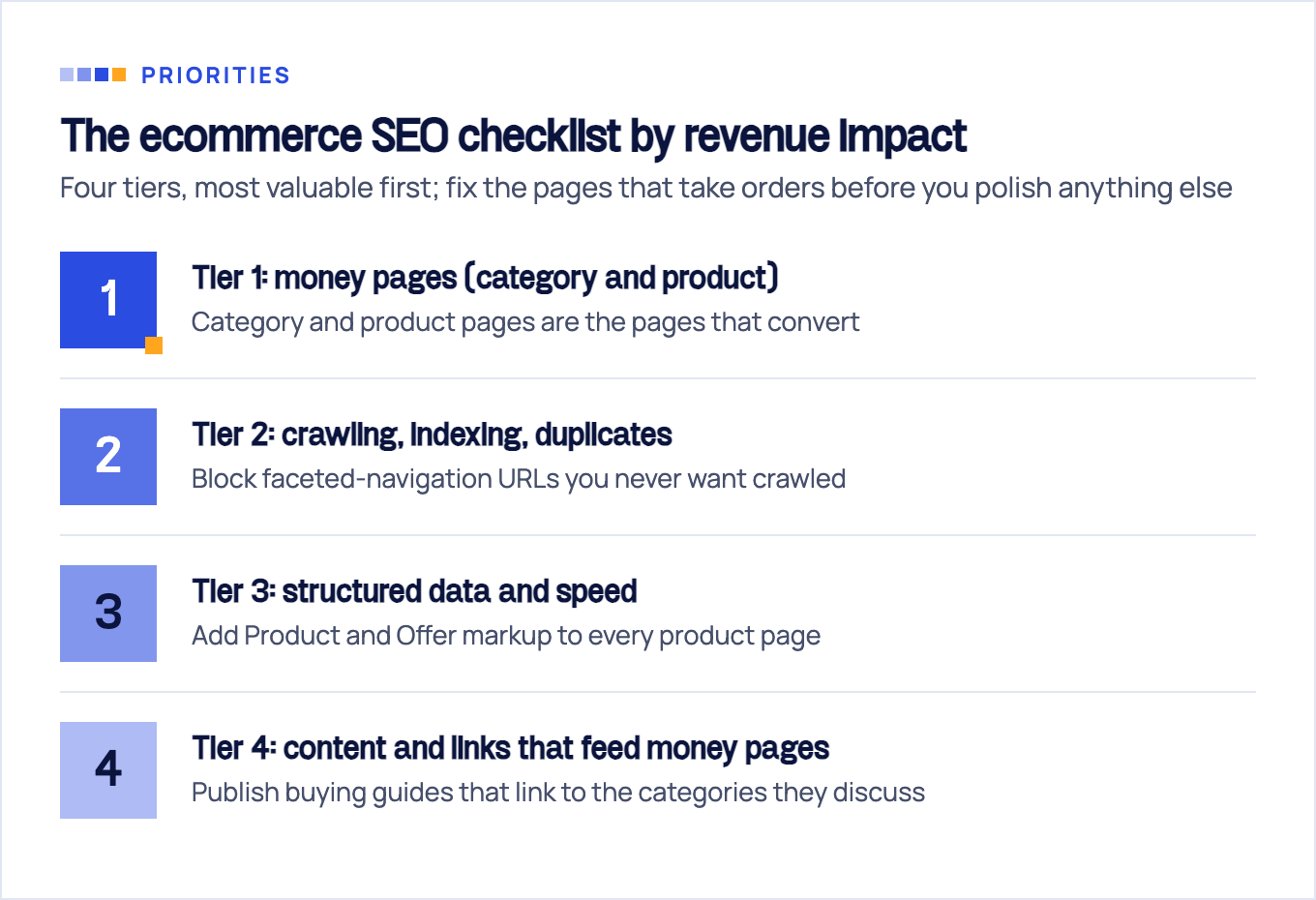
An ecommerce SEO checklist covers five areas: category and product page optimization, crawl and index control, structured data, page speed, and the content and links that support your money pages. The 25-point checklist below groups those areas into four tiers by revenue impact, so you fix the pages that take orders before you polish anything else. Work through it top to bottom and you will have covered what most stores get wrong, in the order that pays back fastest.
The ecommerce SEO checklist at a glance
Most published checklists are flat lists of 30 to 50 items with no priority. That format quietly treats a missing blog post and an uncrawlable category page as equal problems. They are not. Category and product pages are the pages that convert, so this ecommerce SEO checklist starts where your revenue does, not with content production.
Tier 1: money pages (category and product)
- Map head commercial keywords to category pages and long-tail modifier terms to product pages
- Set unique title-tag and H1 patterns per template, not one sitewide formula
- Write 100 to 200 words of real intro copy on your top categories
- Rewrite manufacturer boilerplate on your top-revenue products
- Link priority categories directly from the homepage
- Decide out-of-stock handling once and apply it consistently
Tier 2: crawling, indexing, duplicates
- Block faceted-navigation URLs you never want crawled
- Canonicalize the filtered and variant URLs you keep
- Use clean ?key=value parameters; no timestamps or session IDs in URLs
- Point product-variant canonicals to the parameter-free URL
- Verify the sitemap your platform already generates instead of rebuilding it
- Confirm in Search Console that your money pages are actually indexed
Tier 3: structured data and speed
- Add Product and Offer markup to every product page
- Add AggregateRating wherever you have real reviews
- Add BreadcrumbList sitewide
- Validate markup in the Rich Results Test before and after changes
- Pass Core Web Vitals in field data, not just lab scores
- Compress hero and product images, and set explicit dimensions
- Reserve layout space for review widgets and announcement bars
- Audit third-party app and plugin scripts
Tier 4: content and links that feed money pages
- Publish buying guides that link to the categories they discuss
- Add related-products modules to product pages
- Keep breadcrumbs on every template
- Find and fix orphan products
- Earn supplier “where to buy” links and digital-PR links to data you own
Tier 1, money pages first: category and product page SEO
Category and product pages take the orders, so they get the first week of work. The most common failure we see after 10+ years of store audits is inverted effort: months of blog production while the categories run on a default template with a one-word H1.
Start by mapping keywords to page types. Google rewards the page type searchers expect, and for commercial queries that is almost never an article:
| Query pattern | Example | Page that should rank |
|---|---|---|
| Head commercial term | ”trail running shoes” | Category page |
| Modifier term (brand, gender, attribute) | “salomon trail running shoes womens” | Subcategory or a kept filter page |
| Specific product query | ”salomon speedcross 6 gtx” | Product page |
| Research query (best, vs, for) | “best trail running shoes for mud” | Buying guide that links to the category |
With the map in place, the category page SEO items are mechanical. Give each template a unique title and H1 pattern that leads with the head term, not your brand voice. Put 100 to 200 words of genuinely useful intro copy above the product grid, written for a shopper choosing between options rather than as an SEO essay buried below the footer. Thin categories with zero copy are asking Google to guess what they sell.
Product pages have their own short list. Rewrite manufacturer boilerplate on the products that earn you the most, because that identical text appears on every other store carrying the same SKU. Build title patterns from brand, model, and the attribute people search by. And settle out-of-stock handling once: keep the page live with alternatives if the item is coming back, return a 404 or redirect to a genuinely equivalent product if it is gone for good. Redirecting dead products to the homepage throws their equity away.
Internal linking belongs in Tier 1, not in the nice-to-have pile. Google’s guidance on ecommerce site structure is blunt: “the more links a page has to it within a site, the higher the relative importance of the page,” per Google Search Central. Your homepage is the most-linked page you own, so whatever it links to inherits importance. Link your priority categories from it directly, not three menu levels deep.
Both page types deserve more depth than one section can hold. We tear down what works in category pages that rank and convert and cover the product side in SEO for product pages.
Keyword research for stores: intent before volume
Ecommerce keyword research has one job: find the terms where a purchase is plausible, then assign each to exactly one page type. Volume is the tiebreaker, not the filter.
Three checks do most of the work:
- Filter for commercial intent first. Brand names, product attributes, and modifiers like “buy” or “price” signal a shopper. A 300-volume term with buying intent beats a 5,000-volume informational term for a category page.
- Mine competitor category trees. A competitor’s navigation is a keyword map someone already validated with revenue. Gaps between their tree and yours are your cheapest expansion list.
- Prevent cannibalization. One keyword, one page type. If a blog post outranks your own category for a commercial term, the post is stealing conversions from the page built to close them. Retarget the post to a research query and link it to the category.
Most ecommerce SEO tips lists stop at “target long-tail keywords.” The useful version of that advice: long-tail terms belong to product pages and buying guides, head terms belong to categories, and the assignment matters more than the harvesting.
One more thing the same Google structure documentation makes clear: Google generally doesn’t look at URL structure to work out how your site fits together. A keyword map expressed only in folder names is invisible. It becomes real through navigation and internal links, or not at all.
Tier 2, technical SEO checklist: crawling, indexing, duplicates
Technical SEO for a store is mostly a fight against your own URL count. Every filter, sort order, and variant parameter can mint new addresses, and an unattended 500-product catalog can expose hundreds of thousands of crawlable URLs.
Faceted navigation is the centerpiece, and it is the item nearly every big-brand checklist skips. Google warns that faceted navigation “can generate infinite URL spaces” and causes overcrawling because “crawlers can’t determine whether the URLs are going to be useful without crawling first,” per Google Search Central. The recommended fix is the unglamorous one:
- Disallow facet URL patterns in robots.txt for filter combinations that should never rank (price sliders, sort orders, multi-facet stacks).
- Keep crawlable only the facets with real search demand, such as brand or color subsets people actually query, and give them clean URLs.
- Use rel=canonical for the near-duplicate combinations you keep, and return 404 for facet combinations with no results.
URL hygiene follows the same logic. Google’s ecommerce URL guidance says to use ?key=value parameter formats rather than bare values, to avoid continually changing elements like timestamps, which can make the crawler “think your site contains an infinite number of pages,” to give product variants their own URLs, and to set each variant’s canonical to the URL with the query parameter omitted, per Google Search Central. Add consistent casing to that list; /Shoes/ and /shoes/ serving the same page is a duplicate you created yourself.
Sitemaps are a verification task, not a build task. Every Shopify store automatically generates a sitemap.xml at the root domain covering products, collections, pages, and blog posts, updated as content changes, per the Shopify Help Center. Most platforms do the equivalent. Confirm the file exists, reference it in robots.txt, and submit it in Search Console. Rebuilding what the platform maintains for free is busywork.
Then there is crawl budget, the topic small stores lose the most time to. Google points that guide at three kinds of site: roughly 1 million+ unique pages with weekly-changing content, 10,000+ unique pages with daily-changing content, and sites with a large share of their URLs sitting in Search Console as “Discovered - currently not indexed.” Google calls those page counts a rough estimate rather than exact thresholds, and says outright: “if your pages seem to be crawled the same day that they are published, you don’t need to read this guide,” per Google Search Central.
For the full workflow, log-file checks included, see our ecommerce technical SEO guide.
Tier 3a: product structured data: win the rich result
Product schema markup is the highest-impact code change on this list. Adding Product structured data makes your pages eligible for price, availability, review ratings, and shipping information directly in Google Search, Google Images, and Google Lens, per Google Search Central.
One distinction almost no checklist explains: Google runs two separate product experiences. Product snippets appear on informational pages such as reviews and roundups, while merchant listing experiences are reserved for pages where a customer can actually buy. Your product pages should target merchant listings, and Google notes that the more properties you add, the more enhancements your page can be eligible for.
The working checklist:
- Product plus Offer markup on every product page, with price, currency, and availability.
- AggregateRating only where real reviews exist. Fabricated ratings risk a manual action, and shoppers notice anyway.
- BreadcrumbList sitewide, so results show your category path instead of a raw URL.
- Validate in the Rich Results Test before and after any theme change.
- Check what your platform already outputs before installing anything. Most Shopify themes and WooCommerce setups emit baseline Product markup; adding an app on top often produces duplicate, conflicting markup that is worse than either alone.
A minimal valid example for reference:
{
  "@context": "https://schema.org",
  "@type": "Product",
  "name": "Speedcross 6 GTX",
  "image": "https://example.com/images/speedcross-6-gtx.jpg",
  "brand": { "@type": "Brand", "name": "Salomon" },
  "offers": {
    "@type": "Offer",
    "price": "159.00",
    "priceCurrency": "USD",
    "availability": "https://schema.org/InStock"
  }
}
Tier 3b: speed and Core Web Vitals
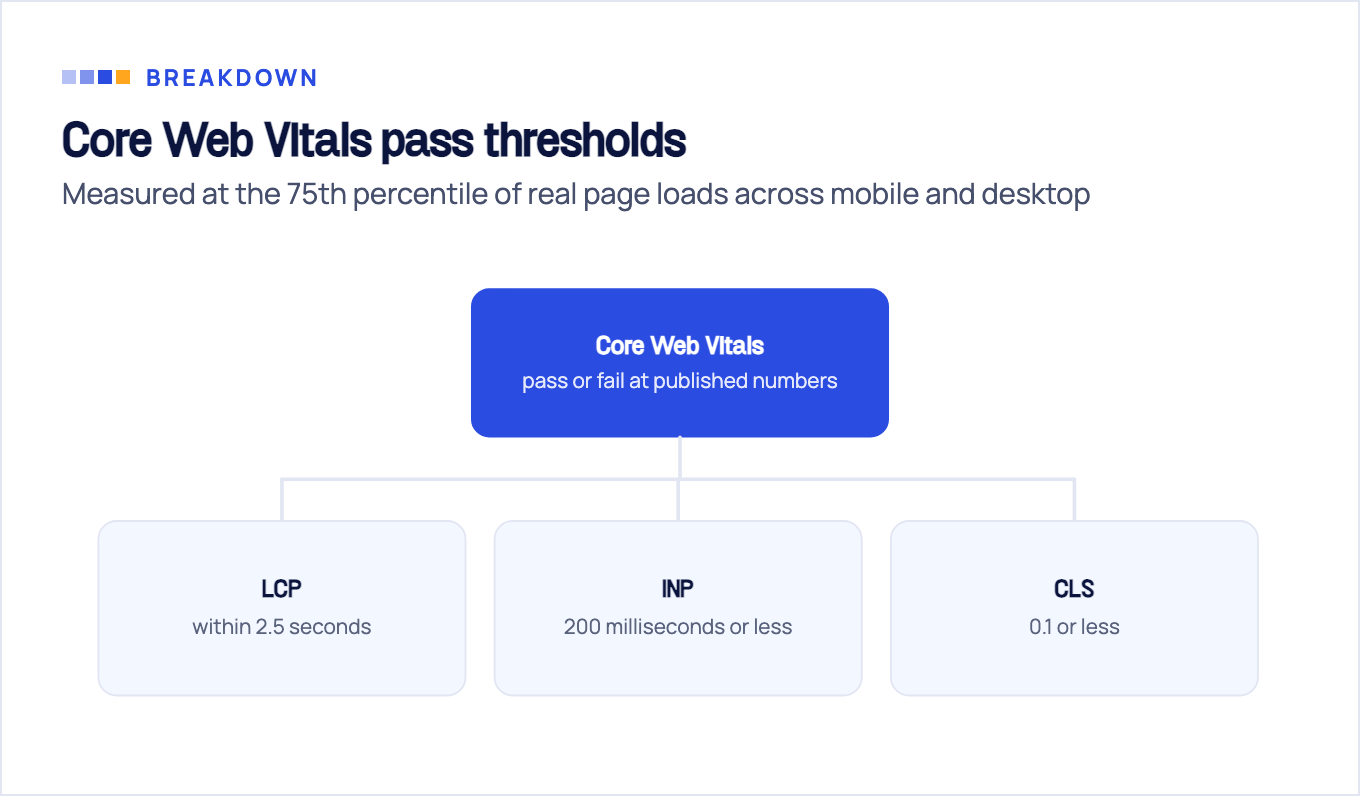
Core Web Vitals are pass or fail at published numbers: LCP within 2.5 seconds, INP of 200 milliseconds or less, and CLS of 0.1 or less, measured at the 75th percentile of real page loads, segmented across mobile and desktop, per web.dev. Everything else in the speed conversation is commentary.
For stores, the usual offenders are predictable:
- Oversized images. Hero banners and product photos exported straight from the design tool. Compress, serve modern formats, and set explicit width and height.
- Layout shift from late loaders. Review widgets, announcement bars, and cookie banners that push content down as they arrive. Reserve their space in CSS and CLS problems mostly disappear.
- App and plugin scripts. The classic Shopify pattern: apps uninstalled months ago still injecting JavaScript through leftover theme code. Audit the script list, not just the app list.
Judge yourself on field data in PageSpeed Insights, not the lab score. A lab score of 90 with failing field data still fails, because the assessment is built from what real visitors experienced.
Tier 4: content and links that feed money pages
Blog content earns its place on this checklist only when it feeds the pages that sell. That is the FLG lens we run every store through: authority flows from content down to categories through internal links, and internal linking for ecommerce is measured by what actually reaches the money pages.
The content items are short:
- Every buying guide links to the categories and products it discusses, with descriptive anchors, not “click here.”
- Related-products modules go on every product page. They are internal links first; the merchandising lift is a bonus.
- Breadcrumbs stay on every template, for users and for the BreadcrumbList markup from Tier 3.
- Orphan products get found and reconnected. Crawl the site, compare against your product feed, and treat anything unreachable through navigation as invisible. Google’s structure guidance expects pages to be reachable by following links, with a sitemap or Merchant Center feed only as the fallback.
Off-page, two moves outwork everything else for stores: supplier and manufacturer “where to buy” pages that should already list you, and digital PR built on product or pricing data you own. The full playbook lives in our guide to ecommerce link building, so this section stays short on purpose.
Run it in 7 days: rollout order and when to get an audit
Here is the sequence we would run on a store this week. Adjust the scope per day, not the order.
| Day | Work | Output |
|---|---|---|
| 1 | Search Console setup, indexation check on money pages | List of unindexed categories and products |
| 2-3 | Top 10 categories: titles, H1s, intro copy, homepage links | Tier 1 done where revenue concentrates |
| 4 | Product schema on best sellers, Rich Results validation | Merchant-listing eligibility |
| 5 | Faceted navigation and duplicates: robots.txt rules, canonicals | Controlled URL space |
| 6 | Speed pass: images, CLS reservations, script audit | Field-data baseline in PageSpeed Insights |
| 7 | Internal links from existing content, measurement baseline | Keyword-to-page map with starting positions |
Day 7 matters more than it looks. Without recorded starting positions for your keyword map, you will not know in three months whether any of this worked.
Honest scoping: some stores should not run this solo. Catalogs above roughly 5,000 SKUs, platform migrations, and international setups have failure modes a checklist cannot catch, because facet math and redirect mapping at that scale punish small mistakes. That is the case where a professional SEO audit earns its fee: we have run this exact playbook across 100+ clients in the USA, UK, and EU, and auditing before executing is consistently cheaper than executing and then diagnosing. For platform-specific work on themes, apps, and collection architecture, there is a dedicated Shopify SEO service.
Sources & fact-check
Every factual claim in this article is checked against primary sources, not opinion. Written by Dmitry Shpytaliev, Master SEO tech & content. Last verified July 16, 2026.
- OfficialGoogle Search Central, Help Google understand your ecommerce site structure (internal links signal importance)
- OfficialGoogle Search Central, Large site owner's guide to managing crawl budget (page counts are a rough estimate)
- OfficialGoogle Search Central, Crawling and managing faceted navigation (filter URLs can generate infinite URL spaces)
- OfficialGoogle Search Central, Designing a URL structure for ecommerce sites (key=value params, one URL per variant)
- OfficialGoogle Search Central, Product structured data (price, availability and ratings can appear in Search and Lens)
- Officialweb.dev, Core Web Vitals (LCP 2.5s, INP 200ms, CLS 0.1 at the 75th percentile, segmented by device)
