Ecommerce technical SEO is the work of controlling how search engines crawl, index, and render an online store. It differs from generic technical SEO in one decisive way: URL multiplication. A store with 200 products can expose hundreds of thousands of URLs through filters, sort orders, variants, and internal search pages, and most of the discipline is deciding which of those URLs deserve Google’s attention. Get that wrong and Google spends its crawl on pages that can never rank or convert.
What is ecommerce technical SEO?
On a brochure site, technical SEO is mostly hygiene: sitemaps, meta tags, redirects, speed. On a store, the site itself manufactures URLs faster than you can audit them. Every layered filter, every sort parameter, every color variant, every internal search query can mint a new address. The catalog you see in your admin panel and the “site” Googlebot sees are two very different things.
That gap creates four store-specific problems, and they are the spine of this guide:
- Faceted navigation generating near-infinite filter combinations.
- Crawl budget waste, where Googlebot burns its visit on junk URLs.
- Duplicate paths, the same product living at five different addresses.
- Index bloat, where Google indexes thousands of pages with zero revenue intent.
Meta tags and sitemaps still matter, but they are table stakes. If your filtered URLs are out of control, no amount of title-tag polish will compensate. So we start where the damage starts: the crawl.
Crawl budget: how online stores burn it
Google defines crawl budget as the combination of two things: the crawl capacity limit (how much crawling your server can handle) and crawl demand (how much Google wants to crawl you). Per Google Search Central, it’s a concern mainly for large sites with over a million unique pages, or medium sites with 10,000+ pages whose content changes very rapidly.
Read that threshold carefully before dismissing it. Your store may have 800 products, but if every category exposes ten filters with combinable values, Googlebot’s perceived inventory isn’t 800 pages. It’s hundreds of thousands. Mid-size stores cross Google’s “large site” line all the time without anyone noticing, because nobody counted the URLs the way a crawler does.
The same Google document lists the wasters, and we find them on nearly every store we audit:
- Unresolved duplicates: the same content at multiple URLs with no canonical consolidation.
- Soft 404s: empty category or discontinued-product pages returning a 200 status.
- Redirect chains: old product URL to old category to new category to final page.
- Infinite scroll and sort variants: scroll pages that duplicate content already linked elsewhere, and differently sorted versions of the same page.
Quick diagnostic, no crawler needed: open GSC’s Crawl Stats report (Settings, then Crawl stats) and look at what Googlebot actually fetched last week. If parameterized URLs dominate the sample, you have a budget problem regardless of your catalog size. A server log sample confirms it: pull a day of Googlebot hits and count what share landed on URLs you’d want ranking. Below half is common. Below 20% is not rare.
Faceted navigation: the biggest index-bloat machine in ecommerce
Filters are great for shoppers and brutal for crawlers. Google’s faceted navigation documentation is blunt about it: crawlers “will typically access a very large number of faceted navigation URLs before the crawlers’ processes determine the URLs are in fact useless,” and crawling those URLs “tends to cost sites large amounts of computing resources.” Google is telling you its own crawler cannot tell useful facets from junk until after it has wasted the crawl.
So you have to decide for it. Google’s primary recommendations are to block faceted URLs in robots.txt or keep facets out of crawlable URLs entirely by using URL fragments. It lists rel=canonical and nofollow as secondary options that are less effective long-term, because Google still has to crawl the URL to see the hint.
Here is the decision framework we apply facet by facet:
| Facet situation | Treatment | Why |
|---|---|---|
| No search demand (price sliders, in-stock toggles, sort orders) | Disallow the parameter in robots.txt | Stops the crawl waste at the door |
| Facet is pure UX, never needs a shareable URL | Apply it via URL fragment (#) or client-side state | Fragments aren’t treated as separate pages |
| Modest demand, near-duplicate of parent category | Allow crawl, canonical to the parent | Consolidates signals without a hard block |
| Real search demand (“red running shoes”, “linen midi dresses”) | Promote to an indexable, crawlable landing page | This is a keyword you want to own |
That last row is the part most guides skip. Blocking everything is as wrong as blocking nothing. A facet combination with genuine query volume deserves a static-looking URL, its own title, intro copy, and internal links, at which point it stops being a facet and becomes a category page. We covered how to build those in our guide to ecommerce category pages that rank.
Two warnings before you deploy robots.txt rules. First, blocked URLs can still get indexed if enough internal links point at them, so fix the linking too. Second, never block facets that are already ranking and earning traffic; check GSC performance data for the parameter patterns before you disallow them.
Duplicate paths and canonicalization
Stores duplicate content in ways brochure sites never do. The usual suspects:
- One product reachable through multiple category paths (/mens/shoes/product-x and /sale/product-x).
- Variant parameters (?color=black) serving 95% identical pages.
- Sort and view parameters (?orderby=price, ?view=grid) reshuffling the same items.
- Session IDs and tracking codes appended by your own platform or email tool.
- Protocol and host variants: http/https, www/non-www, trailing slash or not.
Google’s URL structure guidance for ecommerce sets the ground rules: use standard ?key=value parameters, don’t repeat the same key, and never link internally to URLs carrying session IDs or tracking codes. It also warns that continually changing values like timestamps in URLs can make the crawler “think your site contains an infinite number of pages,” and that content behind a fragment (#black) is invisible as a separate page, which is exactly why fragments work as a facet-hiding tactic. For optional parameters, Google’s instruction is simple: canonicalize to the URL with the parameter omitted.
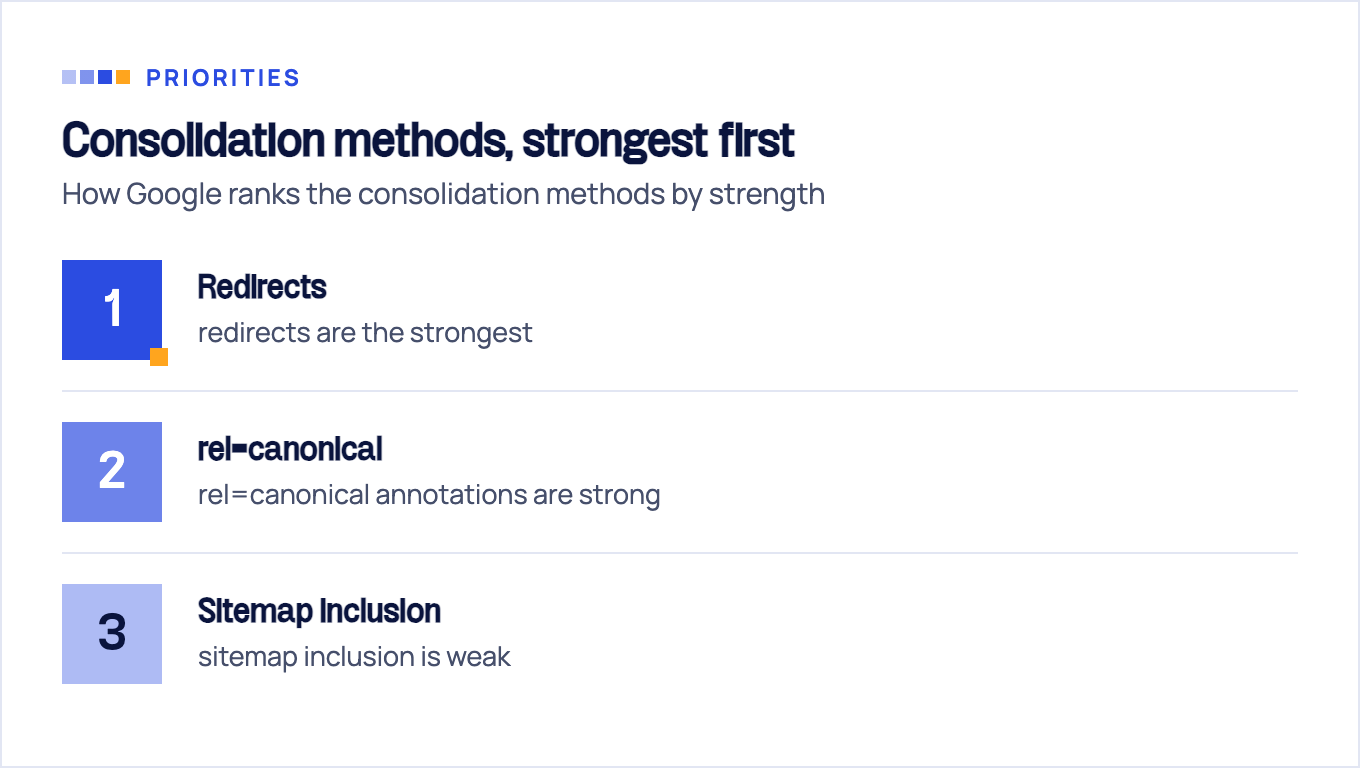
Understand what a canonical actually is, though. Per Google’s canonicalization docs, rel=canonical is “a strong signal that the specified URL should become canonical.” A signal, not a directive. Google ranks the consolidation methods by strength: redirects are the strongest, rel=canonical annotations are strong, sitemap inclusion is weak. The same doc notes a reason to canonicalize that most store owners miss: “to avoid spending crawling time on duplicate pages.” Canonicalization is crawl-budget work, not just dedupe work.
The classic failure we see in audits: a canonical tag pointing to the clean URL while thousands of internal links, the sitemap, and the breadcrumbs all point to the parameterized one. Google weighs your internal linking as evidence, sees the contradiction, and picks its own canonical. If a page can permanently live at one URL, redirect the rest. Save rel=canonical for cases where both URLs must keep working.
Index bloat: find it, prune it
Index bloat is the end state of the problems above: Google’s index fills with filter pages, empty categories, dead products, and internal search results, none of which can convert a visitor. Diagnosis takes ten minutes:
- GSC Page indexing report. Compare “indexed” against your real catalog size (products + categories + content pages). A store with 1,200 sellable pages and 40,000 indexed URLs has a bloat problem, not a visibility win.
- The “why not indexed” buckets. Large counts under “Duplicate without user-selected canonical” or “Crawled - currently not indexed” tell you Google is finding and discarding junk at scale, which is crawl budget spent for nothing.
- Sanity check with the site: operator. Imprecise, but it surfaces the embarrassing stuff fast: indexed search results, staging subdomains, parameter soup.
Then prune. The playbook by page type:
| Page type | What to do |
|---|---|
| Permanently removed products | Return 404 or 410. This is Google’s explicit recommendation for reclaiming crawl budget |
| Discontinued product with a close successor | 301 to the replacement or the parent category |
| Out of stock, returning | Keep the page live and indexed; show restock info and alternatives |
| Internal search results | noindex, and block new crawling in robots.txt |
| Thin auto-generated pages (empty brand pages, zero-result filters) | noindex or remove; fix the templates that generate them |
Resist the temptation to redirect every dead product to the homepage. Google’s site move guidance warns that redirecting many old URLs to one irrelevant destination might be treated as a soft 404 anyway, and shoppers hate them. A parent category redirect preserves relevance; a clean 410 is honest when nothing relevant exists.
Pagination, infinite scroll, and JavaScript rendering
Pagination advice online is full of dead patterns, so let’s clear the record. Google no longer uses rel=next/rel=prev at all. Its current pagination guidance asks for three things: link paginated pages sequentially with plain a-href tags, give each page in the sequence its own self-referencing canonical, and, quoting directly, “don’t use the first page of a paginated sequence as the canonical page.”
That last rule surprises people, and it answers a question we hear constantly: no, page 2 should not canonical to page 1. They aren’t duplicates; they list different products. Canonicalizing deep pages to page 1 tells Google to ignore them, and every product linked only from those pages loses its internal discovery path.
Infinite scroll and “load more” buttons are the riskier pattern. If products only appear after a JavaScript event, Googlebot may simply never see them; Google’s own suggested safety nets in that same doc are a sitemap file or a Merchant Center feed so it can find all products anyway. Use those nets, but don’t rely on them alone: pair the scroll UX with real paginated URLs (?page=2) that load without JavaScript, so every product keeps a crawlable path and clean internal link equity.
The same logic extends to anything rendered client-side: filter contents, product grids, links inside React components. If a link doesn’t exist in an a-href tag Googlebot can fetch, treat it as invisible until proven otherwise. When your storefront leans heavily on client-side rendering, our JavaScript SEO guide walks through the three phases Google uses on those pages, crawling then rendering then indexing, and where product links get lost.
Structured data and Core Web Vitals for stores
Product markup is the highest-impact structured data a store can ship. Google’s Product structured data docs define two distinct result types: product snippets, for pages where people can’t directly buy (reviews, comparisons), and merchant listing experiences, for pages where they can. Both result types carry the same placement rule in their guidelines: Google recommends adding markup to product pages instead of pages that list products or a category of products, so the markup belongs on individual product pages, not on category listings. And Google states plainly that “providing both structured data on web pages and a Merchant Center feed maximizes your eligibility to experiences.” Feed plus markup, not either-or.
Keep price, availability, and reviews in the markup synced with the visible page. Mismatches get your rich results dropped, and stale availability data is the most common cause we see.
On performance, the metric that punishes stores specifically is INP, Interaction to Next Paint, which replaced FID as the Core Web Vitals responsiveness metric. Per web.dev, good INP is 200 milliseconds or less at the 75th percentile of page loads, and anything over 500ms is poor. Ecommerce pages fail INP in predictable places: filter widgets that re-render the whole product grid on every click, image carousels fighting for the main thread, and the pile of third-party scripts (reviews, chat, heatmaps, pixels) every store accumulates. Test the interactions shoppers actually perform, especially applying a filter and opening variant selectors, not just the page load.
Platform gotchas: Shopify, Magento, WooCommerce
Each platform ships its own version of the facet problem.
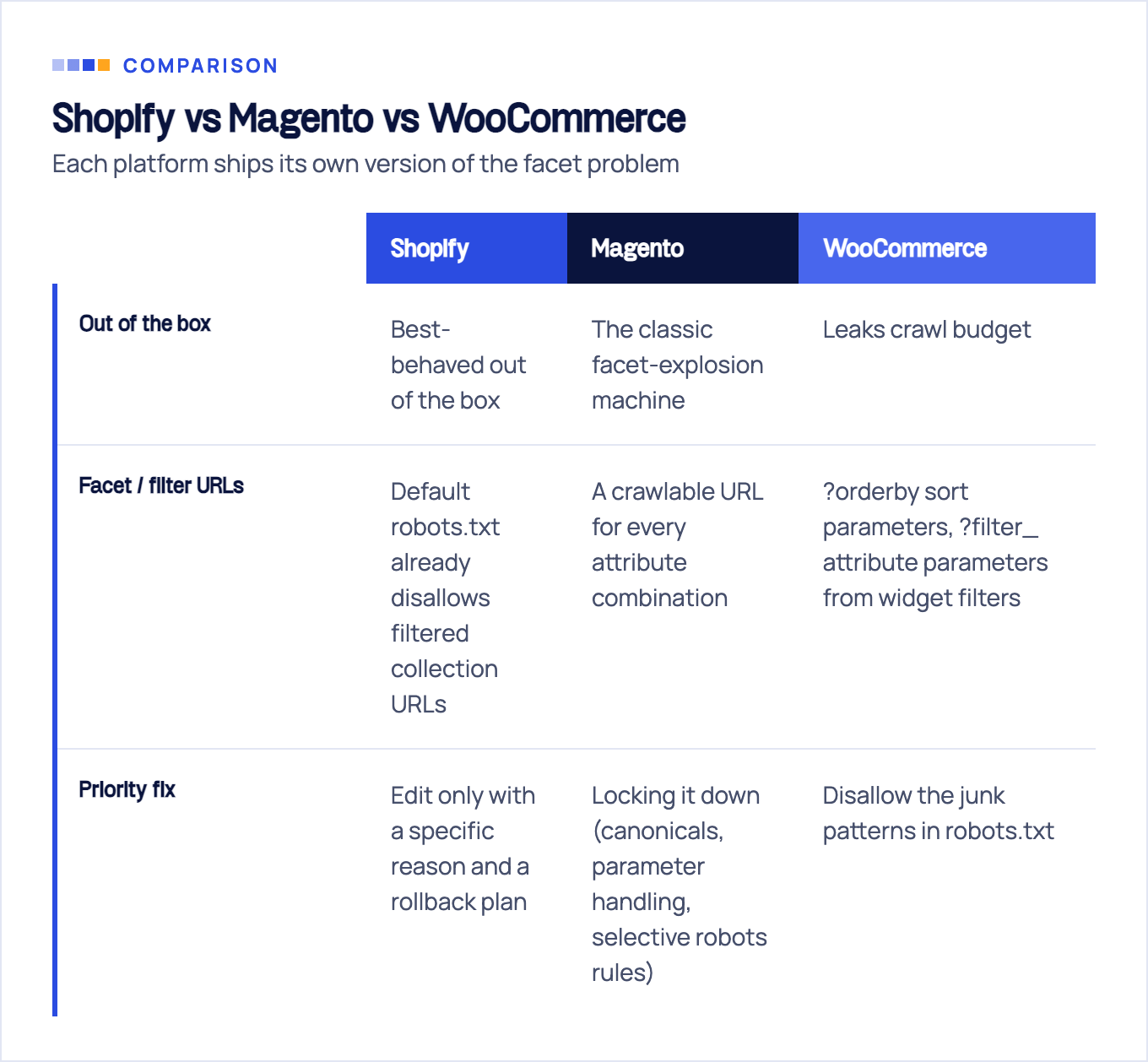
Shopify is the best-behaved out of the box. Its default robots.txt already disallows filtered collection URLs (the /collections/*+* pattern), plus /search, /cart, /checkout, and /admin, per the Shopify Help Center. You can customize it through a robots.txt.liquid template, but Shopify labels that “an unsupported customization” that their support won’t help with. Translation: the defaults are sensible, edit only with a specific reason and a rollback plan. Shopify’s real technical ceilings are elsewhere: forced /products/ and /collections/ URL structures and duplicate product URLs generated by collection paths, which Shopify canonicalizes for you. If Shopify is your stack, our Shopify SEO service covers the platform-specific layer end to end.
Magento (Adobe Commerce) is the classic facet-explosion machine. Layered navigation generates a crawlable URL for every attribute combination, and a mid-size catalog can mint millions of them. Locking it down (canonicals, parameter handling, selective robots rules) is the single highest-impact technical task on most Magento builds.
WooCommerce leaks crawl budget through ?orderby sort parameters, ?filter_ attribute parameters from widget filters, and add-to-cart URLs. WordPress SEO plugins handle canonicals reasonably well, but the parameterized URLs still soak up crawl until you disallow the junk patterns in robots.txt.
A 30-minute ecommerce technical SEO audit
You don’t need a 400-row crawl export to know where you stand. Run this, in order:
- Indexation ratio (5 min). GSC Page indexing report: indexed pages versus real catalog size. A ratio far above 1.5x means bloat; far below 1x means discovery or quality problems.
- Crawl spend (5 min). GSC Crawl Stats: what share of Googlebot requests hit parameterized or junk URLs? Cross-check with a log sample if you have access.
- Hand-check three URLs (10 min). One product, one category, one filtered URL. For each: status code, canonical tag, robots meta, and whether the rendered HTML contains the product links you expect. This single step catches most canonical contradictions and JavaScript rendering surprises.
- Facet policy check (5 min). Pick your busiest category, click three filters, and ask of each resulting URL: blocked, canonicalized, or intentionally indexable? “None of the above” is your priority fix.
- Field CWV (5 min). Check INP and LCP field data for your top templates, not your homepage. Templates carry the traffic.
Then prioritize by revenue, not by error count. This is the core of how we run FLG audits: a broken canonical on a category earning 30% of organic revenue outranks 5,000 cosmetic warnings, every time. Crawlers report issues; they can’t tell you which ones block money pages.
If the 30-minute pass turns up more than you want to untangle solo, that’s the point where a structured technical SEO audit pays for itself, or ongoing technical SEO if the fixes span facets, canonicals, and platform config at once. We’ve run this exact playbook across 100+ clients in the USA, UK, and EU over 10+ years, and on ecommerce sites the pattern holds: the stores that win aren’t the ones with zero errors, they’re the ones whose crawl budget is spent almost entirely on pages that sell.
Sources & fact-check
Every factual claim in this article is checked against primary sources, not opinion. Written by Dmitry Shpytaliev, Master SEO tech & content. Last verified July 16, 2026.
- OfficialGoogle Search Central, Optimize your crawl budget (defines crawl budget and the site sizes where it matters)
- OfficialGoogle Search Central, Improve crawling of faceted navigation URLs (robots.txt beats rel=canonical for facets)
- OfficialGoogle Search Central, How to specify a canonical URL (ranks the methods, redirects beat rel=canonical)
- OfficialGoogle Search Central, Ecommerce pagination and incremental page loading (do not canonicalize to page one)
- OfficialGoogle Search Central, Merchant listing structured data (Product rich results need single-product pages)
- OfficialGoogle Search Central, Move a site with URL changes (mass redirects to one irrelevant page can be soft 404s)
