Your Lovable site doesn’t rank because of three stacked problems, not one. Older Lovable builds ship as client-side React apps, so crawlers can receive a nearly empty HTML shell instead of your content. Even after Lovable’s May 2026 server-side rendering update, most vibe-coded sites still launch without unique page titles, a sitemap, or structured data, and almost all of them carry thin AI-written copy on a domain with zero backlinks. That’s the short Lovable SEO answer. The rest of this guide shows you how to confirm which problem is yours in about ten minutes, and how to fix it without throwing the site away.
The short answer: why your Lovable site doesn’t rank
First, a reframe. Your site isn’t bad. It’s invisible. Those are different problems with different fixes, and the second one is much cheaper to solve.
When founders ask us “is Lovable good for SEO,” what they usually mean is “did I waste three weekends building something Google will never show anyone.” You didn’t. You built a product and skipped distribution, which is fixable. Nearly every Lovable, v0, and Bolt site we’ve diagnosed fails on some combination of the same three layers:
- Rendering. Older Lovable apps are single-page React applications. The HTML that leaves the server is a shell, and your actual copy appears only after JavaScript runs in the visitor’s browser. Google can usually cope with that. Most AI crawlers cannot, at all.
- On-page basics. One title tag shared by every route, no meta descriptions, no canonical URLs, no sitemap. Nothing tells a search engine what any individual page is about or that the other pages even exist.
- Content and authority. Five pages of generated copy targeting no query anyone actually types, on a domain no other site has ever linked to.
The confusion online comes from people arguing about layer 1 as if it were the whole story. The Reddit threads saying “Lovable is terrible for SEO” and the marketing pages saying “Lovable is great for SEO” are mostly talking past each other: one group is describing pre-2026 rendering, the other is describing a platform update that fixed delivery but can’t write your content.
Which brings us to that update, because it changes what advice still applies to you.
What changed in 2026: Lovable’s SSR update (and what it doesn’t fix)
Most Lovable SEO advice you’ll find, including most of what currently ranks for this query, was written before May 2026 and treats every Lovable app as an invisible SPA. That’s now only half true.
Per Lovable’s official documentation, apps created from May 13, 2026 onward are built on TanStack Start with server-side rendering. Crawlers get real HTML on the first request, no JavaScript execution required. Older React + Vite apps got a different treatment: on-request pre-rendering that is served only to verified search and AI crawlers, while “third-party SEO scanners and other unverified agents see the regular single-page app.”
That second detail explains a lot of contradictory test results. Run an older Lovable site through a typical SEO checker and it will report empty HTML, even though verified Googlebot receives a pre-rendered page for the same URL. The scanner isn’t lying. It’s just not on the guest list.
Three practical consequences before you diagnose anything:
- Check when your app was created. Before May 13, 2026 means you’re on the pre-rendering path, and unverified agents still see the SPA. After that date, you have real SSR.
- Publish on a custom domain. Lovable is explicit that only publicly published apps can be indexed, and workspace preview URLs are never indexable. If you’ve been sharing a preview link, Google has had nothing to index this whole time.
- Rendering was never the whole problem. The same documentation concedes that “sitemaps, robots.txt, metadata, and other SEO elements are not always generated up front.” Lovable said that about its own platform, and it matches what we see in audits.
The 10-minute diagnosis: is Google even seeing your pages?
Run these five checks in order and stop at the first one that fails. That’s your problem, and everything after it is noise until it’s fixed.
- Read the raw HTML. Run
curl https://yourdomain.comor use View Page Source in the browser (source, not Inspect, because Inspect shows the rendered DOM and will fool you). Search for a sentence of your homepage copy. If it’s there, rendering isn’t your blocker. If all you find is an empty<div id="root"></div>and a stack of script tags, you have the shell problem from layer 1. - Count your indexed pages. Search
site:yourdomain.comin Google. Zero results means Google hasn’t discovered the site or has been told to stay out. A few results that all share one title points at the on-page layer. Dozens of properly titled results means your problem is further down this article. - Inspect a URL in Google Search Console. The URL Inspection tool shows you the crawled page as Google stored it: the raw HTML it received, the HTTP headers, and the JavaScript console output. Run the live test too, and look at the rendered screenshot. This is ground truth. Every SEO scanner is an approximation of what this tool tells you directly.
- Hunt for a noindex. Check the page source for a
noindexrobots meta tag, check the HTTP headers in the same URL Inspection report, and confirm you actually published to your custom domain rather than a preview URL. A surprising number of “Google hates my site” cases end here. - Find your sitemap. Open
/sitemap.xml. If it doesn’t exist, or exists but was never submitted in Search Console, fix that today. Why it matters more than usual for you is covered in Problem 2.
One honest caveat: if all five checks pass and the site went live three weeks ago, the diagnosis may simply be that you’re early. New domains take time to be crawled and trusted. Spend that time on Problem 3 below rather than refreshing Search Console.
And if you’d rather have someone run the extended version of this triage (rendering, indexation, on-page, internal linking, and the layers you can’t see from a browser), that’s exactly what our SEO audit covers. Most founders can self-serve the first pass with the list above, though. Start there.
Problem 1, rendering: what Google and AI crawlers actually see
Here’s what happens when Googlebot hits a client-side React app. According to Google’s JavaScript SEO documentation, Google processes JavaScript pages in three phases: crawling, rendering, and indexing. A page that needs JavaScript goes into a render queue, and Google’s own wording is that it “may stay on this queue for a few seconds, but it can take longer than that.” Your content exists for Google only after that render succeeds.
Google renders with an evergreen version of Chromium, so it genuinely can index client-side React. It’s just slower and less certain than reading HTML, which is why the same documentation recommends server-side rendering or pre-rendering “because it makes your website faster for users and crawlers, and not all bots can run JavaScript.”
“Not all bots” is doing heavy lifting in that sentence. Vercel’s network study, The rise of the AI crawler, found that the major dedicated AI crawlers render no JavaScript. Not OpenAI’s GPTBot, not Anthropic’s ClaudeBot, not PerplexityBot, not Meta’s crawler, not Bytespider. They fetch your JavaScript files, but they can’t read anything those files would have painted onto the page. Two exceptions are worth knowing: Gemini, which rides on Googlebot’s rendering infrastructure, and AppleBot, which renders through a browser-based crawler of its own.
And this traffic is no longer a rounding error. In one month of Vercel’s network data from that late-2024 study, GPTBot alone made 569 million fetches and Claude 370 million; combined with AppleBot and PerplexityBot, AI crawlers reached nearly 1.3 billion fetches, over 28% of Googlebot’s 4.5 billion.
Where does that leave your Lovable app specifically? If it’s on the new SSR stack, this layer is handled. If it’s an older app, the pre-rendering path covers more than Googlebot: Lovable’s documentation lists the verified AI engines (ChatGPT, Perplexity, Claude, Gemini) among the crawlers that receive pre-rendered HTML, so the blind spot above hits you less hard than it hits a bare SPA. What stays exposed is whatever the allowlist misses: scanners, unverified agents, and any crawler Lovable doesn’t recognize. Either way, if checks 1 and 3 in the diagnosis came back clean, stop blaming rendering and keep reading. We collect more rendering-class diagnoses and fixes in our JavaScript SEO articles if this layer turns out to be yours.
Problem 2, on-page gaps: one title tag for your whole site
Pull up three different pages of your site and look at the browser tabs. If all three say the same thing, you’ve hit the classic SPA-template failure: a single index.html whose title and meta description ride along to every route. Google sees five URLs all claiming to be the same page, picks one, and largely shrugs at the rest.
The usual gaps on a vibe-coded site, in rough order of impact:
- Unique title and meta description per route. Each page should name the thing it’s about in the words your buyers use, not repeat your app name five times.
- A sitemap, generated and submitted. Google’s sitemaps overview says sitemaps particularly help when a site “is new and has few external links to it.” That describes every vibe-coded launch in existence. The same page carries an honest caveat, that a sitemap “doesn’t guarantee that all the items in your sitemap will be crawled and indexed.” It’s a request, not a command, but for a new domain it’s the cheapest request you can file.
- robots.txt sanity. It should exist, allow crawling, and point to the sitemap.
- Canonical URLs. One canonical per page, so URL variants don’t split what little signal a new site has.
- Structured data. JSON-LD for your organization and content types. Not a ranking switch, but it makes your pages machine-readable, which matters more every month.
The good news: this is the layer Lovable can mostly patch itself. Its built-in SEO review tool handles much of the list in one pass, and the rest is prompt work. Something like:
Add per-route SEO to this app: give every page a unique <title> and
meta description based on its content, add canonical URLs, generate
a sitemap.xml listing all public routes, add a robots.txt that allows
crawling and references the sitemap, and add Organization JSON-LD
to the homepage.
Then verify the output against check 1 of the diagnosis, connect Search Console, and submit the sitemap. Half an evening, and your site goes from “one anonymous page” to “a set of pages Google can tell apart.”
Problem 3, the part no tool fixes: content and authority
Suppose the triage came back clean. SSR delivers real HTML, every route has its own title, the sitemap is in. The site still doesn’t rank, and now the uncomfortable question is: rank for what?
A five-page site of AI-generated copy that targets no real query, on a domain with zero referring domains, will not rank no matter how flawlessly it renders. There’s no hidden setting you missed. Google surfaces pages that answer actual searches, from sites it has some reason to trust, and a brand-new domain hasn’t supplied either ingredient yet.
This layer is the boring, compounding work:
- Pick queries your buyers actually type. Not your product name plus adjectives. The problem-words people use before they know you exist.
- Build pages that answer them. One page shaped around one real query beats ten vague ones. Rewrite the generated copy in your own voice with your own specifics; you know things about your customers that no prompt does.
- Earn a first wave of links. Relevant directories, a launch post, a founder interview, a small dataset worth citing. Nothing exotic. Early links exist to show Google the domain is real and someone vouches for it.
You already did the hard part, which was building something worth landing on. This part is repetition, not genius, and it’s the difference between a site that ranks and a site that merely renders.
Fix paths: prompt it, prerender it, or migrate it
Three viable paths, compared honestly. Almost everyone else writing about this sells exactly one of them. We fix JavaScript rendering problems for a living and still tell most Lovable founders to take path A.
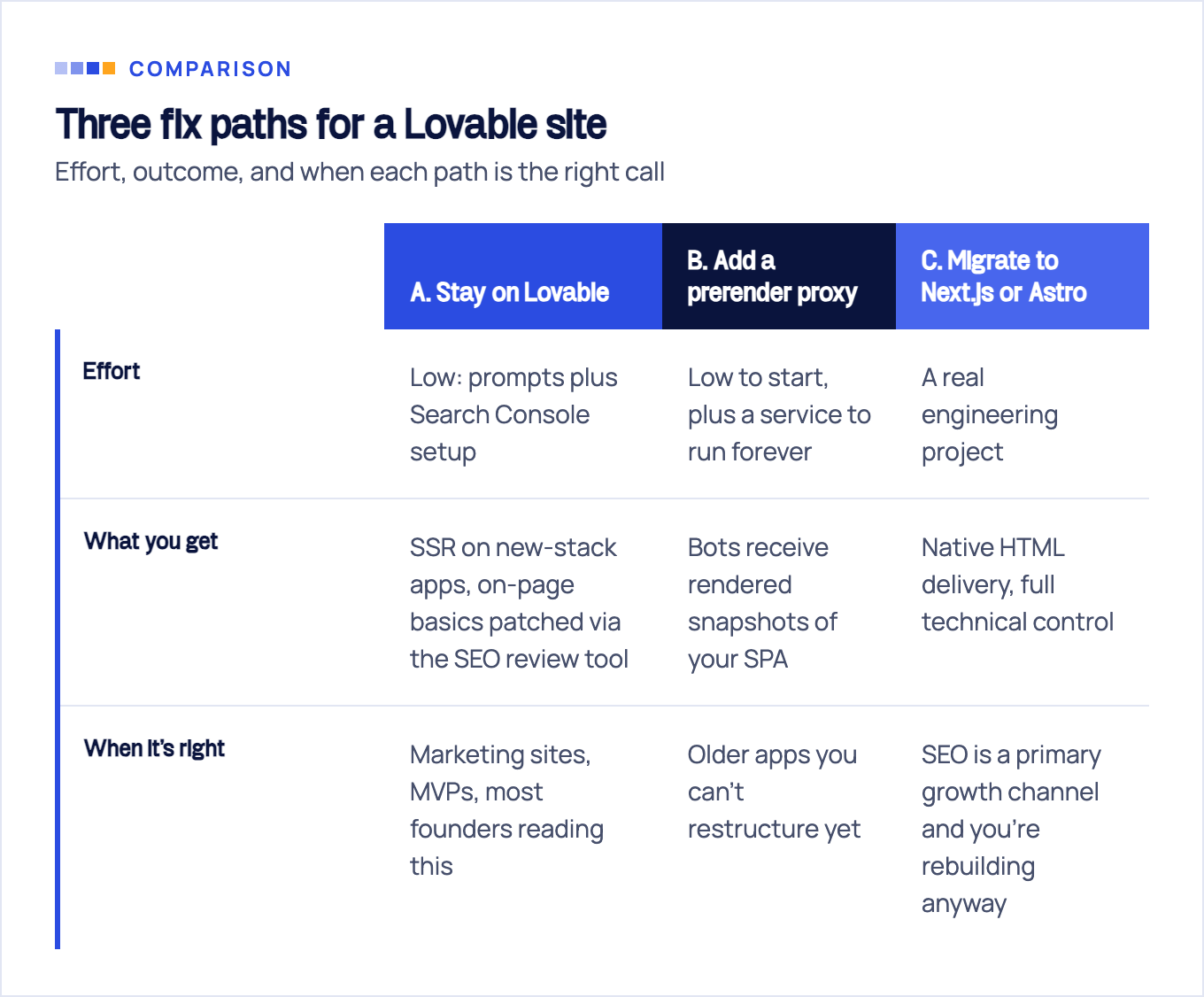
Path A: stay and prompt. New Lovable apps render server-side by default, and older ones already serve verified crawlers pre-rendered pages. Apply the on-page fixes from Problem 2, publish on your custom domain, connect Search Console. For most marketing sites this is genuinely enough infrastructure, and every hour saved here is an hour for Problem 3, which is where your rankings actually live.
Path B: prerendering middleware. Services like Prerender.io intercept bot traffic and serve a rendered snapshot of each page. It works. But it’s worth knowing Google’s own position on dynamic rendering: it calls the technique “a workaround and not a long-term solution for problems with JavaScript-generated content in search engines” and recommends server-side rendering, static rendering, or hydration instead. You’re also adding a moving part, a snapshot that can drift from the live app, sitting between crawlers and your content. A reasonable bridge, a poor destination.
Path C: migrate. Rebuild on a framework that ships HTML natively. This is the strongest end state and the most expensive one, and the bill arrives exactly when you’d rather spend on growth. We run this class of project as SEO migrations, and our honest advice is: don’t migrate for SEO alone unless the diagnosis proved rendering is your bottleneck and paths A and B can’t clear it. Most of the time it isn’t, and they can.
If you’re stuck between B and C, that call (choosing a rendering strategy for a JavaScript app without burning a quarter on the wrong one) is precisely what our JavaScript SEO service exists for.
Same disease, different symptoms: v0, Bolt, and Cursor builds
Everything above applies beyond Lovable. Only the defaults change.
- v0 outputs Next.js, which is SSR-capable out of the box. Its failure mode is quieter: content tucked into misused client components, so the server sends less HTML than you assume. The curl test from the diagnosis catches it in seconds.
- Bolt defaults to Vite single-page apps, the same empty-shell delivery as pre-2026 Lovable, and without a platform pre-rendering layer to soften it for verified crawlers.
- Cursor builds whatever you scaffold. Ask it for a Vite SPA and you inherit SPA SEO. Start from Astro or Next.js and rendering was never your problem, though Problems 2 and 3 still apply in full.
The 10-minute diagnosis runs unchanged on all of them: raw HTML, site: search, URL Inspection, noindex hunt, sitemap. The tool that generated your code doesn’t determine what crawlers see. The delivery model does.
Get a diagnosis before you rebuild
Most Lovable sites we look at don’t need a rebuild. They need the triage above, a keyword-shaped content plan, and a few months of consistent publishing and link earning. That’s less dramatic than switching frameworks, and far more likely to produce the thing you actually wanted: not rankings for their own sake, but rankings that bring buyers.
If you want a second pair of eyes before committing to any path, we run this exact diagnosis, plus the crawl-level and log-level checks you can’t do from a browser, as a fixed-scope SEO audit. After 10+ years of doing SEO for founders, one pattern holds: people suspect the exotic problem and have the boring one. Find out which yours is before spending a month fixing the wrong layer.
Sources & fact-check
Every factual claim in this article is checked against primary sources, not opinion. Written by Roman Sydorenko, Chief SEO & AI search. Last verified July 16, 2026.
- OfficialLovable, SEO & AEO documentation (only verified crawlers get pre-rendered HTML, SEO files may be missing)
- OfficialGoogle Search Central, Understand JavaScript SEO basics (crawl, render, index, and the render queue delay)
- OfficialGoogle Search Central, Dynamic rendering as a workaround (not a long term fix, use SSR or static rendering)
- OfficialGoogle Search Central, Sitemaps overview (new sites with few external links benefit, indexing not guaranteed)
- OfficialGoogle Search Console Help, URL Inspection tool (raw HTML, HTTP headers, console output and a live screenshot)
- Primary dataVercel, The rise of the AI crawler (GPTBot, ClaudeBot and PerplexityBot fetch pages but do not run JavaScript)
