JavaScript SEO is the practice of making content that JavaScript generates or modifies crawlable, renderable, and indexable by search engines and AI crawlers. Two facts define the discipline in 2026: Google can render JavaScript, but through a queue with no guaranteed timing, and most AI crawlers, including GPTBot, ClaudeBot, and PerplexityBot, cannot render it at all. Every diagnosis and every fix in this guide follows from those two facts.
What is JavaScript SEO?
Every modern site runs JavaScript, so it helps to be precise about when JavaScript becomes an SEO problem. A WordPress blog with a JS-powered carousel has no JavaScript SEO problem: the articles, headings, and links are all in the HTML the server sends. A React app whose server response is <div id="root"></div> plus script tags has an existential one: nothing the site says exists until a browser executes the bundle.
Between those poles sits most of the web. Product grids that hydrate from an API, prices injected client-side, tabs and accordions that mount on load, titles rewritten by a router. Each of these puts some ranking-relevant content behind JavaScript execution, and each needs to be checked rather than assumed fine.
This is the default condition, not an edge case. The Web Almanac 2024 found that the median page ships 558 KB of JavaScript on mobile (613 KB on desktop), and at the median, 44% of the mobile JavaScript bytes delivered go unused during page load. Sites keep shipping more script whether or not it earns its weight, which means the gap between what a server sends and what a browser eventually displays keeps growing.
So, does JavaScript hurt SEO? Not by itself. Unrendered JavaScript hurts SEO: content that only exists after execution, read by crawlers that don’t execute. Where that line falls for Google, and where it falls for AI crawlers, are two very different stories, so let’s take them in turn.
How Google processes JavaScript: crawl, render, index
Google handles JavaScript pages in three phases: crawling, rendering, and indexing. That framing comes straight from Google Search Central, and understanding what happens in each phase tells you exactly where things break.
| Phase | What happens | Where it breaks |
|---|---|---|
| Crawling | Googlebot fetches the URL and parses the raw HTML for links and meta signals | Links or content that exist only after JS execution are invisible at this stage |
| Rendering | The page waits in a render queue, then an evergreen Chromium executes the JavaScript | Queue delay, JS errors, blocked resources, timed-out API calls |
| Indexing | Google indexes the rendered HTML; links found in it go back into the crawl queue | If rendering produced a blank or broken page, that’s what gets indexed |
The rendering phase is the one that deserves your attention. When Googlebot fetches a page, anything it can index from the raw HTML gets processed immediately. Pages that need JavaScript go into a render queue, and Google’s own documentation is deliberately vague about the wait: a page “may stay on this queue for a few seconds, but it can take longer than that.”
Rendering runs in Google’s Web Rendering Service, which uses an evergreen version of Chromium, so modern JS syntax and browser APIs are not the problem they were a decade ago. But the same documentation carries a gotcha most teams miss: the WRS may ignore your caching headers, which can lead it to use outdated JavaScript or CSS resources when rendering. If you deploy aggressively and fingerprint assets loosely, Google can render today’s HTML with last week’s bundle, and the result is a broken page you will never see in your own browser.
The rendering and crawling phases also feed each other. Links that only appear in the rendered HTML, which is every link in a client-side-rendered app, enter the crawl queue only after rendering completes. On a large site, that turns crawling into a slow, layered process: render page A to discover page B, queue B, render B to discover C. Server-rendered links skip that loop entirely.
One piece of folklore worth retiring: the “two waves of indexing” model, where rendering supposedly happened weeks after crawling. That described Google’s pipeline in 2018. The modern pipeline is far tighter, and for most pages rendering happens quickly. What remains true is structural, not temporal: rendering is an extra phase with its own queue and its own failure modes, and content that depends on it is always one step less certain than content in the initial HTML.
How AI crawlers handle JavaScript (they mostly don’t)
Everything above describes the best-case reader. Google has spent more than a decade building rendering infrastructure. The crawlers feeding AI assistants have not, and the difference is not a nuance. It’s binary.
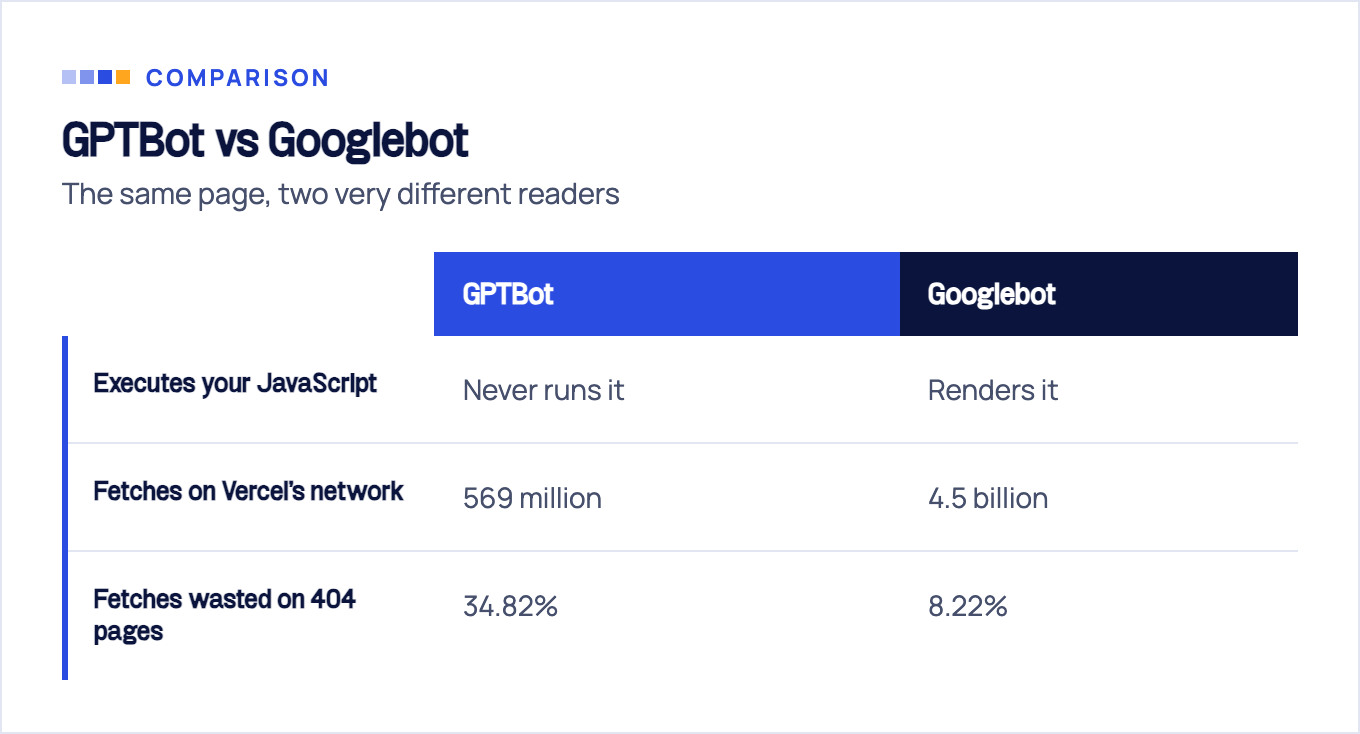
The clearest data comes from a Vercel and MERJ study of crawler traffic across Vercel’s network. Their finding: OpenAI’s crawlers (GPTBot, ChatGPT-User, OAI-SearchBot), Anthropic’s ClaudeBot, Meta-ExternalAgent, Bytespider, and PerplexityBot all download JavaScript files but never execute them. They fetch your bundle, and then they do nothing with it. Of the AI-adjacent crawlers in the study, only Google’s Gemini, which rides Googlebot’s rendering infrastructure, and AppleBot actually render JavaScript.
The practical implication is blunt. If your content is client-side rendered, it does not exist for ChatGPT search or Perplexity. Not delayed, not deprioritized: absent. When those tools answer questions in your category, they cite whoever shipped readable HTML. For any business that counts AI answers as a discovery channel, and in 2026 most should, client-side rendering is a hard blocker rather than a technical debt item.
The same study puts the scale in perspective. In the study’s one-month window ending December 2024, Googlebot made 4.5 billion fetches across Vercel’s network against 569 million for GPTBot and 370 million for Claude’s crawler. AI crawlers are a meaningful minority of crawl traffic and growing, but they are also less sophisticated in every dimension: ChatGPT’s crawler wasted 34.82% of its fetches on 404 pages, versus 8.22% for Googlebot. These bots don’t render, they recrawl inefficiently, and they follow dead links. The way to be visible to them is to make the raw response self-sufficient.
We ran our own bot-by-bot tests and break down exactly which crawlers execute what in our AI crawler JavaScript test. The short version matches Vercel’s data: assume no rendering from any AI crawler and you will not be surprised.
How to diagnose JavaScript SEO problems
You don’t need a crawler license or a consultant to find out whether JavaScript is costing you rankings. This triage takes about 15 minutes on any page that matters.
1. Compare view-source with the rendered DOM. Open the page, hit view-source, and search for a sentence from your main content, a key product name, and your primary heading. Then open DevTools and check the same strings in the Elements panel. Everything in the rendered DOM but missing from view-source is content that crawlers only get if they render. If your money copy lives exclusively on the rendered side, you’ve found your problem in two minutes.
2. Inspect the URL in Google Search Console. URL Inspection shows the rendered HTML Google actually produced for the page, plus any resources it couldn’t load. This is ground truth, not simulation. Look for missing content blocks, JavaScript errors in the console output, and resources blocked by robots.txt.
3. Load the page with JavaScript disabled. Toggle JS off in DevTools and reload. What survives is roughly what a non-rendering crawler reads. A blank page here means every AI crawler sees a blank page too.
4. Search Google for a JS-injected sentence. Take an exact phrase that only exists post-render, wrap it in quotes, and add site:yourdomain.com. If Google indexed the rendered version, the page comes back. If nothing returns for content that has been live for weeks, rendering or indexing failed somewhere.
5. Crawl the site twice and diff. Run a crawler that supports JavaScript rendering, such as Screaming Frog, once with rendering off and once with it on. Diff titles, word counts, and discovered links between the runs. Pages where the two crawls disagree are your rendering-dependent inventory, ranked by how much is at stake.
The reason we insist on making this a scheduled habit rather than a one-time check is that rendering failures fail silently. A broken deploy that blanks your rendered pages throws no error, sends no email, and looks perfect to every human who visits with a working browser. Rankings and the leads behind them erode over weeks while every dashboard stays green. We’ve watched this pattern often enough in FLG engagements that scheduled rendering checks are non-negotiable for any JS-heavy site we work with.
The five steps above are triage: they tell you whether a problem exists. Sizing it across templates, tracing root causes, and prioritizing fixes is a bigger exercise, and we’ve documented the full process in our JavaScript SEO audit walkthrough.
The 7 most common JavaScript SEO issues, and how to fix each
Ten years of auditing JavaScript-heavy sites produces a surprisingly stable list. These seven issues account for nearly every JS-related ranking loss we see, so here is each one as symptom and fix.
1. Links that aren’t real anchor tags
Symptom: Deep pages never get crawled or indexed; the site’s crawl footprint in GSC is a fraction of its real page count.
Google’s guidance on links is explicit: “Generally, Google can only crawl your link if it’s an <a> HTML element with an href attribute,” per Google’s documentation on crawlable links. A div with an onclick handler, a routerLink without a rendered href, a span styled as a link, a javascript: URI: none of these reliably pass crawl discovery, no matter how well they work for users.
Fix: Audit navigation, pagination, and card grids for non-anchor links. Every framework router has a link component that renders a genuine <a href> and intercepts the click; use it everywhere a crawler should follow.
2. Content that requires interaction to appear
Symptom: Tab panels, “load more” content, and scroll-triggered sections are indexed nowhere, even though the pages containing them rank.
Google Search does not interact with pages. It does not click, and it does not scroll, so content that loads only on user interaction is invisible to Googlebot. For lazy-loaded content, Google’s lazy-loading documentation recommends viewport-based loading such as the IntersectionObserver API, and giving paginated content its own unique URLs.
Fix: Ship interaction-gated content in the initial render (visually collapsed is fine; display state doesn’t matter, presence in the DOM does). Replace scroll-event lazy loading with IntersectionObserver. Convert infinite scroll to real paginated URLs that load as the user scrolls.
3. Fragment URLs for routing
Symptom: The app has fifty views and Google indexes one URL: the homepage.
Everything after a # is a client-side convention, and Googlebot cannot reliably parse and extract fragment URLs. Fifty hash routes are one URL to a crawler.
Fix: Route with the History API so every view gets a real path, then configure the server to answer deep URLs. Every mainstream router supports this; it’s a configuration choice, not a rewrite.
4. Soft 404s from single-page apps
Symptom: GSC reports “Soft 404” on pages that look fine, and junk URLs accumulate in the index.
A client-side router happily renders a “not found” view for any path while the server returns HTTP 200. Google sees an error page with a success code, flags it as a soft 404, and your index fills with garbage that dilutes crawl budget.
Fix: For genuinely missing content, either redirect to a URL whose server response is a real 404, or add a noindex robots meta tag to the error view. This failure mode is endemic to SPAs, and our SPA SEO guide covers the routing and status-code architecture that prevents it.
5. JavaScript rewriting titles, canonicals, or robots meta
Symptom: Indexed titles don’t match what the page shows; canonical reports in GSC are erratic; pages you meant to index carry noindex, or vice versa.
When the server HTML says one thing and JavaScript rewrites it to another, you have two versions of the truth, and which one Google honors depends on whether and when rendering happened. Signals as important as canonical and robots directives should never be ambiguous.
Fix: Serve the correct title, meta description, canonical, and robots directives in the initial HTML for every route. If your framework can only set them client-side, that’s an argument for changing the rendering strategy, which is the next section.
6. JS and CSS resources blocked in robots.txt
Symptom: URL Inspection shows partially rendered pages, missing styles, or blank content areas; page resources appear as “blocked.”
A robots.txt line like Disallow: /assets/ or Disallow: /*.js$, often inherited from an old paranoid template, prevents the Web Rendering Service from fetching the very files it needs to render your pages.
Fix: Let crawlers fetch every resource that rendering requires. Check the blocked-resources list in URL Inspection after any robots.txt change.
7. Hydration errors wiping server-rendered content
Symptom: View-source looks perfect, yet rendered checks show missing or duplicated content; the framework console logs hydration mismatch warnings.
Server-side rendering only helps if hydration succeeds. When the server-rendered DOM doesn’t match what the client-side code expects, frameworks can discard the server HTML and re-render from scratch in the browser. At that point you’re paying for SSR while shipping CSR: the impact of hydration failures on JavaScript SEO is that your safety net silently disappears.
Fix: Treat hydration warnings as build failures, not console noise. Common culprits are timestamps, randomized content, locale formatting, and browser-only APIs touched during render.
Rendering strategies: CSR vs SSR vs SSG (and why dynamic rendering is dead)
Every issue above gets rarer the earlier your HTML is complete. That makes the rendering strategy the highest-impact decision in JavaScript rendering SEO, and it’s a per-route decision, not a site-wide religion.
| Strategy | HTML is complete… | AI crawlers | Right for | |
|---|---|---|---|---|
| SSG (static generation) | At build time | Immediate indexing, no render dependence | Fully readable | Marketing pages, blogs, docs, anything that changes on deploy |
| SSR (server-side rendering) | Per request | Immediate indexing, no render dependence | Fully readable | Listings, inventory, pricing, anything that changes between deploys |
| CSR (client-side rendering) | Only in the browser | Delayed, render-dependent, fragile | Invisible | Logged-in app views that should never rank |
The decision rule is short. Content that rarely changes gets SSG, the fastest and most crawler-proof option there is. Content that changes per request gets SSR. CSR is reserved for views behind a login, where crawlability is irrelevant by design. If a public, revenue-relevant URL is client-side rendered, that’s the misallocation to fix first.
You may notice dynamic rendering, serving prerendered HTML to bots and the JS app to humans, is missing from the table. Google removed the ambiguity itself: dynamic rendering documentation now states it “was a workaround and not a long-term solution” and recommends server-side rendering, static rendering, or hydration instead. Bot-detection maintenance, drift between the two versions, and cloaking risk killed it. Don’t build new infrastructure on it.
This is also the honest answer to “which JavaScript framework is the most SEO-friendly”: the framework matters far less than the rendering mode it defaults to. React with a metaframework, Vue with Nuxt, SvelteKit, and Astro can all produce complete HTML; plain client-side builds of any of them produce none. We keep the framework-specific detail in dedicated guides so this one stays strategic: see the React SEO guide for the React 19 and metaframework landscape, and the Next.js SEO guide for App Router rendering modes, metadata, and caching gotchas.
JavaScript SEO best practices checklist
Twelve items, in rough priority order. They apply to SEO for JavaScript pages on any stack, and a JS-heavy site that passes all twelve has no JavaScript SEO problem worth the name.
- Critical content and headings are present in the initial HTML response, not injected post-load
- Every crawlable link is an
<a>element with a real href - Routing uses the History API; no content lives behind
#fragments - Every route returns the correct HTTP status code, including real 404s for missing content
- Titles, meta descriptions, canonicals, and robots directives are server-rendered and unique per route
- robots.txt allows all JS and CSS resources needed for rendering
- Lazy loading uses IntersectionObserver; paginated content has unique URLs
- No indexable content requires a click, scroll, or any other interaction to enter the DOM
- Hydration completes without errors on every template
- Public routes use SSG or SSR; CSR is confined to logged-in views
- Rendered HTML is spot-checked monthly (URL Inspection or a rendering crawl)
- Server logs confirm AI crawlers fetch your pages and receive complete HTML
On tools: you need fewer than the listicles suggest. GSC URL Inspection for Google’s ground truth, the Rich Results Test for a quick public rendering check, Screaming Frog with JavaScript rendering for site-wide diffs, and view-source plus DevTools for everything else. The workflow from the diagnosis section covers when to reach for each.
When JavaScript SEO needs a specialist
Most of this guide is doable in-house, and for a small site the checklist above may be a weekend’s work. The cases that justify outside help share a pattern: the site looks perfect to every human, while rendering failures quietly cost leads for months. Nobody checks, because nothing looks broken.
Three signals say it’s time. Organic traffic dropped after a framework migration or redesign and never recovered. GSC shows pages indexed, but their rankings make no sense for the content quality. AI assistants answer questions in your category without ever citing you, despite your site covering them well.
If any of those sound familiar, our JavaScript SEO service starts with exactly the rendering diagnosis described here, run across every template on your site, and turns it into a prioritized fix plan your developers can execute. Ten years of JS-heavy audits means we’ve usually seen your specific failure mode before, and the fix is rarely a rewrite.
Sources & fact-check
Every factual claim in this article is checked against primary sources, not opinion. Written by Dmitry Shpytaliev, Master SEO tech & content. Last verified July 16, 2026.
- OfficialGoogle Search Central, JavaScript SEO basics (crawl, render, index as separate phases with a render queue)
- OfficialGoogle Search Central, Make your links crawlable (Google generally crawls only anchor elements with href)
- OfficialGoogle Search Central, Dynamic rendering as a workaround (not a long-term fix, prefer SSR or static rendering)
- OfficialGoogle Search Central, Fix lazy-loaded content (Google does not click or scroll, give each chunk a unique URL)
- Primary dataVercel and MERJ, The rise of the AI crawler (crawl-log study, no major AI crawler renders JavaScript)
- Primary dataHTTP Archive, Web Almanac 2024 JavaScript chapter (median 558 KB on mobile, 44% unused during page load)
