Astro is good for SEO for one structural reason: it ships fully pre-rendered HTML with zero client-side JavaScript by default, so search engines and AI crawlers get the complete page on the first fetch, with no rendering queue in between. Client-rendered React inverts that. The initial HTML is an empty shell, and your content only exists for bots that execute JavaScript. For a marketing or lead-generation site, that difference is most of the Astro SEO story. The rest of this article puts numbers on it.
Is Astro good for SEO? The short answer
Yes, and not because of any plugin or configuration trick. An Astro page is generated at build time as plain HTML: the title, meta description, canonical tag, structured data, and every paragraph of body copy exist in the response before a single line of JavaScript runs. A crawler doesn’t have to render anything to index the page. Fetching it is enough.
Compare that with a client-rendered React app, whether Create React App or a Vite SPA without server rendering. The server returns a near-empty div and a bundle reference, and the content you want to rank is assembled in the browser after the JavaScript downloads, parses, and executes. Any bot that can’t or won’t do that sees a blank page.
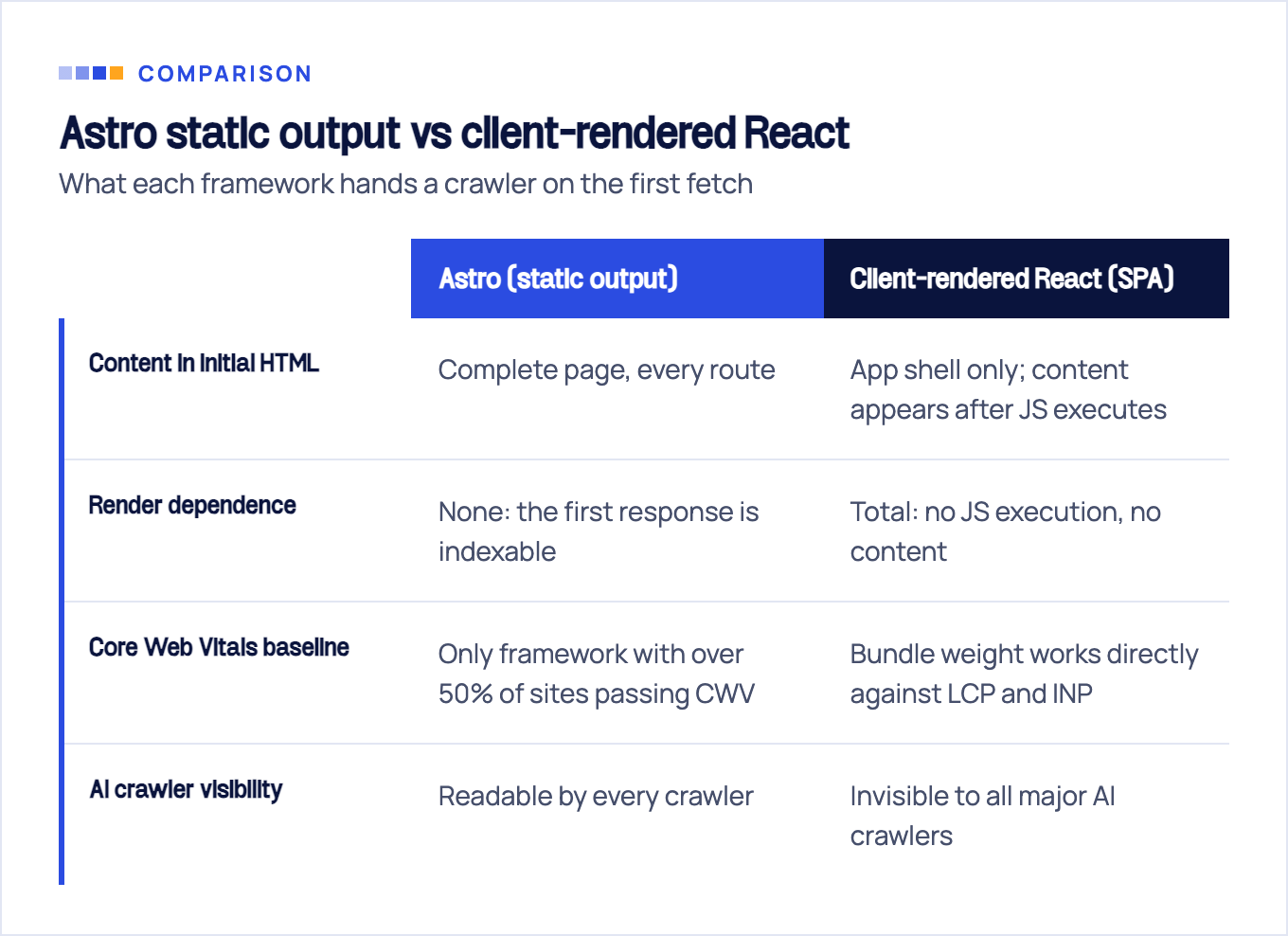
That CWV row comes from Astro’s 2023 Web Framework Performance Report, which found “Astro was the only framework to reach above 50% of websites passing Google’s CWV Assessment.” Astro published the analysis, so read it with that in mind. Still, it’s built on Google’s public CrUX and HTTP Archive field data, not a vendor lab test. We break the numbers down below.
How Google handles client-rendered React (and what it costs you)
Google can index JavaScript sites, but not in one step. Per Google Search Central, JavaScript apps are processed in three phases (crawling, rendering, indexing), and rendering is deferred: a page joins a queue and “may stay on this queue for a few seconds, but it can take longer than that,” with headless Chromium executing your JavaScript “once Google’s resources allow.”
For a ten-page brochure site, the queue is an inconvenience. For a content operation publishing weekly, it’s a tax on every update: nothing counts until a second pass happens on Google’s schedule, not yours.
The same documentation is blunt about the failure mode. App-shell sites contain no actual content in their initial HTML, and Google recommends server-side or pre-rendering “because it makes your website faster for users and crawlers, and not all bots can run JavaScript.” That last clause carries far more weight in 2026 than when it was written. The AI crawler section below quantifies it.
The classic patch doesn’t hold up either. Serving crawlers a pre-rendered copy while users get the SPA (dynamic rendering) is something Google explicitly calls “a workaround and not a long-term solution,” recommending server-side rendering, static rendering, or hydration instead.
None of this means a React SPA can’t rank. It means it ranks with friction at every step. We’ve documented the full diagnosis in our React SEO guide, and what your options look like when SSR is off the table in React SEO without SSR.
How Astro renders: islands architecture in plain terms
Astro is a static site generator first. At build time it executes your components once, on the server, and writes the result to disk as finished HTML files. That’s what ships to the browser.
Interactivity is opt-in through what Astro calls islands architecture: the page is static HTML by default, and you mark individual components (a mobile nav toggle, a contact form, a carousel) for hydration. Only those islands receive JavaScript; the rest of the page never does. Astro’s documentation summarizes the default as “Zero JS, by default,” and unlike most framework taglines, it’s literal.
The result is easiest to see in view-source. Take the page you’re reading: it’s built with static Astro, and the source of the first response contains the title, meta description, canonical URL, JSON-LD, and every paragraph of this article. No crawler had to execute anything to read it. That’s not a brag. It’s the framework’s default output, which is exactly the point.
Because pages are plain HTML, the SEO toolchain stays thin. A shared head layout or the astro-seo npm package handles titles, descriptions, Open Graph tags, and canonicals; @astrojs/sitemap generates the sitemap at build time. There’s no plugin marketplace to configure because there’s very little to fix.
Astro vs React head-to-head: the numbers
Field data first. Astro’s 2023 performance report, built on CrUX and HTTP Archive data, put Astro above 50% of real-world sites passing the Core Web Vitals assessment, while “Next.js and Nuxt came in at the bottom of the pack with roughly 1-in-4 and 1-in-5 websites passing the assessment, respectively.” Those are measurements of production sites at scale, which makes them harder to dismiss than any benchmark, and harder to excuse, since every framework’s marketing pages pass just fine.
The scoring rubric behind “passing” has since moved. The 2023 report scored the assessment on LCP, FID, and CLS; Google replaced FID with INP in March 2024, so those pass rates predate the current interactivity bar. Today web.dev defines the good thresholds as LCP within 2.5 seconds, INP of 200 milliseconds or less, and CLS of 0.1 or less, measured at the 75th percentile of page loads, segmented by mobile and desktop. The percentile matters. Your site passes when most real visits are fast, not when one lab run is.
Astro’s own docs add a stronger claim: “An Astro website can load 40% faster with 90% less JavaScript than the same site built with the most popular React web framework.” That’s a vendor claim, and the only support Astro links for the number is a tweet, and the follow-up link points to a video featuring Astro’s own creator as a guest rather than a published benchmark, so weight it accordingly. But the direction is mechanically plausible. Shipping less JavaScript is the single most reliable way to improve LCP and INP, and Astro ships almost none.
On crawlability, the gap isn’t a percentage; it’s binary. A static Astro site has zero render dependence. A client-rendered React site has total render dependence: for Google that means the queue, and for AI crawlers it means invisibility.
Now the honest caveat. This comparison is Astro versus client-rendered React. A well-built Next.js site using SSR or static generation ships complete HTML too and closes most of the crawlability gap; its remaining handicap is the hydration payload it sends whether or not a page needs interactivity. If your actual question is Astro vs Next.js for a content site, the difference is Core Web Vitals headroom and operational simplicity, not visibility.
When React or Next.js is still the right call
Astro is not the answer to everything, and pretending it is would make the rest of this comparison worthless.
Choose React, through a framework, when you’re building an application: logged-in products, dashboards, editors, anything with heavy client-side state and per-user personalization. Those screens shouldn’t be indexed anyway, and React’s component model earns its bundle there. Next.js with SSR handles the public, indexable surface of such products well; our Next.js SEO guide covers how to pick a rendering strategy per route.
Notably, even React’s own documentation steers people away from the bare-SPA setup this article warns about. react.dev states: “If you want to build a new app or website with React, we recommend starting with a framework,” because building from scratch means solving routing, data fetching, and rendering patterns yourself.
Team reality counts too. If your engineers live in the React ecosystem and your site already runs Next.js with SSR configured correctly, switching to Astro buys performance headroom, not a rescue. Migration effort should chase a real problem.
The decision rule we use with clients: for a marketing, content, or lead-generation site, go static-first, and Astro is the strongest current option. For an application, use a React framework with server rendering for anything public. For lead-gen sites the stakes are asymmetric, because organic visibility is the product. That makes the rendering choice a revenue decision, not a developer-preference one.
Astro SEO setup checklist
Astro’s defaults carry you most of the way, but several things still have to be done deliberately. The astro seo best practices that actually move rankings:
- Centralize head management. A shared layout with title and description props (or the astro-seo package) keeps every page’s meta tags consistent and reviewable in one file.
- Set a canonical URL on every page. Built from
Astro.siteplus the pathname, so staging domains and query strings never generate duplicate-content signals. - Add @astrojs/sitemap. Build-time sitemap generation that stays in sync with your routes automatically; forgotten sitemap entries stop being a failure mode.
- Write a robots.txt that points at the sitemap. Crawlers find your URL inventory without guessing.
- Ship structured data through a schema component. One JSON-LD component with typed props beats hand-pasted script tags that drift out of date.
- Use astro:assets for images. Enforced width and height attributes prevent layout shift, protecting the CLS third of your Core Web Vitals.
- Put the blog in content collections. Typed frontmatter means a missing description fails the build instead of shipping silently.
- Pick a trailing-slash policy and enforce it in config. One URL per page; the other variant should redirect, not duplicate.
- Handle redirects at the host level. Netlify, Vercel, or Cloudflare config, never client-side JavaScript redirects that crawlers may not follow.
If you go the component route, the astro-seo package is the closest thing to an Astro SEO plugin, and it’s a single import:
---
import { SEO } from 'astro-seo';
---
<SEO
  title="Page title"
  description="Page description"
  canonical={new URL(Astro.url.pathname, Astro.site).href}
/>
One warning from audit experience: a green build verifies none of this. Astro will happily compile a site with duplicate titles, missing canonicals, and orphaned pages. Crawl your built output with a spider before launch, the same way you’d audit any other site.
AI search: static HTML is the price of entry
If part of your audience now asks ChatGPT or Perplexity instead of Google, rendering stops being a nuance and becomes a gate. Vercel’s AI crawler study found that none of the major AI crawlers currently render JavaScript: GPTBot, ChatGPT-User, and OAI-SearchBot from OpenAI, Anthropic’s ClaudeBot, PerplexityBot, Meta-ExternalAgent, and Bytespider all fetch JavaScript files as text but never execute them. Two exceptions sit outside that list: Google’s Gemini, which rides Googlebot’s infrastructure, and Apple’s AppleBot, which the same study describes as rendering JavaScript through a browser-based crawler.
The volume behind those bots is no longer a rounding error. In the month Vercel measured for its December 2024 study, GPTBot made 569 million requests and Anthropic’s Claude crawler 370 million; adding AppleBot and PerplexityBot brings the four-bot total to roughly 1.3 billion requests, a little over 28% of Googlebot’s volume. That snapshot predates this article by more than a year, so treat it as a directional benchmark rather than a current count.
Put the two together and the conclusion is uncomfortable for SPA owners: a client-rendered React marketing site is effectively invisible to every AI answer engine except Google’s and Apple’s. Whatever those assistants tell users about your category, they compose it from competitors whose pages they can actually read. Astro’s static output is readable by all of them, by default, with no extra work.
We dug into the crawler-by-crawler behavior, including what each bot fetches and skips, in do AI crawlers execute JavaScript.
Migrating a React marketing site to Astro without losing rankings
Migration pays when three things line up: the site’s job is leads or content rather than app functionality, Core Web Vitals are failing in field data, and meaningful content sits behind JavaScript execution. If that describes your marketing site, switching frameworks usually costs less than another year of paying the SPA tax in rankings and AI invisibility.
A rankings-safe migration is process, not luck. Full URL inventory before any code is written. A 1:1 redirect map for every URL that moves. Parity checks on titles, descriptions, canonicals, and structured data between old and new. A staged cutover, then post-launch crawl monitoring to catch whatever slipped through. Skipping any of those steps is how migrations turn into recovery projects.
This site went through exactly that workflow: seobro.com was rebuilt on static Astro with the inventory, redirect, and parity discipline above, which is why we recommend the approach from experience rather than theory. If you’re weighing the same move, our SEO migration service runs that process end to end. And if you first want to know how much of your content crawlers can actually see today, a JavaScript SEO audit answers that question before you commit to anything.
Sources & fact-check
Every factual claim in this article is checked against primary sources, not opinion. Written by Dmitry Shpytaliev, Master SEO tech & content. Last verified July 16, 2026.
- OfficialGoogle Search Central, JavaScript SEO Basics (the crawl, render, index model and the render queue delay)
- Officialweb.dev, Web Vitals (the good thresholds for LCP, INP and CLS at the 75th percentile)
- Officialweb.dev, INP becomes a Core Web Vital on March 12 (Google replaced FID with INP in March 2024)
- Primary dataAstro, 2023 Web Framework Performance Report (vendor CrUX analysis behind the quoted FID era pass rates)
- Primary dataVercel, The Rise of the AI Crawler (vendor data on which AI bots render JavaScript, and fetch volumes)
- Primary dataAstro Docs, Why Astro? (vendor source for its own zero JS and 40% faster claims, not independent proof)
