Next.js is one of the most SEO-capable ways to build a React site: SSG, ISR, and SSR all ship complete HTML in the initial response, which is exactly what search engines and AI crawlers need. The catch is that none of it is automatic. Next.js SEO comes down to three decisions (how each page renders, how metadata gets generated, and what crawlers are allowed to see), and a misconfigured app quietly inherits every problem a client-side SPA has.
This guide is App Router-first, decision-focused, and based on what we actually find when auditing Next.js sites, not on walking through every API the framework offers.
Is Next.js good for SEO?
Yes. Next.js is good for SEO because it can serve fully rendered HTML to every crawler on the first request, removing the JavaScript-execution gamble that hurts client-side React apps. That answer holds only while your indexable content stays server-rendered. Move it into client-side fetches and you are running a SPA with extra build steps.
Server-rendered HTML matters because of how Google handles JavaScript. Per Google Search Central, Google processes JS pages in three phases (crawling, rendering, and indexing), and rendering happens in a deferred queue: a page “may stay on this queue for a few seconds, but it can take longer than that.” Google renders with an evergreen version of Chromium, so your JavaScript will eventually execute. Google still recommends hedging anyway: server-side or pre-rendering “is still a great idea because it makes your website faster for users and crawlers, and not all bots can run JavaScript.”
That last clause carries more weight every year. In 2026, “bots that can’t run JavaScript” includes essentially every AI crawler, which we cover in its own section below.
So the framework is capable. The rest of this article is about not squandering that capability: rendering strategy first, because it decides everything downstream, then metadata, canonicals and sitemaps, structured data, Core Web Vitals, and the misconfigurations we keep finding in real audits.
Pick the right rendering strategy: SSG vs ISR vs SSR (and when CSR hurts)
Rendering strategy is the highest-leverage Next.js SEO decision. It determines what crawlers see before a single meta tag matters, and it is set per page, so treat it as a routing table, not a site-wide setting.
| Page type | Strategy | Why |
|---|---|---|
| Marketing pages, blog posts, docs | SSG | Content changes on deploy. Static HTML from a CDN is the fastest and most crawlable option there is. |
| Category pages, product listings, anything that changes between deploys | ISR | Static speed with scheduled freshness. No full rebuild when one product updates. |
| Pages that genuinely differ per request (live inventory, personalized landing pages) | SSR | Crawlers still get full HTML; you pay for it with server latency on every hit. |
| Dashboards, account areas, checkout | CSR | These should not be indexed anyway. Client-side rendering is fine behind a login. |
ISR deserves a closer look because most teams under-use it. Incremental Static Regeneration lets you update static content without rebuilding the entire site: most requests are served a prerendered static page, and Next.js regenerates it in the background based on the revalidate route segment config (for example, export const revalidate = 3600 for hourly freshness). For a 10,000-URL catalog, that is the difference between static-grade crawlability and an SSR bill.
The trap in this decision is subtler than picking the wrong row in the table. A Server Component page is not automatically “done”: any content fetched inside a 'use client' component with useEffect never reaches the initial HTML, no matter how the page itself renders. One client-side product-description widget on an otherwise static page means the description does not exist for most crawlers. If your app started life as client-side React, our React SEO guide covers that diagnosis in depth.
The App Router Metadata API, done right
Meta tags in the App Router come from two exports: a static metadata object for pages whose tags never change, and a generateMetadata function for dynamic routes. Per the generateMetadata API reference, both are only supported in Server Components, and you cannot export both from the same route segment. If your page is a client component, metadata has to live in a server-side parent, a common source of silently missing tags.
A typical dynamic route looks like this:
// app/blog/[slug]/page.tsx
import type { Metadata } from 'next';

export async function generateMetadata({ params }): Promise<Metadata> {
  const { slug } = await params;
  const post = await getPost(slug);
  return {
    title: post.title,
    description: post.excerpt,
    alternates: { canonical: `/blog/${slug}` },
    openGraph: { title: post.title, images: [post.ogImage] },
  };
}
Three details separate a working setup from a broken one.
Set metadataBase in the root layout. Canonical URLs and OG images are URL-based fields, and using a relative path in them without configuring metadataBase causes a build error; with it configured, Next.js composes relative paths into fully qualified URLs. Set it once from an environment variable that points at your production domain, and every canonical and OG image resolves correctly across environments.
Use title.template for consistent branding. Define a title object with a template (such as '%s | Acme') and a default in the root layout, and pages only supply the page-specific part. Child segments inherit it.
Respect the shallow merge. Metadata objects from layouts and pages are shallowly merged. If a page defines its own openGraph object, all openGraph fields from the parent layout are replaced, not merged:
// app/layout.tsx
export const metadata = {
  openGraph: {
    siteName: 'Acme',
    description: 'Sitewide OG description',
    images: ['/og-default.png'],
  },
};

// app/pricing/page.tsx
export const metadata = {
  // This REPLACES the whole openGraph object above.
  // siteName, description, and images are now gone on /pricing.
  openGraph: { title: 'Pricing' },
};
The fix is boring but non-negotiable: any page that touches openGraph must restate every field it still wants, or import a shared helper that builds the full object.
One more behavior nobody writing about Next.js SEO seems to cover: since v15.2, Next.js can stream metadata after the initial UI instead of blocking on it. JavaScript-executing bots like Googlebot handle that fine, while HTML-limited bots such as facebookexternalhit are detected by User-Agent and still receive render-blocking metadata in the head, with the detection list configurable via the htmlLimitedBots option. If your OG previews break on one platform while Google sees everything, this is the mechanism to check.
Canonicals, robots.txt, and sitemaps with file conventions
The App Router replaces hand-rolled SEO plumbing with file conventions: drop robots.txt or robots.ts and sitemap.xml or sitemap.ts into app/ and Next.js serves them at the root.
A dynamic sitemap pulls straight from your data source, so it never drifts from reality:
// app/sitemap.ts
import type { MetadataRoute } from 'next';

export default async function sitemap(): Promise<MetadataRoute.Sitemap> {
  const posts = await getPosts();
  return posts.map((post) => ({
    url: `https://example.com/blog/${post.slug}`,
    lastModified: post.updatedAt,
  }));
}
For large sites, the sitemap file convention includes a generateSitemaps function that splits output into multiple files, built around Google’s limit of 50,000 URLs per sitemap. Canonicals live per route via alternates.canonical, as in the metadata example above. Set them everywhere, not just on pages you suspect of duplication.
Now the classic Next.js duplicate-content leak: preview deployments. Every Vercel preview is a live copy of your site on a vercel.app URL, and once one gets indexed you are competing against your own staging builds. Gate indexability on environment:
// app/layout.tsx
export const metadata = {
  robots:
    process.env.VERCEL_ENV === 'production'
      ? undefined
      : { index: false, follow: false },
};
The same logic belongs in robots.ts. And check the inverse before every launch: a noindex that was correct on staging ships to production more often than anyone admits.
Structured data (JSON-LD) in Next.js
There is no file convention for structured data; the pattern is an inline script rendered in a Server Component, so the JSON-LD is present in the initial HTML alongside the content it describes:
// app/blog/[slug]/page.tsx (Server Component)
const jsonLd = {
  '@context': 'https://schema.org',
  '@type': 'Article',
  headline: post.title,
  datePublished: post.publishedAt,
  author: { '@type': 'Person', name: post.author },
};

<script
  type="application/ld+json"
  dangerouslySetInnerHTML={{
    __html: JSON.stringify(jsonLd).replace(/</g, '\\u003c'),
  }}
/>
The replace call escapes < characters, which matters whenever any field contains user-supplied or CMS-supplied strings. Skipping it is an XSS vector, not just a validation warning.
Stick to schema types that earn visible rich results for typical Next.js sites: Article for blog content, Product with offers and reviews for e-commerce, and BreadcrumbList for anything with hierarchy. FAQPage no longer earns a rich result: Google restricted FAQ results to government and health sites in 2023 and removed them for every site in May 2026, so the markup now only helps AI parsing and on-page structure, not the SERP. Validate with Google’s Rich Results Test rather than trusting that valid JSON equals valid schema.
Core Web Vitals: where Next.js helps and where it hurts
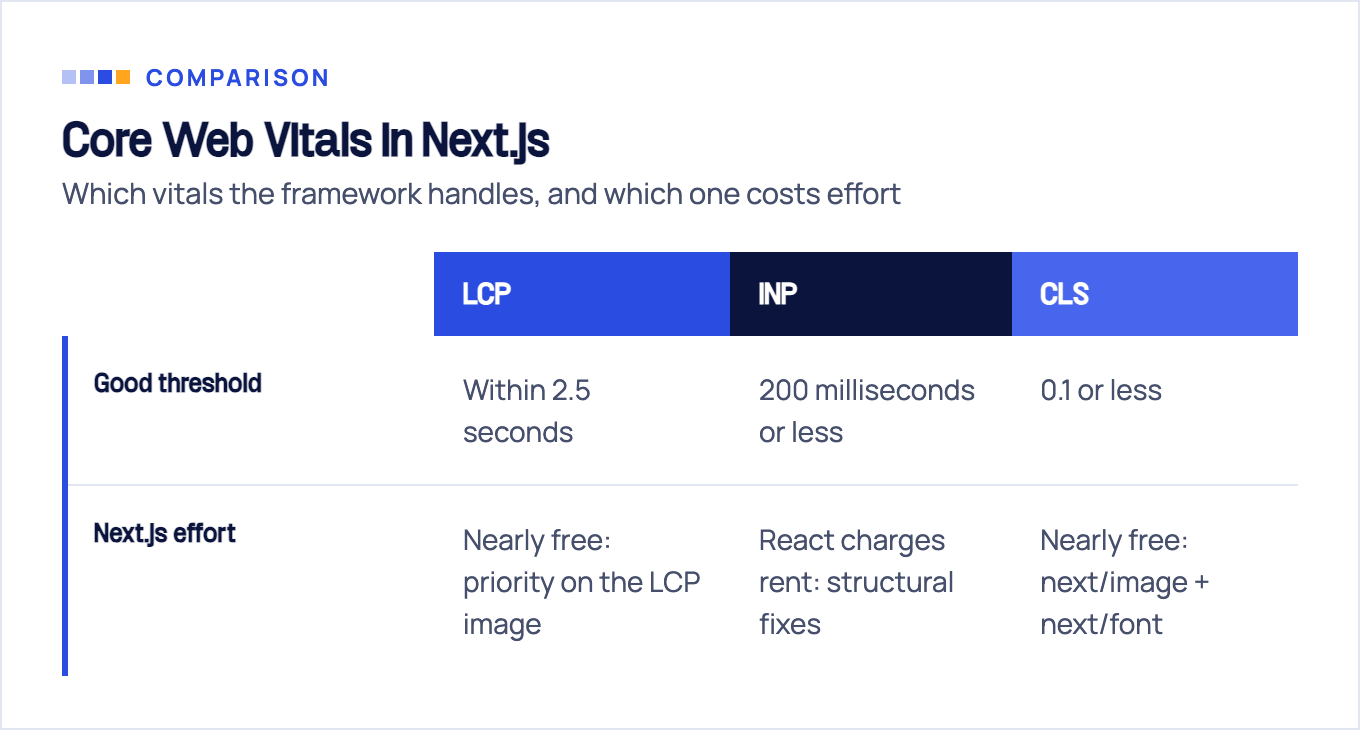
Keep the thresholds in view first. Per web.dev, good Core Web Vitals means LCP within 2.5 seconds, INP of 200 milliseconds or less, and CLS of 0.1 or less, measured at the 75th percentile of page loads across mobile and desktop.
Next.js hands you two of the three nearly for free. next/image enforces dimensions (protecting CLS) and supports priority for the LCP image; next/font self-hosts fonts and removes layout shift from font swapping. Use both everywhere and LCP and CLS become build-discipline problems rather than engineering projects.
INP is where React charges rent. Every client component ships JavaScript that must download, parse, and hydrate before the page responds crisply to input, and a large 'use client' surface area drags INP down on mid-range phones. The fixes are structural: keep components server-side by default, push 'use client' to the leaves of the tree, and lazy-load heavy interactive widgets with next/dynamic so they hydrate only when needed.
Honest framing: Core Web Vitals are a tiebreaker, not a ranking strategy. Relevance and content quality decide which pages compete; vitals decide close calls and, more importantly, whether visitors stay. Fix rendering and metadata first, vitals second.
7 Next.js SEO misconfigurations we keep finding in audits
Documentation tells you how features work. Audits tell you how they fail. These seven come up over and over in Next.js sites we crawl, in roughly this order of damage.
1. Indexable content fetched client-side. Symptom: pages rank for their title but never for their body content. Spot it by curling the URL and searching the response for a sentence from the page. Fix: move the fetch into the Server Component and pass data down as props.
2. Wrong metadataBase. Symptom: canonicals and OG images pointing at localhost:3000 or a preview URL in production, usually from a metadataBase that falls back to a hardcoded localhost or preview default when the env var is missing in the deployed environment. Spot it in view-source on any deployed page. Fix: set metadataBase from an environment variable in the root layout and verify it in the build output.
3. Soft 404s. Symptom: “Product not found” pages returned with HTTP 200, which Google indexes as thin duplicates by the thousand. Spot it by requesting a deliberately fake URL and checking the status code. Fix: call notFound() from the missing-data branch so Next.js serves a real 404.
4. Staging noindex in production (or previews without one). Symptom: either your production site vanishes from the index, or vercel.app URLs outrank you for brand queries. Spot it by checking the robots meta tag and X-Robots-Tag header in both environments. Fix: environment-conditional robots metadata, as shown above, plus a post-deploy check.
5. Shallow-merge OG loss. Symptom: some pages share fine on social, others show no image or description. Spot it by diffing rendered OG tags between a working and a broken page. Fix: restate the full openGraph object on every page that overrides it.
6. Client-side redirects. Symptom: old URLs that “redirect” via router.push in a useEffect, which crawlers see as a 200 page with no content, bleeding the old URL’s equity. Fix: declare redirects in next.config redirects() or middleware so they return proper 301/308 status codes.
7. Over-blocking robots.txt. Symptom: rendered pages look broken in Google’s URL Inspection because /_next/ assets or API routes the page depends on are disallowed. Fix: block crawl-trap paths, not the framework’s own asset pipeline.
Every one of these is invisible in the browser, which is why they survive to production: the site looks perfect to every human who checks it. They show up the moment you crawl the site the way a bot does. That is precisely what a technical SEO audit exists to do, and framework-specific traps like these are the core of our JavaScript SEO service. After 10+ years of audits, our shortlist for Next.js rarely goes beyond these seven.
Next.js SEO for AI search: crawlers that never run your JavaScript
Everything above concerns Google, which does render JavaScript. Most of the crawlers feeding AI assistants do not, and that changes the stakes of your rendering choices.
Vercel’s crawler study found that none of the dedicated AI crawlers (OpenAI’s OAI-SearchBot, ChatGPT-User and GPTBot; Anthropic’s ClaudeBot; PerplexityBot) render JavaScript. They fetch JS files (ChatGPT in 11.5% of requests, Claude in 23.84%) but never execute them. The scale is not fringe either: GPTBot alone made 569 million requests across Vercel’s network in a single month. Among AI-adjacent crawlers, only Gemini, riding Googlebot’s infrastructure, and AppleBot actually render.
The implication for a Next.js site is blunt. Whatever exists only after hydration does not exist for ChatGPT, Claude, or Perplexity. Server-rendered HTML stopped being a Google optimization and became table stakes for AI visibility, which quietly reframes the SSG/ISR/SSR decision from the first section: you are not choosing how Google sees your site, you are choosing whether AI assistants can cite it at all.
Next.js SEO launch checklist
Run this before launch and after any significant refactor:
- Every indexable route serves its content in the raw HTML (
curltest, no JS). - Rendering strategy matches page type: SSG or ISR for content, SSR only where per-request data demands it.
metadataBaseset from an env var in the root layout.title.templatedefined once; pages supply only their unique part.- Pages overriding
openGraphrestate the full object. alternates.canonicalon every indexable route.app/sitemap.tsgenerates from the same data source as the pages.robots.tsallows production, disallows previews; no/_next/blocking.- Robots metadata is environment-conditional; previews are noindexed.
- Missing-data branches call
notFound(), never render a 200 shell. - Redirects live in
next.configor middleware with 301/308 codes. - JSON-LD renders server-side and passes the Rich Results Test.
For the wider discipline beyond Next.js, our JavaScript SEO hub collects framework-specific guides like this one.
Sources & fact-check
Every factual claim in this article is checked against primary sources, not opinion. Written by Dmitry Shpytaliev, Master SEO tech & content. Last verified July 16, 2026.
- OfficialGoogle Search Central, JavaScript SEO Basics (crawl, render, index phases and the deferred render queue)
- OfficialNext.js docs, generateMetadata API reference (Server Components only, title.template, shallow openGraph merge)
- OfficialNext.js docs, sitemap.xml file convention (generateSitemaps splits output at the 50,000 URL per sitemap limit)
- Officialweb.dev, Core Web Vitals (LCP 2.5s, INP 200ms, CLS 0.1 thresholds at the 75th percentile)
- OfficialGoogle Search Central changelog, FAQ rich results (restricted, then deprecated and removed from Search)
- Primary dataVercel, The Rise of the AI Crawler (GPTBot, ClaudeBot and PerplexityBot fetch JavaScript but never execute it)
