React is not bad for SEO. Client-side rendering, the default way React apps ship, is the problem: the server sends a nearly empty HTML shell, and your content exists only after JavaScript downloads and runs. Google can render that shell, usually within seconds but sometimes hours later, while AI crawlers like GPTBot never render it at all. Fixing React SEO comes down to one architectural decision (where your HTML gets rendered) plus a short list of hygiene practices. This guide covers both.
Is React bad for SEO? The short answer
No. React is a UI library. It has no opinion about search engines, and plenty of top-ranking sites run on it. What hurts rankings is shipping a client-side rendered (CSR) single-page app to a public URL and expecting crawlers to treat it like an HTML document.
View source on a default Vite build and you’ll see what a crawler sees on first fetch: a <div id="root"> and a script tag. No headings, no copy, no product descriptions. Everything your users see gets assembled in the browser, after the fact.
Google has spent years building rendering infrastructure to cope with exactly this, and it mostly works. The trouble hides in “mostly”: rendering is delayed, it fails silently, and not every crawler does it. Bing runs an evergreen, Chromium-based bingbot that renders pages too, but the crawlers behind ChatGPT, Claude, and Perplexity never render at all. So when people ask whether React is good for SEO, the honest answer is that React is neutral. Your rendering strategy is what’s good or bad.
The rest of this guide follows that logic. First, how Google actually processes JavaScript, so you’re working from current evidence rather than 2019 folklore. Then the five failure modes behind almost every React ranking problem we audit. Then the decision that matters most (SSG, SSR, prerendering, or accepting CSR) and how React 19 and the framework landscape have shifted the defaults.
How Google actually processes React apps
Google handles JavaScript pages in three phases: crawling, rendering, and indexing. According to Google Search Central, a fetched page goes into a render queue, where it “may stay on this queue for a few seconds, but it can take longer than that.” The rendering itself runs in an evergreen version of Chromium, so the old fear that Googlebot uses some ancient engine is dead. It runs a current browser.
How much longer than a few seconds? A study by Vercel and MERJ analyzed over 100,000 Googlebot fetches and put real numbers on the render queue. Google fully rendered 100% of the analyzed HTML pages, including ones with complex JavaScript. The median rendering delay was 10 seconds, and a quarter of pages rendered within 4 seconds. The tail is long, though: the 90th percentile waited around 3 hours, the 99th around 18 hours.
Two caveats keep those numbers honest. First, rendering fails silently. A JavaScript error, a resource blocked in robots.txt, or a timeout means Google indexes whatever HTML it received, which for a CSR app is close to nothing, and Search Console won’t flag it loudly. Second, scale amplifies delay. For a ten-page portfolio, a 10-second median is irrelevant. For a 50,000-URL e-commerce SPA where prices and stock change daily, render-dependent indexing costs freshness on exactly the pages that make money.
The five real React SEO problems
Nearly every React SEO issue we find in audits reduces to one of five failures, and each has a known fix.
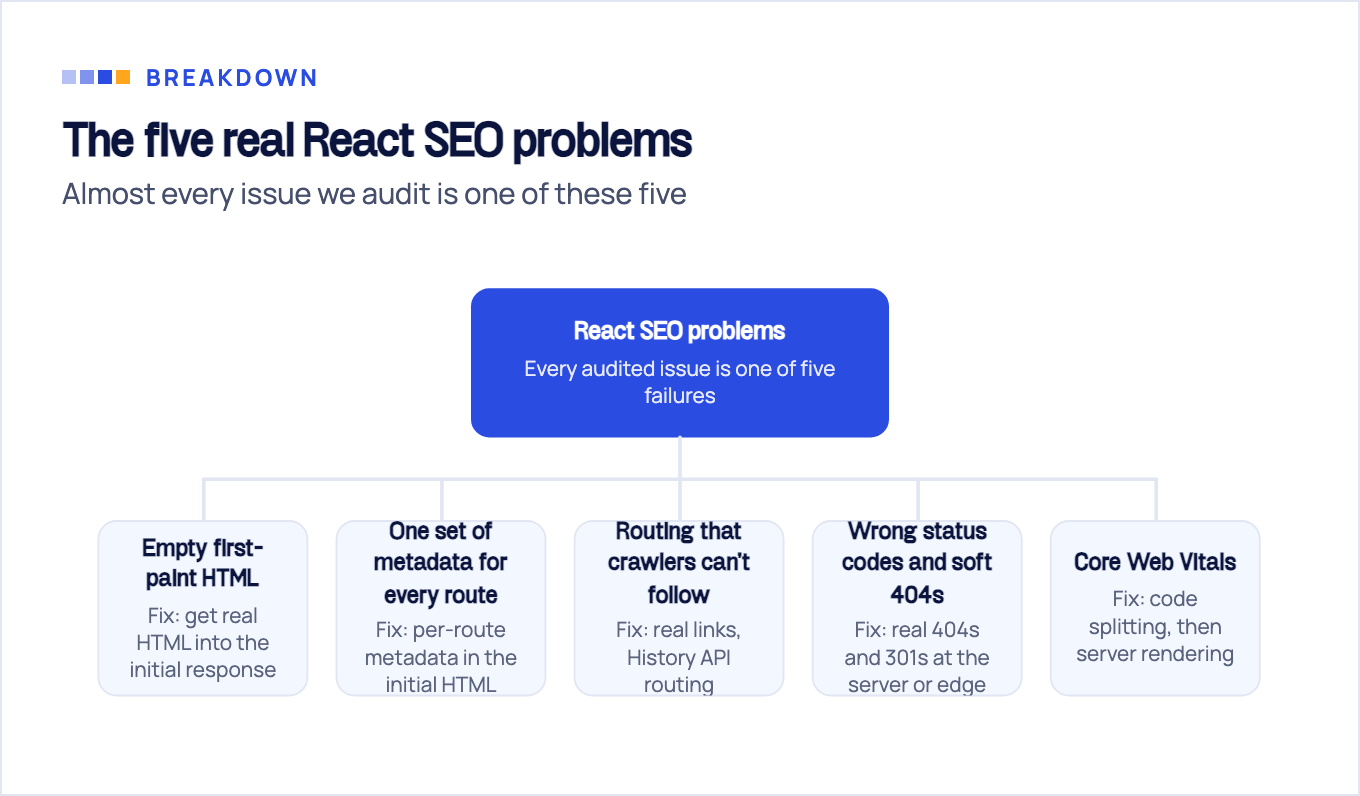
1. Empty first-paint HTML. The core CSR problem described above. Anything that reads your raw HTML response (a non-rendering crawler, a social preview scraper, a browser extension) finds a blank shell. The fix is architectural: get real HTML into the initial response, which is what the rendering section below is for.
2. One set of metadata for every route. A stock SPA serves a single index.html, so every route shares one <title> and one meta description until JavaScript swaps them. Titles are among your strongest on-page signals and descriptions drive click-through, so shipping “My App” on 500 URLs is self-sabotage. Fix: per-route metadata rendered into the initial HTML, through your framework’s metadata API or React 19’s native tags (more on those below).
3. Routing that crawlers can’t follow. Google’s documentation is explicit here: Googlebot only considers URLs in the href attribute of an HTML link, and it can’t reliably resolve fragment URLs like /#/pricing. Google’s crawlable links guidance spells out the anti-patterns: a <span href>, an <a routerLink>, or an <a onclick> with no href are all links Google can’t reliably extract. Google recommends History API routing, which every mainstream React router has done for years. The remaining sin is rendering divs with click handlers instead of real anchors. Render actual <a href> links.
4. Wrong status codes and soft 404s. A typical SPA server answers 200 for every path and lets the client render a “not found” screen. Google sees content-free pages returning 200 and classifies them as soft 404s, or worse, indexes junk URLs that dilute your crawl budget. Return real 404s, 301s, and 410s at the server or CDN edge, not in JavaScript.
5. Core Web Vitals dragged down by the bundle. Big JavaScript bundles delay rendering and make interactions sluggish. Google’s thresholds for a “good” experience are LCP within 2.5 seconds, INP of 200 milliseconds or less, and CLS of 0.1 or less, measured at the 75th percentile of page loads across mobile and desktop. CSR concentrates the entire rendering cost in the user’s browser, which is why heavy SPAs miss LCP and INP targets. Code splitting helps; server rendering helps more.
None of this is exotic. It’s the same discipline as any technical SEO audit, applied to a JavaScript stack. All five failures are checkable in an afternoon, and most are fixable in a sprint.
AI crawlers change the math
Even if Google copes with your CSR app, a growing share of discovery no longer happens on Google. Vercel’s crawler traffic data shows that the crawlers behind the assistants don’t execute JavaScript: OpenAI’s bots (OAI-SearchBot, ChatGPT-User, and GPTBot), ClaudeBot, and PerplexityBot fetch JavaScript files but never run them. Two AI crawlers in the same study do render: Gemini, which rides on Googlebot’s infrastructure, and AppleBot, which crawls through a browser. Neither one is ChatGPT, Claude, or Perplexity. The OpenAI split matters, because the bot most people name is not the one that decides whether you show up. Per OpenAI’s crawler documentation, OAI-SearchBot is what surfaces sites in ChatGPT’s search results and ChatGPT-User fetches a page when someone asks about it, while GPTBot only gathers training data. None of the three run your JavaScript. This isn’t fringe traffic either. On Vercel’s network, GPTBot made 569 million requests in a month and Claude’s crawler 370 million, together roughly 20% of Googlebot’s 4.5 billion.
The practical consequence: a client-side rendered React site can rank in Google and still be invisible to ChatGPT and Perplexity. When those assistants fetch your page to answer a buyer’s question, they get <div id="root"> and move on to a competitor whose content sits in the HTML.
That reframes the oldest debate in this space, the “do I really need SSR?” question. For years the pragmatic answer was “not strictly, Google renders JavaScript,” and that was defensible while Google was the only crawler that mattered. In 2026, with assistants answering product and vendor questions directly, HTML-first delivery is the only strategy that covers both audiences. We break down the crawler-by-crawler behavior in do AI crawlers execute JavaScript.
Rendering options compared: SSG, SSR, prerendering, CSR
Pick a rendering strategy by what your pages actually do, not by what a framework tutorial defaults to.
| Strategy | What crawlers get | SEO reliability | Infra cost | Best fit |
|---|---|---|---|---|
| Static generation (SSG) | Full HTML built at deploy time | Highest: nothing to render, nothing to fail | Low, static hosting on a CDN | Marketing sites, blogs, docs, catalogs that change on deploy |
| Server-side rendering (SSR) | Full HTML rendered per request | High, as long as the server stays fast | Highest: compute per request plus caching | Personalized or fast-changing pages at scale |
| Prerendering middleware | Cached rendered snapshot served to bots | Medium: snapshots go stale and drift from the live app | Low to medium, usually a service fee | Retrofitting an existing CSR SPA you can’t rebuild yet |
| Client-side rendering (CSR) | Empty shell plus a JS bundle | Lowest: depends on the render queue, invisible to ChatGPT, Claude, and Perplexity | Lowest | Auth-gated apps where public search doesn’t apply |
Static generation wins whenever content doesn’t change per request. It produces the best Core Web Vitals, has zero render risk, and costs almost nothing to host. Most marketing sites, including most SaaS marketing sites, fit this bucket and overbuild anyway.
SSR earns its infrastructure bill when pages are personalized or change faster than your deploy cadence: marketplaces, large e-commerce, anything with live inventory. The reliability caveat matters: an SSR page is only as SEO-safe as the server behind it. A slow or flaky renderer produces timeouts, and a timeout on Google’s side means it indexes an empty response.
Prerendering (Prerender.io and similar) detects bot user agents and serves them a rendered snapshot while humans get the SPA. It works, and it’s often the only realistic short-term fix for a large legacy SPA. Treat it as a bridge, not a destination: Google itself now calls dynamic rendering “a workaround and not a long-term solution” and recommends server-side rendering, static rendering, or hydration instead. If a rewrite is off the table, we’ve mapped the whole no-rewrite path in React SEO without SSR.
CSR remains a legitimate choice exactly where SEO doesn’t apply: dashboards, internal tools, anything behind a login. Don’t pay for rendering infrastructure on pages no crawler will ever see, and don’t bolt SSR onto an app whose only URLs require authentication.
React 19 and Server Components: what actually changed
If your mental model of React metadata tooling was formed in the react-helmet era, it needs an update. React 19, stable since December 2024, natively supports rendering <title>, <meta>, and <link> tags inside any component and automatically hoists them into the document <head>. Per-route metadata no longer requires a third-party library.
So is React Helmet still necessary in 2026? For new builds, no. React 19’s native tags cover the common cases, and one fewer dependency is one fewer thing to keep patched. Keep react-helmet only in older codebases where the migration diff isn’t worth the effort, or where you rely on features the native tags don’t yet replicate.
React 19 also ships Server Components as stable. Components marked for the server run at build or request time, so the HTML arrives pre-rendered and the client downloads less JavaScript, which attacks the empty-shell problem and the Core Web Vitals problem at once. The same release added resource preloading APIs (preconnect, preload, and friends) that shave real milliseconds off LCP when used on fonts and hero images.
Now the caveat that most “React 19 fixes SEO” takes skip: none of this rescues a Vite CSR SPA by itself. Native metadata tags still render client-side if your app renders client-side, so non-rendering crawlers still see nothing. Server Components require a server or a framework integration to execute. React 19 removes the old excuses inside a proper setup; it does not turn a browser-only SPA into an SEO-ready site on its own.
Choosing your stack: frameworks vs fixing what you have
The React team settled the biggest question themselves: Create React App was deprecated on February 14, 2025, with the official recommendation to start new apps with a framework such as Next.js, React Router, or Expo. Their reasoning names our topic directly: server rendering “can improve SEO” and “also improves performance by reducing the amount of JavaScript the user needs to download and parse.”
What that means by situation:
- New project with organic traffic goals. Start on a framework with server rendering by default. Next.js is the common answer to “should I use Next.js for SEO,” and yes, it ships complete HTML on the first request, but it has its own sharp edges worth knowing. Our Next.js SEO guide covers the configuration that actually moves rankings.
- Existing Vite or CRA SPA. Don’t reach for a rewrite first. Add prerendering as a bridge, fix the five problems from this guide, and migrate route-by-route only if the business case holds.
- Content-heavy marketing site. Consider Astro with React islands: static HTML everywhere, React only where interactivity earns its bundle. This site runs that way, so we’re not recommending anything we don’t ship on. We compare the two approaches in Astro vs React for SEO.
One warning from the trenches: migrations, not frameworks, are where sites lose rankings, usually through dropped redirects and metadata that doesn’t survive the move. Migration planning is the part we treat most carefully when SEOBRO moves a client between JavaScript frameworks, because traffic lost in a botched cutover takes months to claw back.
React SEO best practices checklist
Whatever rendering path you land on, these practices make a React website SEO friendly and stay valid across framework churn:
- Unique metadata per route:
<title>and meta description present in the initial HTML response, not injected after hydration. - Canonical tags on every indexable route, self-referencing by default.
- XML sitemap generated at build or deploy, submitted in Search Console.
- Real links:
<a href>for every crawlable path, History API routing, no fragment URLs, no navigation trapped in onClick handlers. - Correct status codes at the server or edge: real 404s and 301s, no JavaScript-only redirects, no “not found” screens served on a 200.
- Structured data as JSON-LD, server-rendered. Client-injected schema is at the mercy of the render queue; put it in the HTML.
- Image discipline: modern formats, explicit dimensions to protect CLS, lazy-load below the fold only, never the LCP image.
- Code splitting per route, so the bundle a page ships matches what that page needs.
- Test like a crawler, not like a user. URL Inspection in Search Console shows the rendered result; the Rich Results Test validates schema; and raw HTML never lies:
curl -s https://yoursite.com/pricing/ | grep -i "a phrase from that page"If the phrase isn’t in the output, neither Google’s first pass nor the crawlers behind ChatGPT, Claude, and Perplexity can see it. That one-line test settles more React SEO arguments than any thread.
When to get an audit
Most of this checklist is a solo weekend for a competent front-end team. Where teams get stuck is diagnosis, not repair.
If the React site exists to produce leads but isn’t, the useful question is which bottleneck you’re actually facing: rendering, content, or authority. They look identical from a traffic chart and need completely different fixes. Throwing SSR at a content or link problem burns a quarter and moves nothing. A JavaScript SEO audit starts by separating them, and the rest of our JavaScript SEO guides cover each fix in depth once you know which one you need.
Sources & fact-check
Every factual claim in this article is checked against primary sources, not opinion. Written by Dmitry Shpytaliev, Master SEO tech & content. Last verified July 16, 2026.
- OfficialGoogle Search Central, JavaScript SEO basics (Googlebot queues rendering and follows only <a href> links)
- OfficialGoogle Search Central, Crawlable links (links need an href attribute, onclick alone is not crawlable)
- OfficialOpenAI, Bots (OAI-SearchBot powers ChatGPT search, GPTBot crawls for model training)
- OfficialReact, Sunsetting Create React App (CRA deprecated, React now recommends Next.js, React Router or Expo)
- Primary dataVercel and MERJ, How Google handles JavaScript throughout the indexing process (10 second median render delay)
- Primary dataVercel, The rise of the AI crawler (GPTBot and ClaudeBot do not render JavaScript, Gemini and AppleBot do)
