Yes, a React app can rank on Google without server-side rendering. Google crawls, renders, and indexes client-side JavaScript, so a plain CRA or Vite SPA is not doomed. But that yes comes with real limits: your pages wait in a rendering queue, the crawlers behind ChatGPT, Claude, and Perplexity, along with social scrapers, never execute your JavaScript, and every rendering-dependent step is a place where indexing can silently fail. React SEO without SSR means picking one of three workable paths around those limits, not pretending they don’t exist.
Most React SEO guides end with “migrate to Next.js.” This one is for when that isn’t an option.
Can a React app rank without SSR? (short answer: yes, with real limits)
A client-rendered React app can appear in Google’s index and rank for real queries. What it can’t do is compete on equal footing with served HTML: indexing is slower, more fragile, and invisible to anything that doesn’t run a headless browser. The practical question is not “can it rank” but “how do I get indexable HTML for the routes that matter without running a Node server.”
You have three real options:
- Prerender at build time. Generate a static HTML file per route during your build and ship it to a CDN. No server, no runtime, crawlers get finished HTML.
- Use a runtime prerendering service. Middleware detects bots and serves them headless-Chrome-rendered HTML while users get the normal SPA. The classic prerender.io pattern.
- Move the SEO pages out of React entirely. Keep the app a SPA and build the pages that need to rank on a static-first stack, on the same domain.
If you want the full landscape including the SSR routes, our complete React SEO guide covers it. This article assumes SSR is off the table and works within that.
Why “just use SSR” is sometimes off the table
Telling someone with a five-year-old client-rendered codebase to “just add SSR” is technically a solution and practically a different project. The constraint is usually one of these:
- The codebase assumes a browser. Years of
windowaccess at module scope, browser-only libraries, data fetching wired to mount effects. Making that server-safe means auditing every component. - Hosting is static by design. The app deploys to a bucket behind a CDN; there is no Node runtime, and nobody on the team wants to own one. SSR turns a deploy-and-forget artifact into a service with uptime, scaling, and patching.
- The app is 95% behind a login. Dashboards, editors, settings: none of it should be indexed anyway. Server-rendering an auth wall is effort spent on pages you’d immediately noindex.
- The rewrite budget doesn’t exist. The honest quote for a Next.js migration is months. The business need is twenty marketing URLs that rank.
All four are legitimate, and they share an implication: you almost never need to fix rendering for the whole app, just for a small set of URLs. Keep that scope in mind through everything below.
What Google actually does with client-rendered React
Google processes JavaScript apps in three phases: crawling, rendering, and indexing. That’s straight from Google’s JavaScript SEO documentation, which also explains the mechanics: rendering runs on an evergreen version of Chromium, and after crawling, a page sits in a rendering queue “for a few seconds, but it can take longer than that.” Until that render happens, Google is working with your empty HTML shell.
The same documentation contains a nasty gotcha: when Google encounters a noindex robots tag in the initial HTML, it may skip rendering and JavaScript execution entirely. Shipping a noindex in the shell and removing it client-side doesn’t work; the tag Google sees before rendering is the one that counts.
Does Google penalize client-side rendering? No. A well-built client-rendered app with clean URLs and correct status codes will get indexed. What you pay is latency and fragility: a JS error, a timed-out API call, or a blocked resource during Google’s render, and the indexed page is blank. If your SPA also has routing or soft-404 problems, fix those first. Our SPA SEO guide covers that layer.
Option 1: Prerender at build time (static export)
Build-time prerendering runs your React app once, at build, and writes rendered HTML for each route to disk. Crawlers, scrapers, and AI bots all get finished HTML with zero servers involved.
Is prerendering the same as SSR? No. SSR renders each page per request on a live server; prerendering renders each page once at build time, and after that it’s just files. For content that doesn’t change between deploys, the crawler-facing result is identical.
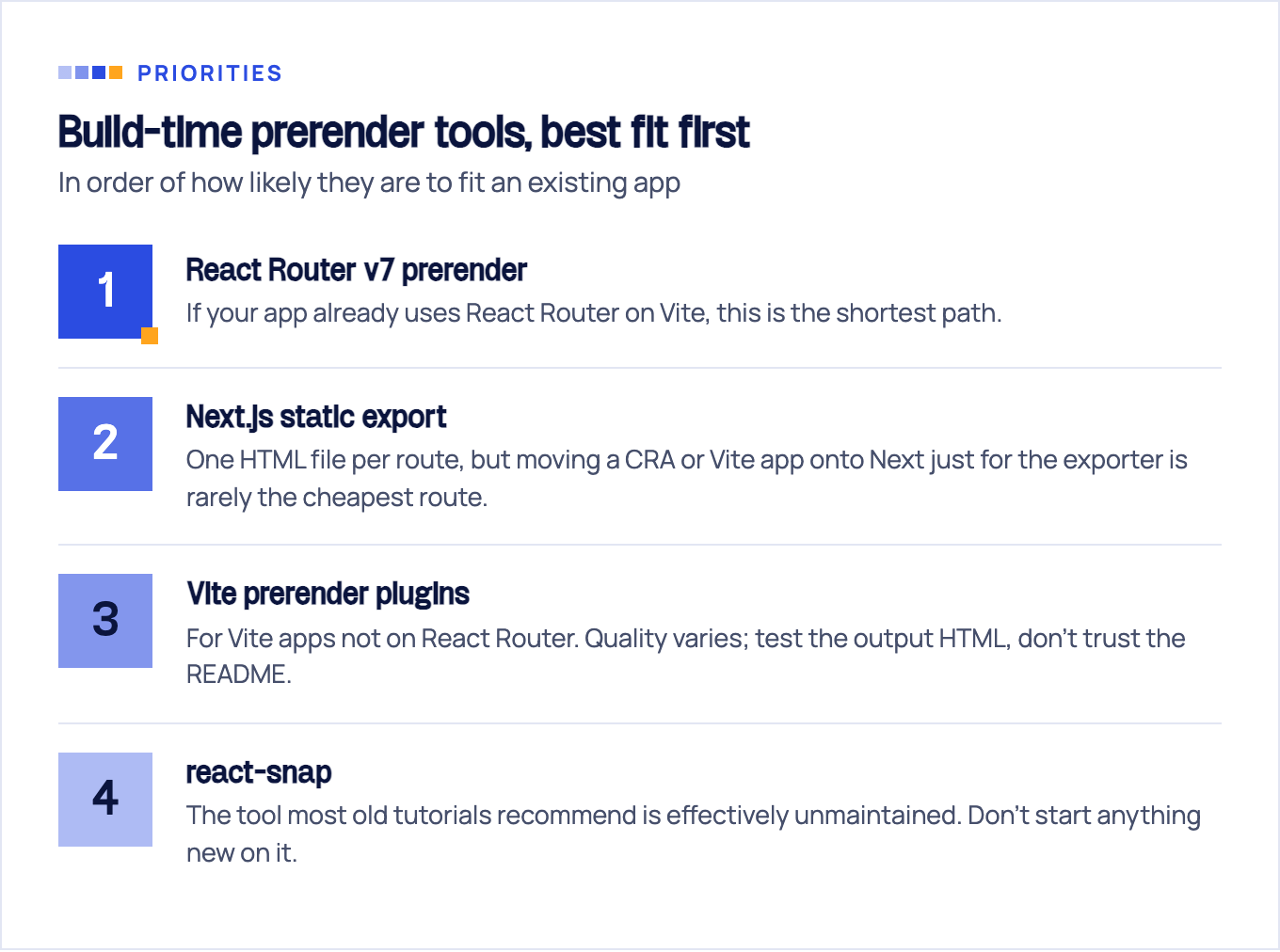
Your tooling options, in order of how likely they are to fit an existing app:
- React Router v7
prerender. If your app already uses React Router on Vite, this is the shortest path. Per the React Router pre-rendering docs, you list the paths to render at build time and setssr: false; the named routes become static HTML and every other route falls back to normal SPA behavior on a static file server:
// react-router.config.ts
import type { Config } from "@react-router/dev/config";

export default {
  ssr: false,
  async prerender() {
    return ["/", "/pricing", "/features", "/about-us"];
  },
} satisfies Config;- Next.js static export.
output: 'export'generates an HTML file per route at build time, deployable on any static host. The Next.js static exports guide lists what you give up: ISR, Server Actions, cookies, rewrites, redirects, headers, and dynamic routes withoutgenerateStaticParams(). It’s Next as a pure build tool, though moving a CRA or Vite app onto Next just for the exporter is rarely the cheapest route. - Vite prerender plugins. For Vite apps not on React Router, community plugins render your routes in headless Chrome at build time. Quality varies; test the output HTML, don’t trust the README.
- react-snap, the tool most old tutorials recommend, is effectively unmaintained. Don’t start anything new on it.
Prerender every URL you want indexed: home, pricing, features, blog, docs, landing pages. The app behind the login stays client-rendered, since nothing there belongs in the index anyway.
Option 2: Runtime prerendering services (prerender.io and friends)
The dynamic rendering pattern: middleware in front of your app inspects the user agent. Humans get the normal SPA. Bots get a cached, headless-Chrome-rendered HTML snapshot from a service like prerender.io. Nothing about your build changes, which is the entire appeal.
Google’s position deserves quoting precisely, because half the articles recommending dynamic rendering skip it. Google states that dynamic rendering “is a workaround and not a recommended solution,” and recommends server-side rendering, static rendering, or hydration instead, as stated in Google’s dynamic rendering documentation. The same page answers the cloaking question: “Googlebot generally doesn’t consider dynamic rendering as cloaking,” as long as it produces similar content to what users see. Serving bots a prerendered version of the same page is fine; serving them different content is not.
Runtime prerendering is still the pragmatic call for a huge legacy SPA with thousands of long-tail URLs and no rebuild budget. Rebuilding ten thousand programmatic pages as static exports is a project; pointing a prerender service at them is config.
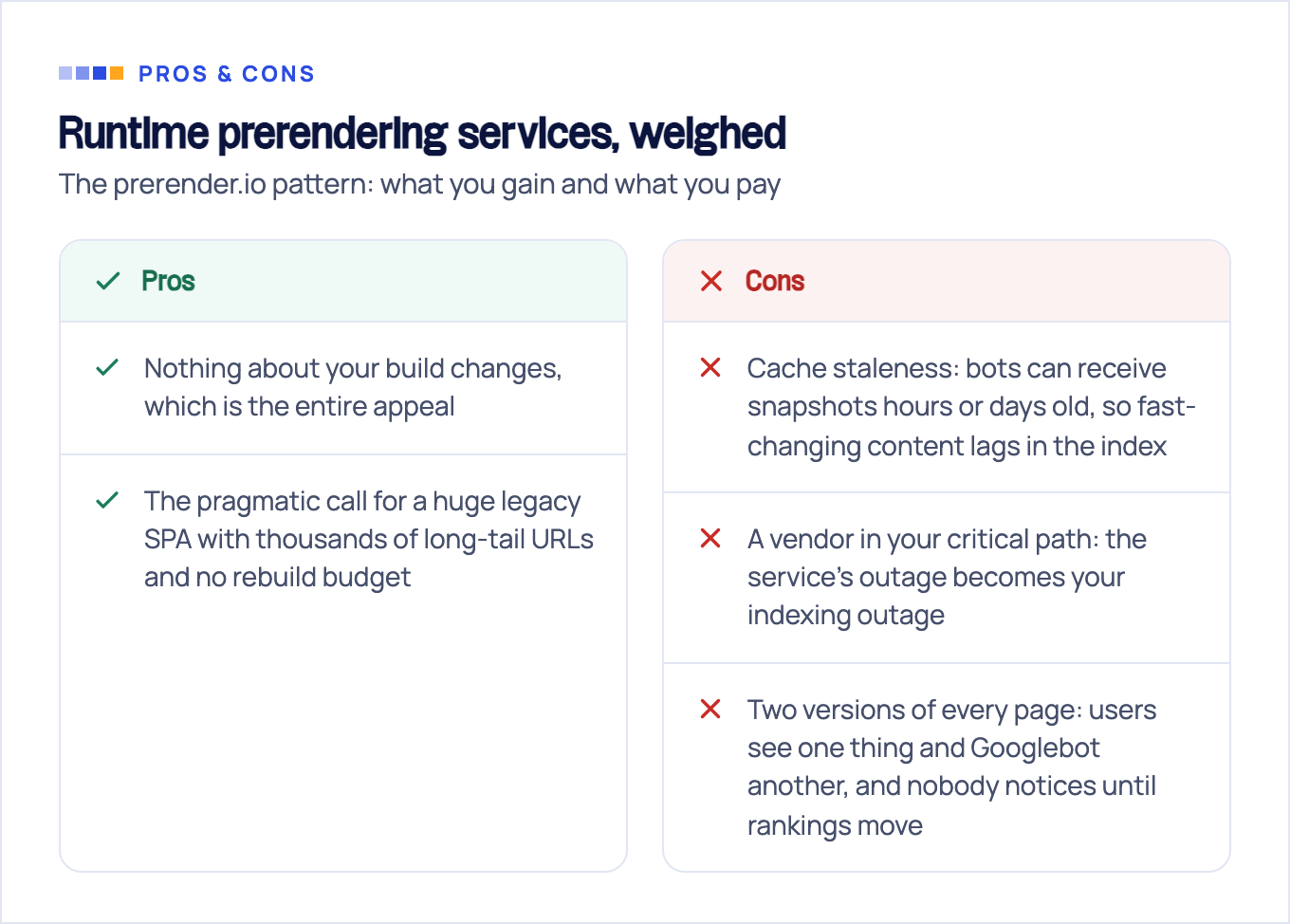
Price it honestly, though:
- Cache staleness. Bots can receive snapshots hours or days old, so fast-changing content lags in the index.
- A vendor in your critical path. The bill scales with URL count, and the service’s outage becomes your indexing outage.
- Two versions of every page. Every rendering discrepancy is a bug where users see one thing and Googlebot another, and nobody notices until rankings move.
Treat it as a bridge: a way to stop the bleeding while you move the URLs that matter onto option 1 or option 3.
Option 3: Hybrid islands, or taking the SEO pages out of React entirely
Here’s the reframe most teams miss: you don’t need SSR for the app. You need indexable HTML for the twenty-odd URLs that drive leads. Nothing says those URLs have to be rendered by the same stack as your dashboard.
The hybrid island setup: keep the React app exactly as it is, and build the pages that need to rank (marketing pages, blog, docs, landing pages) on a static-first stack, served from the same domain. Routing happens at the CDN or proxy level: /blog/* and /guides/* go to the static build, everything else falls through to the SPA shell.
Two decisions inside this option:
- Subdirectory beats subdomain. Put the static pages at
yourapp.com/blog/, notblog.yourapp.com. A subdirectory consolidates authority onto one host; a subdomain splits your link equity across two. - Pick a static-first generator. Astro is the strongest fit: it ships zero JavaScript by default and can embed your existing React components as interactive islands, so you reuse code instead of rewriting it. We’ve compared the stacks head-to-head in Astro vs React for SEO.
It also decouples failure modes: a broken app release can no longer blank your blog out of Google’s index, because the two no longer share a deploy pipeline.
Meta tags without SSR: React 19 metadata vs react-helmet, and their shared blind spot
For years the standard answer to per-route titles in a SPA was react-helmet, then react-helmet-async after the original went unmaintained. React 19 closed that chapter: per the React v19 release notes, the stable release (December 5, 2024) natively supports rendering <title>, <meta>, and <link> tags inside any component and hoists them to <head> automatically, in client-only apps, streaming SSR, and Server Components alike. On React 19, you render the tags in the route component and you’re done; no helmet library needed.
Now the part every helmet tutorial skips: none of this changes who can see the tags. Client-injected metadata exists only after JavaScript runs. Google’s renderer picks it up eventually; social scrapers from X, Slack, LinkedIn, and WhatsApp don’t run JavaScript, so they read the raw HTML and show the same default title and image for every URL you share.
React 19 metadata, react-helmet, react-helmet-async: all three share this blind spot, because it isn’t a library problem. The only fix for React SEO meta tags without SSR is making the tags exist in the served HTML, exactly what the three options above provide. Metadata is a reason to prerender, not a substitute for it.
The honest limits: what you cannot fix without server-rendered HTML
Prerendering closes most of the gap for stable pages. Here is what stays open; know it before choosing an architecture, not after.
The dedicated AI crawlers don’t render JavaScript. Vercel and MERJ’s December 2024 analysis of AI crawler traffic, published in The rise of the AI crawler, found that none of the major AI crawlers render JavaScript. GPTBot made 569 million fetches in a month and Claude 370 million, and while they download JavaScript files (11.5% of GPTBot requests, 23.84% of Claude’s), they never execute them. The study names two exceptions: Gemini rides Googlebot’s infrastructure and renders fully, and AppleBot renders through its own browser-based crawler. Everything else it tested, including OpenAI’s OAI-SearchBot and ChatGPT-User, Anthropic’s ClaudeBot, and PerplexityBot, reads your raw HTML, and no vendor has documented adding rendering since. A client-rendered React page contributes nothing to ChatGPT or Claude answers about your category; we break the published evidence down bot-by-bot in which AI crawlers execute JavaScript. Prerendered routes are fine, because static HTML serves everyone.
Freshness requires rebuilds. Build-time prerendering snapshots your content at deploy. There is no ISR-style per-request regeneration on a static host, so fast-changing public content either goes stale or forces frequent builds.
Genuinely dynamic pages can’t be prebuilt. Search results, personalized views, live inventory: anything assembled per request needs a server. If those pages are your SEO surface, SSR is the answer; plan the migration rather than working around it.
Client-side error states become soft 404s. A SPA that renders “not found” in JavaScript while returning HTTP 200 teaches Google to index garbage. Static files get this right for free; anything still client-rendered needs deliberate handling.
If your lead-generation pages sit on the wrong side of these limits, that’s not a technical footnote. It’s your pipeline quietly excluded from an entire channel.
Which path fits your site? (decision table + next step)
| Your situation | Best path |
|---|---|
| Marketing or content site that happens to be built in React | Build-time prerender / static export, for all indexable routes |
| App with a small set of money pages (pricing, landing, blog) | Hybrid island: static stack for those URLs, SPA untouched |
| Large legacy SPA, thousands of long-tail URLs, no rebuild budget | Runtime prerendering service, as a bridge |
| Dynamic, personalized, or fast-changing pages on competitive SERPs | SSR is the real answer; plan the migration |
Before committing to any of these, find out what Google currently sees: run your key URLs through URL Inspection in Search Console and compare the rendered HTML against what you ship. Teams are routinely surprised both ways: pages they assumed were invisible render fine, and pages they counted on sit unindexed behind a failed render.
That diagnosis is the first thing we produce in a JavaScript SEO audit: a URL-by-URL account of what Google renders, what it indexes, and what AI crawlers can see, so you pick an architecture on evidence instead of forum threads. Whichever path you take, take it for the URLs that pay for themselves, and leave the rest of the app alone.
Sources & fact-check
Every factual claim in this article is checked against primary sources, not opinion. Written by Dmitry Shpytaliev, Master SEO tech & content. Last verified July 16, 2026.
- OfficialGoogle Search Central, JavaScript SEO basics (the crawl, render, index phases and the rendering queue delay)
- OfficialGoogle Search Central, Dynamic rendering as a workaround (Google calls it a workaround, not a recommendation)
- OfficialReact, React v19 release notes (title, meta and link tags hoist to head, including in client-only apps)
- OfficialNext.js, Static exports guide (output export drops ISR, Server Actions, rewrites, headers and dynamic routes)
- OfficialReact Router, Pre-rendering (prerender config plus an SPA fallback file for paths not pre-rendered)
- Primary dataVercel and MERJ, The rise of the AI crawler (GPTBot, ClaudeBot and peers fetch pages but do not render JS)
