SPA SEO is the work of making a single-page application (a JavaScript app that ships one HTML shell and builds every view in the browser) crawlable, indexable, and rankable. Out of the box, most SPAs fail at this in predictable ways: crawlers receive an empty <div>, every view shares one URL, and error pages return 200. Each of those failures has a documented fix, and this guide covers them in order of impact.
One scope note before anything else. This article is about single-page applications built with React, Vue, Angular, or Svelte. It is not about marketing for day spas or med spas (same three letters, different industry), and it is not about one-page brochure websites, which have their own, much simpler set of problems.
What Is SPA SEO? (Single-Page Applications, Not Day Spas)
SPA SEO covers everything required for a single-page application’s content to end up in Google’s index and in AI-generated answers: HTML that crawlers can read without executing scripts, a real URL for every view, correct status codes, per-route metadata, and responsive interactions. It exists as a discipline because SPAs invert the model search engines were built on. A traditional site returns finished HTML for every URL. A SPA returns one nearly empty HTML file plus a JavaScript bundle that assembles each view client-side.
That leads straight to the question half of r/webdev keeps arguing about: are single-page applications bad for SEO?
Not inherently. Google executes JavaScript and can crawl and index a well-built SPA. The problem is the default client-side-rendered setup, which fails in specific ways:
- The initial HTML contains no content, so indexing depends entirely on Google’s rendering pipeline.
- Views often live behind hash fragments or click handlers instead of crawlable URLs.
- Titles, descriptions, and canonicals don’t change between views.
- Error states return HTTP 200 and get indexed as soft 404s.
- The AI crawlers that feed ChatGPT, Claude and Perplexity never execute JavaScript, so they see nothing at all.
Every item on that list is fixable without abandoning your framework. Some fixes are configuration, some are architecture. Let’s start with what crawlers actually see, because that’s where the diagnosis begins.
Why SPAs Struggle in Search: What Crawlers Actually See
Open view-source on a client-side-rendered app and you’ll find something like <div id="root"></div>, a few script tags, and not a word of your product copy. Everything a visitor sees is constructed after the JavaScript downloads, parses, and runs.
Google can handle this, with caveats. According to Google Search Central, Google processes JavaScript apps in three phases: crawling, rendering, and indexing. After crawling, a page goes into a rendering queue. As Google puts it, “The page may stay on this queue for a few seconds, but it can take longer than that.” Rendering runs on an evergreen version of Chromium, so modern JS features aren’t the issue. The queue is.
How much longer than a few seconds? A Vercel and MERJ study of over 100,000 Googlebot fetches across various sites, led by nextjs.org, found Google achieved full-page renders on 100% of HTML pages, including JavaScript-heavy ones. The median rendering-queue time was 10 seconds and the 25th percentile rendered within 4 seconds. But the 90th percentile took around 3 hours, and the 99th around 18 hours. So Google will see your content, eventually. Rendering-dependent indexing is slower, and every added step is a new failure mode: a JS error, a blocked resource, a timed-out API call, and that render produces a blank page.
Google is also no longer the only reader that matters. Vercel’s network data shows that the major AI crawlers (OpenAI’s GPTBot, Anthropic’s ClaudeBot, PerplexityBot, Meta-ExternalAgent, Bytespider, CCBot) fetch JavaScript files but do not execute them. Only Gemini (which rides Googlebot’s infrastructure) and AppleBot render JS. In the month Vercel measured for that December 2024 study, GPTBot, Claude, AppleBot and PerplexityBot together made nearly 1.3 billion fetches, a little over 28% of Googlebot’s 4.5 billion, with GPTBot alone at 569 million. We break down what that means per bot in our test of which AI crawlers execute JavaScript.
Routing and URLs: Use the History API, Never Hash Fragments
Every view you want to rank needs its own crawlable URL. Google’s guidance here is unusually blunt: use the History API to implement routing between views, and don’t use fragments to load different content, because Googlebot cannot reliably parse and extract fragment URLs. That’s straight from the JavaScript SEO basics documentation, and it makes hash routing a hard disqualifier for any public page.
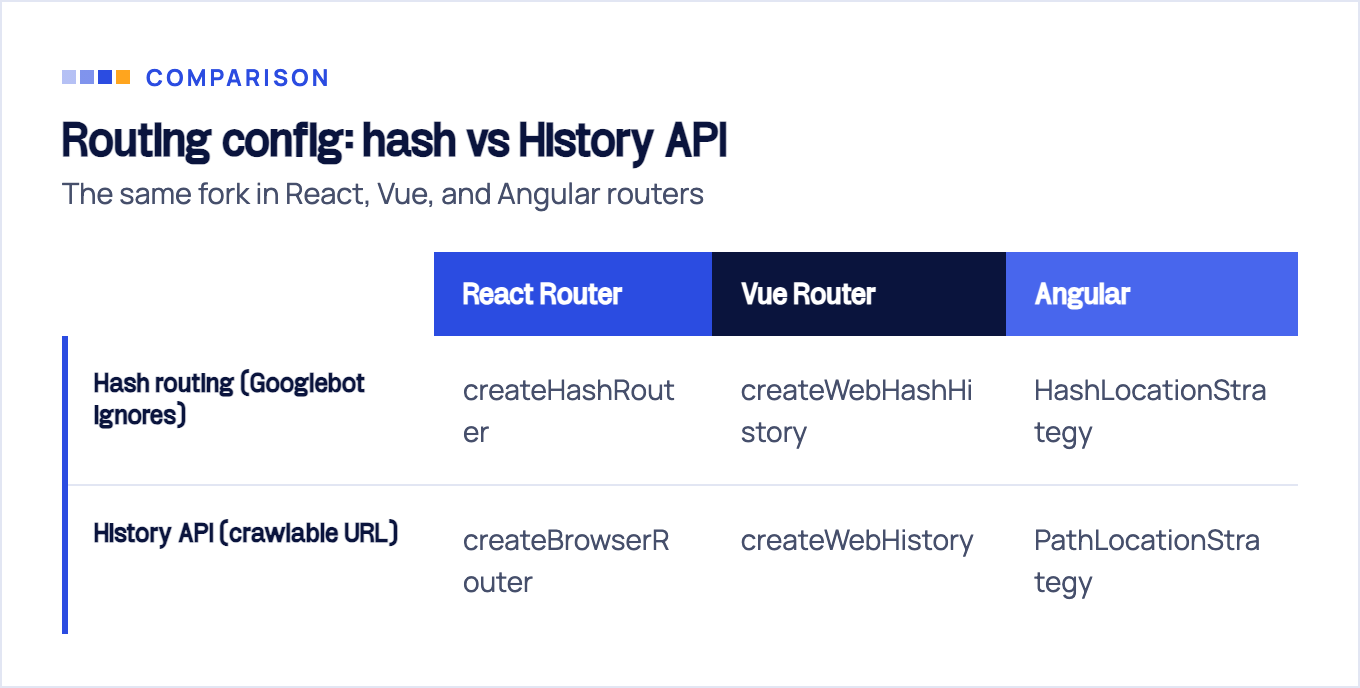
In React Router terms, this is the choice between the two router factories:
// Hash routing: every view hides behind #/..., which Googlebot ignores.
// https://app.example.com/#/pricing is just https://app.example.com/ to a crawler.
const router = createHashRouter(routes); // do not use for public pages

// History API routing: every view gets a real, crawlable URL.
// https://app.example.com/pricing is a distinct page Google can index.
const router = createBrowserRouter(routes);
Vue Router (createWebHistory vs createWebHashHistory) and Angular (PathLocationStrategy vs HashLocationStrategy) offer the same fork. Pick the History API side every time; the only cost is configuring your server to return the app shell for deep URLs.
Three more routing rules that SPAs routinely break:
- Use real
<a href>links. Googlebot discovers URLs fromhrefattributes. Adivwith anonclickhandler that callsrouter.push()navigates fine for users and is invisible to crawl discovery. Your router’s link component renders a real anchor and intercepts the click. Use it everywhere. - Put every route in your XML sitemap. Client-side routes don’t exist anywhere a crawler can enumerate them. The sitemap is your route manifest for search engines; generate it from the same route table your router uses so they never drift.
- One canonical per view. Each route needs a self-referencing canonical tag that updates on navigation. If every view reports the homepage as canonical (a common default), you’ve told Google to index one page out of your entire app.
Rendering Fixes, Ranked: SSR, Prerendering, and Why Dynamic Rendering Is Dead
Clean URLs get your views crawled. Rendering determines what crawlers find there. This is a decision framework, not a tool list, because the right answer depends on the page type, not the framework.
| Route type | Example | Rendering fix |
|---|---|---|
| Stable marketing pages | home, features, pricing, blog | Static prerendering / SSG at build time |
| Frequently changing public content | listings, inventory, user-generated content | Server-side rendering |
| App behind login | dashboard, settings, editor | None needed; client-side is fine here |
| Legacy SPA you can’t refactor now | any public route | Prerendering middleware, as a bridge |
Static generation first. If a page’s content changes only when you deploy (true for almost every marketing page), prerender it to HTML at build time. It’s the cheapest option, the fastest to serve, and the most reliable: there is no render step to fail, and every crawler, JS-executing or not, gets the full content from the first byte.
SSR for content that changes between builds. Next.js, Nuxt, and Angular’s built-in SSR render each request on the server and hydrate in the browser. You get crawler-complete HTML plus live data, at the cost of running and scaling a server. If you’re going this route in React, our Next.js SEO guide covers the framework-specific details.
Islands and partial hydration sit between the two: static HTML with interactivity attached only where needed. This site runs on that model.
Prerendering middleware (Prerender.io and similar) serves bots a headless-browser snapshot while users get the live app. It works, and for a legacy codebase it’s often the only fix that ships this quarter. Treat it as a bridge: snapshots drift from the live app, and you’re maintaining two versions of the truth. The middleware route and other no-rewrite options are covered in our guide to React SEO without SSR.
Dynamic rendering, serving bots one thing and users another based on user-agent, is dead. Google’s own dynamic rendering documentation now states it “was a workaround and not a long-term solution for problems with JavaScript-generated content” and points to server-side rendering, static rendering, or hydration instead. Don’t build anything new on it.
Metadata, Status Codes, and the Soft-404 Trap
Rendering gets your content seen; metadata tells search engines what each view is. A SPA serves one physical HTML file, which means one title, one description, and one set of OG tags unless you actively update them on every route change. Every modern framework has a mechanism for this (React 19’s native metadata support, useHead in Nuxt, Angular’s Title and Meta services). If your rendering strategy produces server HTML, put the metadata there. It’s more reliable than any client-side update.
Status codes are where SPAs quietly bleed. The server returns 200 for every path so the shell can load, and the app decides client-side whether the route exists. Google warns about this exact pattern: SPAs handling errors client-side “often report a 200 HTTP status code instead of the appropriate status code,” and those error views get indexed as soft 404s. Your “Page not found” component can end up ranking, as thin duplicate content, on hundreds of URLs.
Google sanctions two fixes:
- JavaScript-redirect the error state to a URL where the server returns a real 404, e.g.
/not-found. - Inject
<meta name="robots" content="noindex">via JavaScript when the route resolves to an error.
There’s a trap hiding in the second one, in reverse. When Google sees noindex in a page’s initial HTML, it may skip rendering and JavaScript execution entirely, so you cannot ship noindex in the shell and remove it with JS for valid pages. Noindex-by-default with client-side removal looks clever and deindexes your whole app.
One more crawler behavior from the same documentation: Google’s Web Rendering Service does not retain state across page loads. Local Storage, Session Storage, and cookies are all cleared. Any content gated on stored client state (a saved location, a dismissed modal, a cached auth token) renders as if it’s the visitor’s first second on the site, every time. Never make indexable content depend on storage.
Core Web Vitals for SPAs: INP Is Your Metric
Among the Core Web Vitals, one is practically designed to catch SPA problems. INP (Interaction to Next Paint) needs to be 200 milliseconds or less at the 75th percentile to score “good,” and it’s measured across the entire page lifecycle. That last part is the SPA-relevant clause: web.dev notes 90% of a user’s time on a page is spent after it loads, which is exactly where SPA soft navigations live. Every client-side route change, filter click, and tab switch feeds your INP score.
Heavy JavaScript bundles are the usual culprit: long main-thread tasks block the browser from painting a response to the user’s input. The practical levers, in order:
- Code-split the bundle by route so navigating to one view doesn’t pay for all of them.
- Break up long tasks by yielding to the main thread during expensive work instead of running 500ms of synchronous rendering.
- Lazy-load below-the-fold components, but never lazy-load content you want indexed behind interaction; if it takes a click to exist, crawlers won’t see it.
Don’t turn this into a six-month performance project. Fix rendering and routing first; they decide whether you’re in the index at all. INP decides how you’re scored once you’re there.
How to Test Whether Your SPA Is Actually Indexable
You can verify all of the above on your own site in about ten minutes. This mini-audit is the first thing we run on any JS-framework lead’s site at SEOBRO, and it separates “we have an SEO problem” from “crawlers literally cannot read the site.”
| # | Check | How | Pass looks like |
|---|---|---|---|
| 1 | Raw HTML | curl https://yoursite.com/some-view/ | Your actual copy is in the response; this is exactly what AI crawlers get |
| 2 | No-JS browse | Disable JavaScript in DevTools, reload key pages | Content and navigation still visible |
| 3 | Google’s render | GSC URL Inspection → View crawled page | Rendered HTML contains the full view, no error states |
| 4 | Index coverage | site:yoursite.com in Google | Interior views appear with their own titles, not just the homepage |
| 5 | Error handling | Visit a made-up URL, check the network tab | Real 404 status, or a noindexed error view |
| 6 | Per-view metadata | Navigate between views, watch the tab title | Title and canonical change on every route |
Check 1 is the one to run first. Whatever curl returns is the complete universe of what GPTBot, ClaudeBot, and PerplexityBot will ever know about that page. If it’s an empty div and script tags, your content does not exist for AI search, whatever Google manages to render.
If several checks fail and you want the full diagnostic workflow (rendering comparison, log analysis, framework-specific fixes), our JavaScript SEO guide walks through the complete process, and the JavaScript SEO hub collects the framework-by-framework playbooks.
When to Keep the SPA and When to Move Your Marketing Pages Off It
The closing question isn’t technical, it’s commercial: which pages earn you leads, and can crawlers read them?
Here’s the rule of thumb we apply. The product app behind login stays a SPA. It’s the right architecture for dense interactivity, and no crawler needs it. The pages that must capture demand (home, features, pricing, blog, landing pages) need server-rendered HTML from the first byte, because they compete against sites that already serve it.
You have three ways to get there, in ascending order of effort:
- Prerender the marketing routes inside your existing app (build-time SSG for those paths, or middleware as a stopgap).
- Adopt an SSR framework for the public surface and keep the app as-is behind it.
- Split the marketing site off entirely: a static site at the root domain, the SPA at
app.yourdomain.com. Cleanest separation, and each side gets the architecture it actually needs.
This is Focused Lead Generation logic applied to rendering: leads come only from pages crawlers can read, so that’s where the engineering budget goes. Optimizing the dashboard for Google is effort spent on a page that will never bring a customer.
If you’d rather have the diagnosis and the fix handled (which rendering strategy fits your stack, which routes to migrate first, and proof via before/after crawl data), that’s exactly what our JavaScript SEO service does. We’ve spent 10+ years doing SEO for 100+ clients across the USA, UK, and EU, and SPAs that “don’t rank” are one of the most common, and most fixable, problems that walk in the door.
Sources & fact-check
Every factual claim in this article is checked against primary sources, not opinion. Written by Dmitry Shpytaliev, Master SEO tech & content. Last verified July 16, 2026.
- OfficialGoogle Search Central, Understand the JavaScript SEO basics (Google crawls, renders, then indexes JavaScript)
- OfficialGoogle Search Central, Fix search-related JavaScript problems (SPA errors return 200, so redirect or noindex)
- Officialweb.dev, Interaction to Next Paint (good INP is 200 ms or below at the 75th percentile of field loads)
- OfficialOpenAI, Overview of OpenAI crawlers (OAI-SearchBot, not GPTBot, is the crawler behind ChatGPT search results)
- Primary dataVercel and MERJ, How Google handles JavaScript throughout the indexing process (median 10 second render queue)
- Primary dataVercel and MERJ, The rise of the AI crawler (most AI crawlers skip JavaScript, Gemini and AppleBot render it)
